Triangle Solver (SSS)
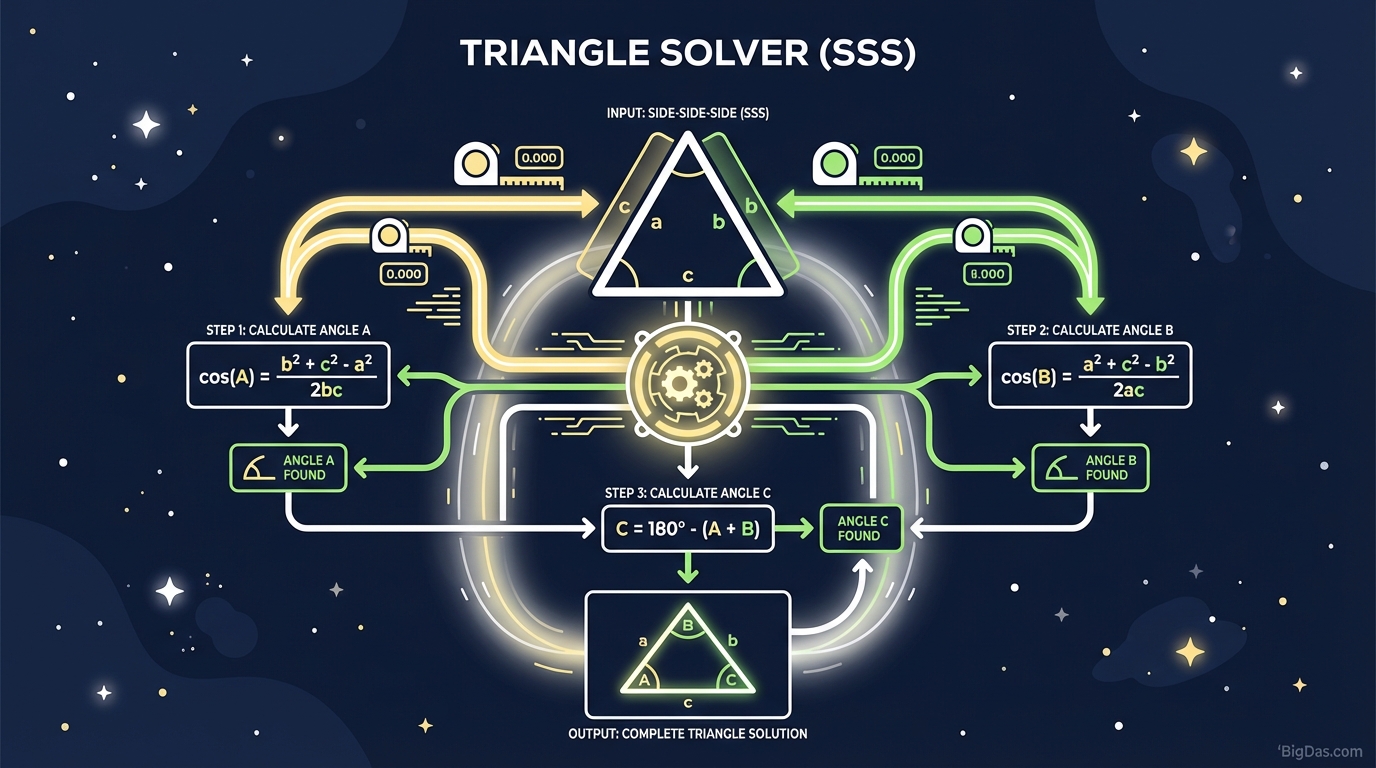 Modern scientific illustration of Triangle Solver (SSS)
Triangle Solver (SSS): Instantly Calculate Angles from Side Lengths with Precision
Geometry is the bedrock of design, construction, and engineering. Yet, even for the most seasoned professionals or dedicated students, trigonometry can become a tedious obstacle course of inverse functions and complex formulas.
Have you ever found yourself staring at a triangle where you know exactly how long the sides are, but you have no idea what the angles are? This is the classic Side-Side-Side (SSS) problem. Solving it manually requires repetitive calculations, a scientific calculator, and a high tolerance for rounding errors.
Enter the Triangle Solver (SSS)—the best-in-class computational tool designed to bridge the gap between raw data and geometric insight. Whether you are a student verifying homework, a carpenter laying out a truss, or an engineer calculating vectors, this tool eliminates the math anxiety and delivers precise angle calculations in milliseconds.
In this guide, we will deep dive into how the SSS Triangle Solver works, the mathematics behind the curtain, and how you can leverage this tool to solve complex geometric problems instantly.
What is the Triangle Solver (SSS)?
The Triangle Solver (SSS) is a specialized digital calculator designed to solve the geometry of a triangle when only the lengths of its three sides are known.
In trigonometry, "solving a triangle" means finding all unknown sides and angles. When you are provided with three sides (let’s call them $a$, $b$, and $c$), the internal angles ($\alpha$, $\beta$, and $\gamma$) are fixed by the laws of geometry, specifically the Law of Cosines.
However, manually extracting these angles involves rearranging complex formulas and performing inverse trigonometric operations. This tool automates that process. You simply input the lengths, and the algorithm instantly computes the corresponding internal angles, often providing additional data such as the triangle's area and perimeter.
The Mathematics: How It Works
To understand the power of this tool, one must appreciate the math it handles for you. The solver relies primarily on the Law of Cosines, a generalization of the Pythagorean theorem applicable to non-right triangles.
For a triangle with sides $a$, $b$, and $c$, and opposite angles $A$, $B$, and $C$, the formula for finding Angle $A$ is:
$$ \cos(A) = \frac{b^2 + c^2 - a^2}{2bc} $$
To find the angle itself, you must calculate the inverse cosine ($\arccos$):
$$ A = \arccos\left(\frac{b^2 + c^2 - a^2}{2bc}\right) $$
You would then repeat this process for Angle $B$ and Angle $C$. If you make a rounding error in the first step, it cascades through the rest of your calculations. The Triangle Solver (SSS) performs these operations using high-precision floating-point arithmetic, ensuring that $A + B + C$ always equals exactly $180^\circ$ (or $\pi$ radians).
Key Features & Benefits
Why is this specific Triangle Solver considered the industry standard? It goes beyond simple calculation; it offers a suite of features designed for accuracy and usability.
1. Instant Precision
Time is money. In construction or exam settings, you cannot afford to spend five minutes punching buttons on a handheld calculator. This tool delivers results in under a second. More importantly, it calculates to a high number of decimal places, ensuring that precision is maintained for engineering-grade requirements.
2. Built-in Error Detection (Triangle Inequality Theorem)
Not every set of three numbers makes a triangle. For example, you cannot make a triangle with side lengths 10, 2, and 2. The two shorter sides simply won't meet. This tool features an intelligent validation algorithm based on the Triangle Inequality Theorem, which states that the sum of any two sides must be greater than the third side ($a + b > c$). If you enter invalid data, the tool instantly flags it, saving you from working with impossible geometry.
3. Dual Output: Degrees and Radians
Depending on your field, you may need your answer in degrees (common in construction and basic education) or radians (standard in higher mathematics and physics). Our Triangle Solver (SSS) automatically provides or toggles between these units, preventing conversion errors.
4. Comprehensive Geometric Data
While the primary goal is finding angles, this best-in-class tool goes further. By utilizing Heron’s Formula, it also calculates the Area of the triangle based solely on the side lengths, as well as the Perimeter and Semi-perimeter.
Step-by-Step Guide: How to Use the Tool
Using the Triangle Solver (SSS) is intuitive, but following these steps ensures you get the most accurate data for your specific project.
Step 1: Measure Your Sides
Gather the lengths of the three sides of your triangle. Ensure that you are measuring all sides in the same unit (e.g., all in meters, all in inches, or all in miles).
- Note: The tool is unit-agnostic. If you input inches, the calculated area will be in square inches.
Step 2: Input Data
Enter the values into the designated fields:
- Side A: Length of the first side.
- Side B: Length of the second side.
- Side C: Length of the third side.
Step 3: Validate Feasibility
Before hitting calculate, do a quick mental check. Is the longest side shorter than the sum of the other two? If not, the tool will return an error (as it should).
Step 4: Calculate
Click the "Solve" or "Calculate" button.
Step 5: Analyze Results
Review the output section. You will see:
- Angle A, B, and C: Usually displayed to 2-4 decimal places.
- Triangle Type: The tool may identify if it is an Acute, Obtuse, or Right triangle.
- Area: The total space inside the triangle.
How to Get the Best Out of This Tool
While the tool does the heavy lifting, a skilled user knows how to interpret the data. Here are expert tips for maximizing utility:
1. Understanding Accuracy and Rounding
While the tool calculates with extreme precision, real-world measurements have tolerances. If you measure a wooden beam to the nearest millimeter, do not rely on the angle calculation out to the 10th decimal place. Use the result that matches your measurement significance.
2. Identifying "Almost" Right Triangles
Sometimes, the solver will give you an angle of $90.05^\circ$ or $89.9^\circ$. This indicates that while your triangle is mathematically not a right triangle, it might be intended to be one in the real world, and your measurements are slightly off. Use the tool to quality-check your physical build.
3. Using it for Layout Verification
If you are laying out a foundation or a garden bed, measure the sides and use the tool to find the angles. If the angles don't match your design drawings, you know immediately that your physical side measurements or stake placements are incorrect.
Why You Need This Tool: Real-World Use Cases
The Triangle Solver (SSS) isn't just for math homework. It is a vital utility across various industries.
1. Construction and Carpentry
Roof framing is essentially a series of triangles. When a carpenter knows the span of the roof (Side A), the rise (Side B), and the rafter length (Side C), they can use this tool to determine exactly what angle to cut the "bird's mouth" notch or the ridge cut. It eliminates guesswork and wasted timber.
2. Land Surveying and Geocaching
Surveyors use triangulation to map points on a plot of land. By measuring distances between three points (SSS), they can determine the angular relationship between property lines without needing expensive theodolites for rough estimates.
3. CNC Machining and Fabrication
In metal fabrication, sheet metal is often bent to specific degrees. If a machinist has a blueprint with coordinate points (distances), they can calculate the SSS lengths and use this tool to program the press brake with the exact bend angle required.
4. Graphic Design and Vector Art
Designers working with vector graphics often need to construct shapes with specific side lengths. This tool allows them to figure out the rotation degrees required to close a path perfectly in software like Adobe Illustrator.
FAQ: Frequently Asked Questions
Q1: What happens if I input sides that don't form a triangle?
The tool uses the Triangle Inequality Theorem. If the sum of the two shorter sides is less than or equal to the longest side, the shape cannot close. The tool will display an "Impossible Triangle" error message to alert you that your measurements are incorrect.
Q2: Does the unit of measurement matter?
No and yes. The tool calculates ratios, so it doesn't care if you use meters, feet, or lightyears. However, consistency is key. You cannot enter Side A in inches and Side B in centimeters. You must convert them to the same unit before inputting.
Q3: Can this tool calculate the Area of the triangle?
Yes. Since the tool knows all three sides, it automatically applies Heron's Formula: $\text{Area} = \sqrt{s(s-a)(s-b)(s-c)}$, where $s$ is the semi-perimeter. This is often displayed alongside the angle results.
Q4: Why do the angles always add up to 180?
This is a fundamental property of Euclidean geometry. The sum of internal angles in any planar triangle is always 180 degrees (or $\pi$ radians). Our tool uses this rule as a final checksum to ensure the calculated values are mathematically valid.
Q5: Can I use this for Right Triangles?
Absolutely. While the Pythagorean Theorem ($a^2 + b^2 = c^2$) is usually the go-to for right triangles, the SSS Solver works perfectly on them as well. In fact, inputting sides like 3, 4, and 5 will instantly return a $90^\circ$ angle, confirming the triangle's classification.
Conclusion
The Triangle Solver (SSS) is more than just a calculator; it is a bridge between physical measurements and theoretical geometry. By leveraging the Law of Cosines and advanced algorithms, it transforms raw side lengths into actionable angular data instantly.
Whether you are cutting rafters, solving physics vectors, or simply double-checking your trigonometry homework, manual calculation is a thing of the past. Stop wrestling with inverse cosines and rounding errors.
Ready to solve your geometry problems? Input your side lengths above and get instant, precise results now.