Arduino Code Generator
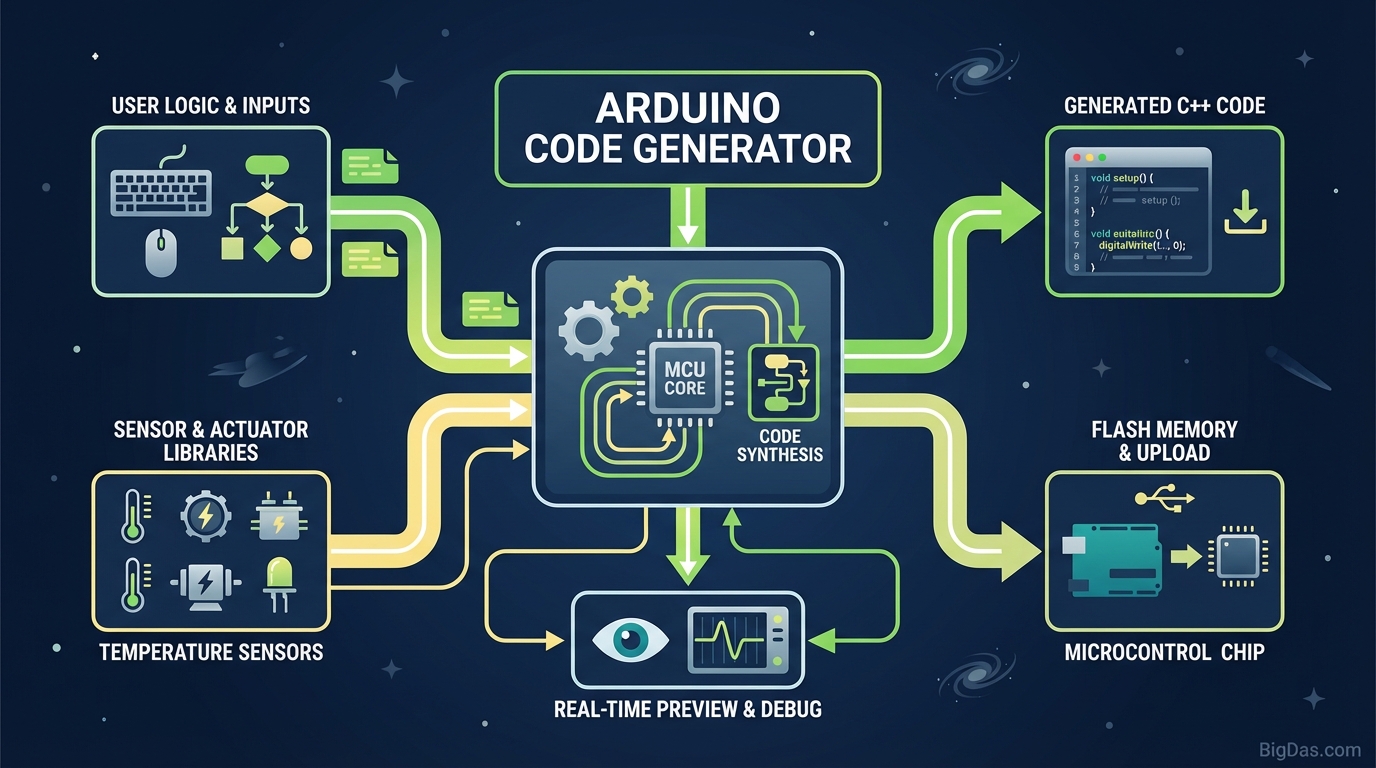
 Modern scientific illustration of Arduino Code Generator
Master Multitasking: Arduino Code Generator for Non-Blocking Projects
Most Arduino projects start with a clear goal, then stall at the implementation. You know the logic, blink an LED while reading a temperature sensor, but writing the C++ that actually does both at once is where the time goes. Hours vanish to a single missing semicolon, and any delay() call freezes the entire board.
The Arduino Code Generator solves this by building the code visually. You select components, set behaviors, and the tool outputs working, non-blocking C++ ready for the IDE. This guide covers how the tool works, why non-blocking logic matters, and how to generate production-ready sketches without writing boilerplate.
What is the Arduino Code Generator?
The Arduino Code Generator is a browser-based tool that builds Arduino sketches through a visual interface. Instead of typing setup() and loop() by hand, you pick components, assign pins, and define behavior. The tool outputs standard, formatted C++.
The main difference from other block-based tools is the output. Most visual builders produce linear code that relies on delay(), which halts the processor. This generator writes non-blocking code based on millis().
The "Blocking" Problem vs. The "Non-Blocking" Solution
- Blocking Code (
delay()):delay(1000)pauses the processor for one second. The board cannot read inputs, update a display, or drive a motor during that time. - Non-Blocking Code (
millis()): The loop checks the internal clock against a target time. The processor never stops, so multiple tasks run in sequence on every pass throughloop().
Writing non-blocking logic by hand requires tracking state variables and timing thresholds for every component. The generator handles this automatically.
Key Features
1. True Multitasking
The engine produces code that runs independent timers for each component. A servo can sweep, an LED can breathe, and a sensor can read data within the same loop without one blocking the others.
2. Component Library
Pre-loaded logic covers the most common hardware:
- Outputs: LEDs, Relays, Buzzers, I2C LCDs, Servos, Stepper Motors
- Inputs: Pushbuttons (with debouncing), Potentiometers, Ultrasonic Sensors, DHT sensors
- Communication: Serial logging and debug output
3. Clean Output
The generated sketch is indented, commented, and uses logical variable names based on the labels you assign in the UI. It reads like code written by hand.
4. No Syntax Errors
Programmatic generation eliminates the common compile failures:
- Missing semicolons
- Unmatched braces
{ } - Wrong function arguments
- Typos in variable names
5. Board Compatibility
The output targets the Arduino Uno/Nano pin map by default, but the code is standard AVR/ESP Arduino C++. It runs on the Mega, ESP32, and ESP8266 after updating the pin numbers to match the target board.
Step-by-Step Guide
Step 1: Define Global Settings
Open the tool and set the project name (this becomes the sketch filename). Declare any global variables or libraries you need. Libraries such as Servo.h or LiquidCrystal.h are included automatically based on the components you add later.
Step 2: Add Components
Use the Add Component menu to select hardware.
- Click LED, name it
StatusLight, assign Pin 13. - Click Button, name it
StartBtn, assign Pin 2.
Step 3: Configure Behavior
Set the mode and timing for each component.
- LED: Blink mode at
500msinterval. The tool writes themillis()comparison for you. - Button: Toggle or Momentary mode. Debounce logic is added automatically.
Step 4: Define Interactions (Optional)
Link components with simple conditions. Example: If StartBtn is HIGH, enable StatusLight.
Step 5: Generate and Upload
Click Generate Code. The output panel fills with the full sketch.
- Review the code.
- Copy to clipboard.
- Paste into the Arduino IDE.
- Compile and upload.
Use Cases
Beginners and Students
Learning C++ syntax and project logic at the same time slows both down. The generator lets you build a working project visually, then read the output to see how the syntax maps to your intent.
Rapid Prototyping
When you need to prove a concept the same day, writing pin definitions, state variables, and timer blocks for every component is wasted effort. The generator handles the boilerplate so you can focus on the hardware.
Robotics and Automation
A robot must sense and act at the same time. An obstacle-avoiding robot cannot pause its wheel control to wait for a distance reading. Non-blocking code from the generator keeps motion and sensor polling running in parallel.
Code Organization
Projects grow messy fast. Starting from a generator output gives you a modular structure with clean loop() and clearly named components, which is easier to extend later.
Tips for Best Results
- Pin Management: The tool suggests pins, but always check your board. Avoid Pins 0 and 1 if you plan to use Serial, since those are the hardware RX/TX lines.
- Power Budgeting: The generator handles logic, not current. Confirm the Arduino can source enough current for your motors and servos, or use an external supply.
- Read the Comments: Each block in the output explains its purpose, including how the
millis()subtraction tracks elapsed time without blocking the loop. - Iterate: Add one component, generate, test on hardware, then add the next. Building in stages catches wiring and logic errors early.
Frequently Asked Questions (FAQ)
1. Is the generated code compatible with the ESP32?
Yes. The output is standard Arduino C++. You only need to update the pin numbers in the definition section to match the ESP32 or ESP8266 GPIO map.
2. What exactly is "Non-Blocking" code?
Non-blocking code lets the Arduino handle multiple tasks in one loop. Instead of calling delay() to pause the processor, the loop checks the clock on every pass and only runs a task when its target time has passed. The processor stays free for other work in between.
3. Can I edit the code after generating it?
Yes. The output is plain text. Paste it into the Arduino IDE and modify, expand, or rewrite any part. The generator produces a working foundation, not a locked file.
4. Does this tool handle switch debouncing?
Yes. The generator includes software debouncing for all digital inputs, so a single press registers as one event instead of several.
Conclusion
The Arduino Code Generator removes the gap between project idea and working sketch. Non-blocking logic is built into the output, so beginners build responsive projects and experienced users skip the boilerplate.
Build the logic visually, then own the code it produces.