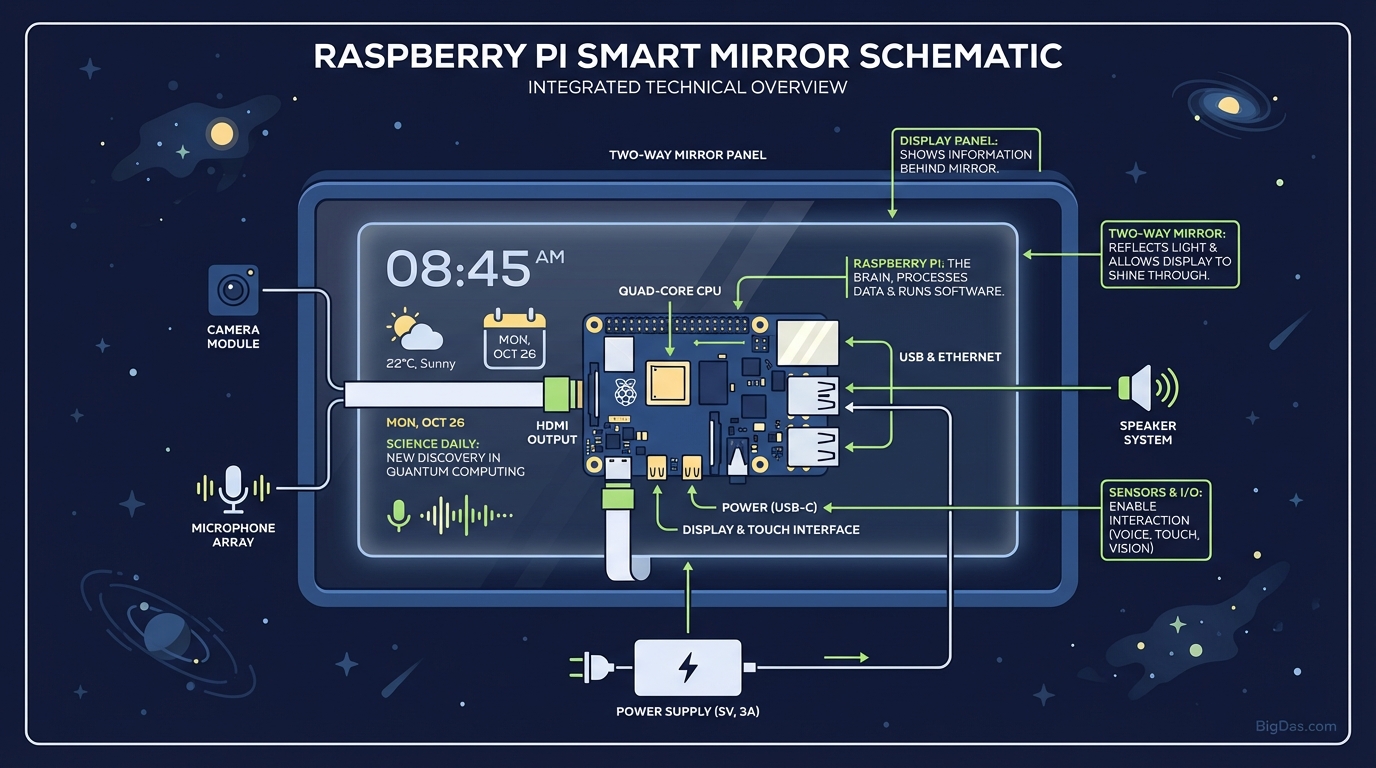
Raspberry Pi Smart Mirror
 Modern scientific illustration of Raspberry Pi Smart Mirror
Raspberry Pi Smart Mirror: A Practical Guide
A two-way mirror with a monitor behind it can show the weather, your calendar, and the news while you brush your teeth. This guide covers the hardware, software, and configuration needed to build one.
How It Works
A Raspberry Pi Smart Mirror is a monitor placed behind a sheet of two-way glass. The mirror reflects light from the front while letting the monitor's display pass through. Black pixels on the screen become invisible, so white text appears to float on the glass surface.
The Raspberry Pi is a small, inexpensive single-board computer that runs the display software. The most common platform for this project is MagicMirror², an open-source application built specifically for smart mirror displays.
Compared to commercial smart displays (Echo Show, Nest Hub), a Raspberry Pi build offers:
- Local data control: No cloud account required for core functions.
- Full customization: Every module on the screen is user-defined.
- Repairability: Standard components, no proprietary hardware.
Core Features
1. Modular Layout
The screen is divided into regions (top_left, top_right, bottom_bar, etc.) that you populate with modules. Common ones include:
- Clock & Calendar: Analog, digital, or both.
- Weather: Current conditions, 5-day forecast, sunrise/sunset.
- News Feed: RSS from any source (BBC, Reuters, Hacker News).
- Calendar: Google, iCloud, or CalDAV.
2. Third-Party Modules
The MagicMirror² community maintains thousands of modules. Popular additions:
- MMM-Spotify: Now-playing track and album art.
- MMM-Traffic: Commute time via Google Maps API.
- MMM-Hue: Philips Hue light status.
- MMM-Facial-Recognition: Customizes the displayed profile based on who is looking at the mirror.
3. Voice Control
A USB microphone and the Google Assistant SDK or Alexa Voice Service add voice control. The mirror functions as a visual feedback display for voice queries.
4. Power Draw
A Raspberry Pi 4 with a 24-inch monitor draws roughly 20 to 30W. Left on 24/7, that's about $15 to 25/year in electricity at average US rates.
Build Process
Phase 1: Components
| Component | Recommendation |
|---|---|
| Computer | Raspberry Pi 4 (2GB+ RAM) for full modules; Pi Zero 2 W for clock/weather only. |
| Storage | MicroSD card, 32GB minimum, Class 10 or better. |
| Display | Any LCD/LED monitor with HDMI input. IPS panels have wider viewing angles. |
| Mirror | Glass two-way mirror (acrylic is cheaper but warps under heat and scratches easily). |
| Frame | Custom wood or metal box, deep enough to house the monitor and Pi. |
| Power | Official USB-C supply for the Pi; separate supply for the monitor. |
Phase 2: Assembly
- Disassemble the monitor: Remove the plastic bezel and stand. Expose the bare LCD panel and metal chassis.
- Build the frame: Construct a box roughly the depth of the monitor chassis. Add 5 to 10mm of clearance for airflow.
- Mount the glass: Secure the two-way mirror to the front of the frame with mirror clips or silicone adhesive.
- Mount the screen: Place the monitor directly against the glass. Seal the edges with black electrical tape to prevent light leakage around the display perimeter.
- Mount the Pi: Attach the Raspberry Pi inside the frame using adhesive standoffs. Route HDMI and power cables.
Phase 3: Software
Step 1: Install the OS
Flash Raspberry Pi OS (Desktop) to the SD card using Raspberry Pi Imager. Boot the Pi, connect to Wi-Fi, and enable SSH if you plan to configure headlessly.
Step 2: Install MagicMirror²
Run the official installer:
bash -c "$(curl -sL https://raw.githubusercontent.com/MichMich/MagicMirror/master/installers/raspberry.sh)"
Step 3: Enable auto-start
The installer prompts you to install PM2. Accept. PM2 restarts the mirror software on boot and recovers from crashes automatically.
Step 4: Configure modules
Edit /MagicMirror/config/config.js. Each module block specifies its position, size, and data source. Weather and calendar modules require API keys (OpenWeatherMap, Google Calendar API).
Three Optimizations That Matter
1. Add a PIR Motion Sensor
A HC-SR501 PIR sensor wired to GPIO pin 17 lets the MMM-PIR-Sensor module blank the display when the room is empty. The monitor's backlight turns off, extending its lifespan (backlights are usually the first component to fail) and reducing power draw by roughly 60%.
2. Vent the Frame
A sealed wooden box around a monitor traps heat. The Pi will thermal-throttle at 80°C, and the monitor's power supply will degrade faster. Drill 10 to 15mm holes at the bottom and top of the frame to create a convection path. If you're using a Pi 4, add a passive heatsink or a 30mm fan on the GPIO header.
3. Build It in Portrait Mode
Most tutorials show landscape orientation. Portrait is better for a full-length mirror. Edit /boot/config.txt and add:
display_hdmi_rotate=1
This rotates the HDMI output 90°. The mirror then matches the proportions of a standing person, and vertical content (calendar events, news headlines) fits without horizontal cropping.
Common Configurations
Home office: Calendar, weather, Pomodoro timer, Trello board, stock ticker.
Family kitchen: Shared Google Calendar, meal plan for the week, chore list, traffic to school and work.
Bathroom: Clock, weather, news headlines, Spotify now-playing.
Frequently Asked Questions
Do I need programming experience?
No. The installation is a single shell command. Configuration involves editing a JavaScript file, but most of it is changing values like lat: 40.7128 to your own coordinates. If you can edit a text file, you can configure MagicMirror².
Can I reuse a laptop screen?
It's possible but not recommended. Laptop panels use LVDS or eDP connectors, not HDMI. You'd need a controller board matched to your specific panel model, and these boards are often harder to source than a used desktop monitor. A $20 to 40 used 17 to 24" monitor from a thrift store is the practical choice.
What's the total cost?
| Item | Cost |
|---|---|
| Raspberry Pi 4 + SD card + power | $55 to 80 |
| Two-way glass (acrylic: $30, glass: $80 to 150) | $30 to 150 |
| Used monitor | $20 to 50 |
| Frame materials (wood, hardware) | $25 to 50 |
| Total | $130 to 330 |
Commercial smart mirrors with similar features start around $800. High-end models (Hauschen, Electric Mirror) run $1,500 to 5,000.
Does the mirror reflection still work?
Yes. The black areas of the display are unlit, so the mirror reflects normally. The only reduction in reflection is directly behind lit white text. For grooming, dressing, and general use, the reflection is clear.
Can I stream video to it?
Yes. The MMM-YouTube and MMM-RTSPStream modules handle video playback. Performance depends on the Pi model: the Pi 4 can handle 1080p video; the Pi Zero 2 W struggles above 480p. The reflective surface does make long-form video uncomfortable to watch, so video modules are best for short clips, security camera feeds, or music.
Safety Notes
- Glass handling: Wear cut-resistant gloves when cutting or drilling the two-way mirror. Glass edges should be ground smooth before mounting.
- Electrical: Mains voltage (110/220V) for the monitor power supply should be routed through a grounded outlet. Don't splice low-voltage and mains cables inside the frame.
- Heat: Monitor the internal temperature during the first 24 hours of operation. If the frame exceeds 50°C, add ventilation.
- Mounting: A 24" mirror with glass weighs 8 to 12 kg. Use wall anchors rated for the combined weight of the frame, glass, and monitor.
References
- MagicMirror² documentation: docs.magicmirror.builders
- Raspberry Pi OS installation guide: raspberrypi.com/documentation
- OpenWeatherMap API: openweathermap.org/api