AM/FM Modulation
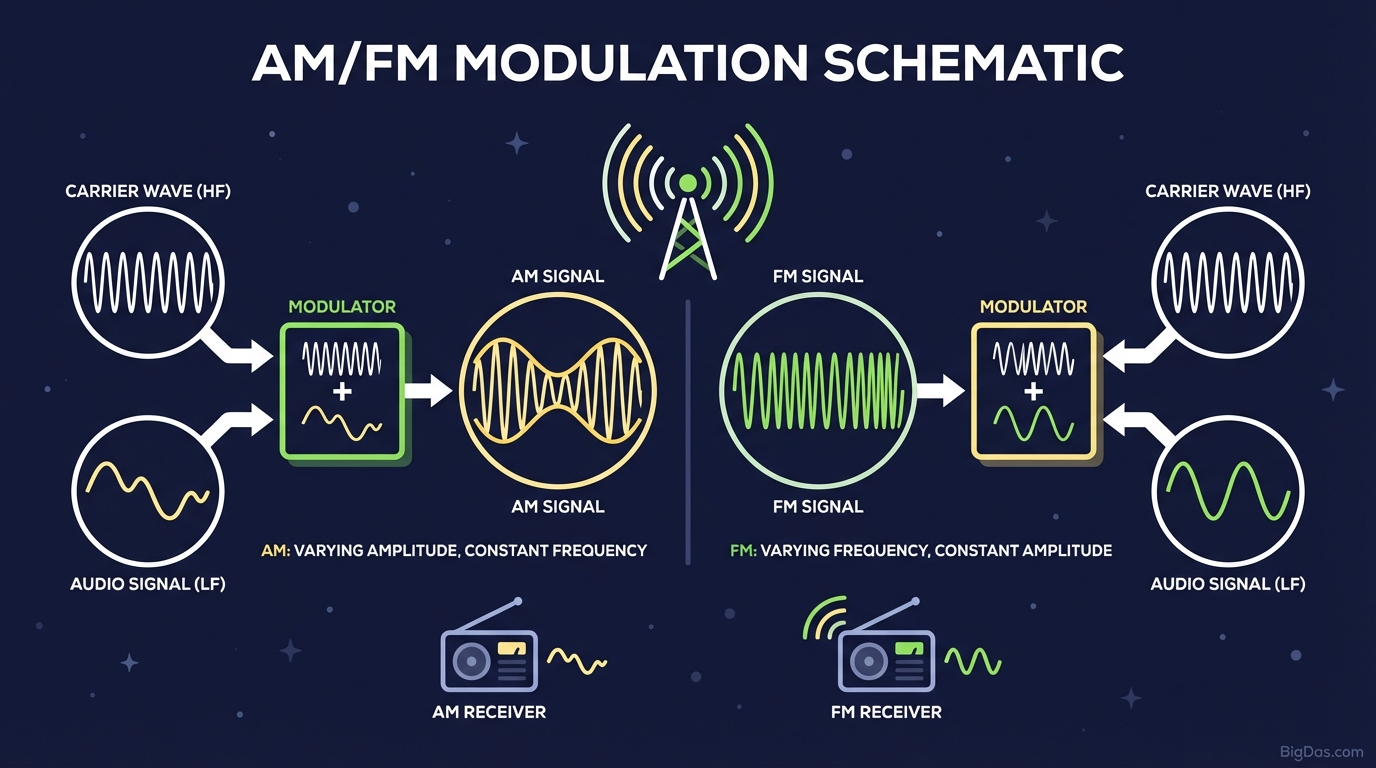
 Modern scientific illustration of AM/FM Modulation
What is Modulation?
Modulation is the process of varying one or more properties of a periodic waveform, called the carrier signal, with a separate signal called the message signal (or modulating signal) that contains information to be transmitted.
Low-frequency audio waves lack the energy to travel long distances on their own. Modulation shifts the information onto a high-frequency carrier wave, which propagates efficiently through space.
Amplitude Modulation (AM)
In Amplitude Modulation, the strength (amplitude) of the carrier wave is varied in proportion to the message signal, while the frequency remains constant.
- Visualization: The carrier wave's height grows and shrinks with the message signal.
- Envelope: The peaks of the modulated carrier trace out the exact shape of the message signal.
- Characteristics: AM is the oldest form of radio transmission. It is simple to implement but susceptible to noise, since electrical interference typically affects amplitude.
Frequency Modulation (FM)
In Frequency Modulation, the frequency of the carrier wave is varied in proportion to the message signal, while the amplitude remains constant.
- Visualization: An FM wave compresses and expands like a spring. As the message signal peaks, the carrier cycles bunch together (higher frequency); as the message dips, they spread apart (lower frequency).
- Noise Immunity: Because the amplitude does not change, FM rejects most amplitude-based interference, producing cleaner audio than AM.
Key Features
1. Real-Time Dynamic Rendering
The tool renders waveforms live. You watch the cycles flow, which makes the temporal evolution of the signal visible in a way static diagrams cannot match.
2. Parameter Control
You have direct control over:
- Message Frequency ($f_m$) and Amplitude ($A_m$): The information signal you transmit.
- Carrier Frequency ($f_c$) and Amplitude ($A_c$): The transport wave.
- Modulation Index: Adjust the modulation index to see its effect on bandwidth and efficiency.
3. Dual-View Comparison
A split-screen or overlay mode lets you compare the same message signal under AM and FM simultaneously.
4. High-Resolution Waveform Rendering
The rendering engine handles dense waveforms cleanly, keeping individual carrier cycles visible even when $f_c \gg f_m$.
Step-by-Step Guide
Step 1: Set the Carrier Wave
Open Carrier Settings and set $f_c$.
- Tip: Set $f_c$ at least 10× higher than $f_m$ to avoid aliasing. When the two frequencies are too close, the waveform becomes unreadable.
Step 2: Configure the Message Signal
Open Message Settings. This represents the data (voice or music) you want to send.
- Set $f_m$ lower than $f_c$.
- Adjust $A_m$.
Step 3: Select the Modulation Mode
Toggle between AM and FM.
- AM: Watch the envelope. If $A_m$ exceeds $A_c$, the envelope crosses the zero axis, causing over-modulation and distortion.
- FM: Watch the cycle density. Increasing $A_m$ increases the frequency deviation $\Delta f$.
Step 4: Analyze the Modulation Index
- AM Index: $m = \dfrac{A_m}{A_c}$. At $m = 1.0$ you have 100% modulation. Above 1.0, distortion appears.
- FM Index: $\beta = \dfrac{\Delta f}{f_m}$. Larger $\beta$ produces wideband FM, which requires more bandwidth.
Use Cases
1. Electrical Engineering Students and Educators
The tool provides a visual check on homework calculations involving modulation indices and sidebands, and works as a live lecture demonstration.
2. Ham Radio Operators
Understanding the differences between AM and FM is required for amateur radio licensing. The tool shows why over-modulation causes splatter and how FM deviation affects signal clarity.
3. Audio Engineers and Synthesists
FM synthesis, popularized by instruments such as the Yamaha DX7, uses frequency modulation in the audio range to generate complex timbres. The tool visualizes how operators interact to produce metallic or bell-like tones.
4. RF System Designers
Before using a vector signal generator or oscilloscope, engineers can use the tool to check carrier-to-message ratios and expected waveform shapes.
Expert Tips
- Force Over-Modulation in AM: Set $A_m > A_c$. The envelope crosses zero and reverses phase, illustrating why clipping distorts audio.
- Find a Bessel Null in FM: Adjust $\beta$ to values such as 2.405 or 5.520, where the carrier component in the spectrum drops to zero. The time-domain waveform changes shape at these points.
- Slow the Simulation: A slower time scale makes FM's frequency changes easier to track. AM is easier to follow at speed; FM benefits from a reduced playback rate.
Frequently Asked Questions (FAQ)
1. What is the main difference between AM and FM?
In AM, the amplitude of the carrier varies with the message signal. In FM, the frequency of the carrier varies, while the amplitude stays constant.
2. What happens if the modulation index is greater than 1 in AM?
The result is over-modulation. The envelope crosses the zero axis, producing severe distortion and spurious sideband frequencies (splatter) that can interfere with adjacent channels.
3. Why is FM sound quality generally better than AM?
Most environmental noise (lightning, power lines, motors) appears as amplitude spikes. FM receivers use a limiter to ignore amplitude variations and track frequency only, so this noise is rejected. AM receivers, which decode amplitude, pass the noise through.
4. Can this tool simulate Phase Modulation (PM)?
PM is closely related to FM. A phase-modulated signal is the time derivative of a frequency-modulated signal. The FM visualization in this tool provides a solid conceptual foundation for PM.
5. Is this tool helpful for understanding synthesizer LFOs?
Yes. A low-frequency oscillator (LFO) modulating the volume of a synth patch is AM (tremolo). An LFO modulating pitch is FM (vibrato). The tool shows both effects directly.