Ant Colony Optimization
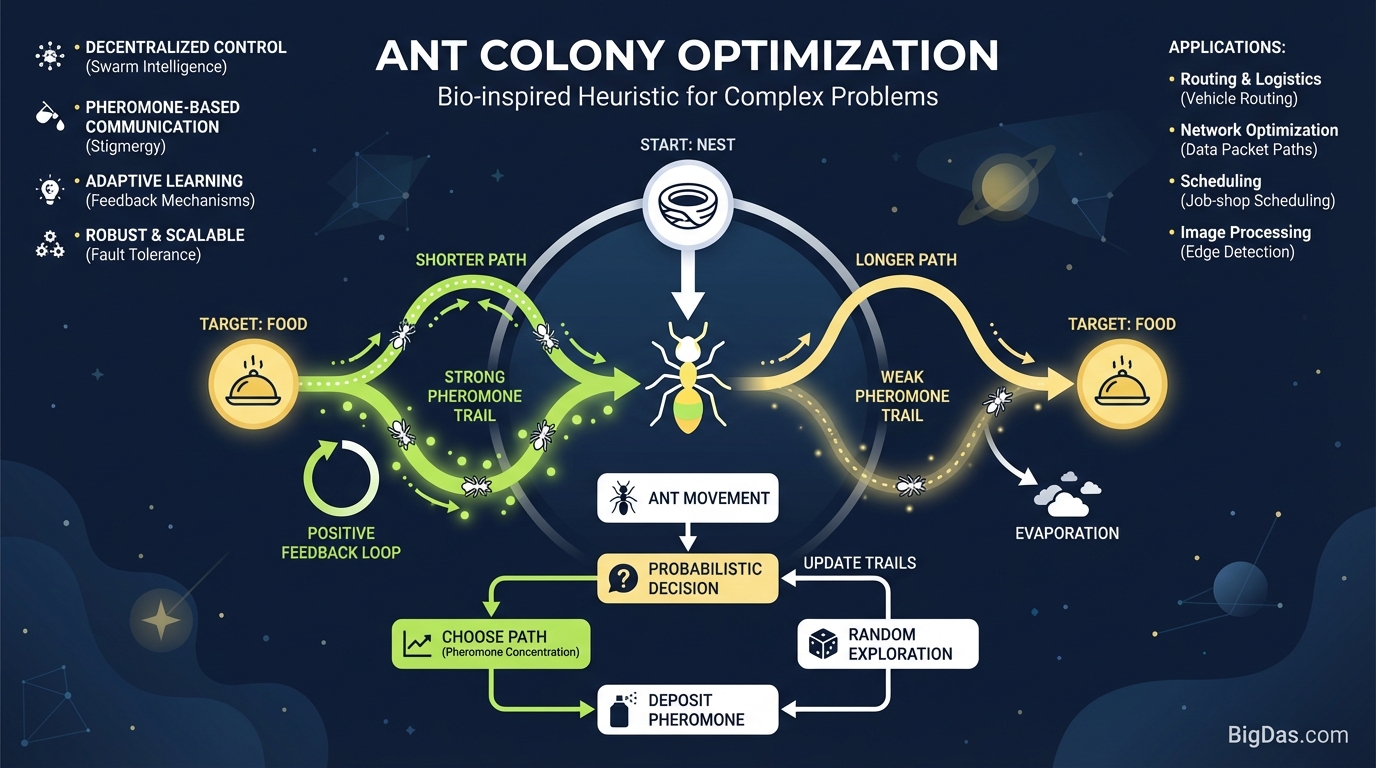
 Modern scientific illustration of Ant Colony Optimization
Visualize Ant Colony Optimization
Real ants solve routing problems without a map, a computer, or any concept of geometry. They use pheromone trails. Ant Colony Optimization (ACO) translates that behavior into an algorithm for finding good paths through graphs, and it works well on problems like the Traveling Salesman Problem (TSP) and dynamic network routing. Brute force scales poorly on these problems; ACO gives a "good enough" answer quickly.
The math behind ACO is well-defined, but watching agents interact with the environment and converge on a solution is harder to grasp from equations alone. The Ant Colony Optimization Visualizer shows the process in real time so you can see how parameters change behavior.
This guide covers the ACO algorithm, the role of visualization, and how to use the tool step by step.
What is Ant Colony Optimization (ACO)?
Ant Colony Optimization (ACO) is a probabilistic technique for finding good paths through graphs. It is a branch of Swarm Intelligence, where simple agents following simple rules produce complex global behavior.
Biological Inspiration
Real ants are blind. A foraging ant wanders randomly until it finds food, then returns to the colony while laying down a chemical trail called a pheromone. Other ants that encounter the trail tend to follow it. If the trail leads to food, they reinforce it on their return.
- Shorter paths get reinforced faster. An ant on a short path returns sooner, so it and its recruits deposit pheromone at a higher rate per unit time.
- Pheromone evaporates. On long paths, the scent dissipates before enough ants can reinforce it. On short paths, reinforcement outpaces evaporation.
Over time, the colony converges on the shortest path.
Algorithmic Translation
In code, we simulate this with artificial ants moving through a graph:
- Environment: A graph where nodes represent cities, servers, or destinations, and edges represent distances or costs.
- Agents: Virtual ants that move probabilistically. At each node, an ant chooses its next edge based on pheromone strength (past experience) and heuristic information (distance or cost).
- Feedback loop: The algorithm updates edge weights after each iteration. Weak edges evaporate; strong edges get reinforced.
Features of the ACO Visualization Tool
Most optimization code is a black box: input goes in, output comes out, and the convergence process is invisible. This tool shows the process. It renders pheromone trails on a live graph and exposes every parameter.
1. Real-Time Convergence
Pheromone strength is drawn on the edges. Good paths appear as thick, bright lines; bad paths fade. The visual feedback shows how quickly the algorithm converges and where it stalls.
2. Full Parameter Control
ACO is sensitive to hyperparameters. The tool exposes:
- Alpha (α): Weight of the pheromone trail.
- Beta (β): Weight of the heuristic information (distance).
- Evaporation Rate (ρ): How quickly pheromone decays.
- Ant Count: Number of agents in the swarm.
3. Dynamic Graph Generation
Generate random clusters, arrange nodes on a circle, or place nodes manually to model a specific topology.
4. Performance Metrics
A dashboard tracks:
- Global best distance so far
- Current iteration
- Convergence speed graph
5. Step-by-Step Debugging
Pause the simulation at any iteration and inspect the probability distribution an ant faces at a specific node. This is useful for diagnosing local optima.
How to Use the Tool
Step 1: Define Your Environment
Open the tool to a blank canvas.
- Manual mode: Click to place nodes.
- Random generation: Use the sidebar to spawn 20, 50, or 100 nodes.
- Start with 20 nodes to see individual ant behavior, then scale up.
Step 2: Tune the Parameters
Before running, adjust the sliders:
- Alpha (α) = 1.0: Standard pheromone weight.
- Beta (β) = 2.0: Distance weighted slightly higher than pheromone to prevent early convergence on a bad path.
- Evaporation (ρ) = 0.5: Balanced decay.
Step 3: Run the Simulation
Click "Run Simulation."
- Early phase: A faint web of lines appears as ants explore.
- Mid phase: Edges on shorter paths thicken and brighten.
- Convergence: A single closed loop emerges connecting all nodes. This is the TSP solution.
Step 4: Iterate
If the ants lock into a sub-optimal loop:
- Reset the simulation.
- Lower the evaporation rate so trails persist longer and ants explore alternatives.
- Increase the Q constant to add more noise.
Use Cases
The TSP is the textbook example, but ACO is used in several industries.
Logistics and Supply Chain
UPS, FedEx, and similar companies route thousands of trucks daily. Visualizing routes helps engineers spot bottlenecks before deployment.
Telecommunications Routing
Data packets travel through congested networks. ACO finds paths that balance latency and load. Network engineers use the tool to test load balancing and dynamic routing protocols.
Game Development
AI agents in games need to navigate terrain. Swarm logic controls groups of enemies or NPCs. The tool helps developers predict how agents will react to obstacles.
Academic Research and Education
Formulas like $P_{ij}$ are abstract. The tool connects the math to the agent's actual movement and is useful for computer science courses on optimization.
Frequently Asked Questions (FAQ)
1. How is ACO different from Dijkstra's or A*?
Dijkstra and A* are exact algorithms for static graphs with a defined start and end. They guarantee the shortest path but scale poorly. ACO is a probabilistic heuristic for problems like TSP where a near-optimal answer fast is more useful than a perfect answer slow.
2. Why do my ants get stuck in a local optimum?
Pheromone on a decent path gets strong enough that ants stop exploring. Raise the Evaporation Rate or lower Alpha to force the colony to forget the bad path and try alternatives.
3. Can this tool handle 3D graphs?
No. The tool visualizes 2D planar graphs for clarity, but the logic transfers to higher-dimensional problems.
4. What is the pheromone evaporation rate?
It models the natural decay of scent. In code, it prevents pheromone from accumulating without bound and helps the search escape local optima. At 0, old paths never disappear. At 1, the ants have no memory and the search is random.
Conclusion
Ant Colony Optimization is a practical algorithm used in routing, scheduling, and AI. Tuning its parameters without seeing the effect is guesswork.
The Ant Colony Optimization Visualization Tool shows the algorithm working. Students can connect equations to behavior. Researchers can test parameter settings. Engineers can validate routing logic before deployment.
See the path, not just the result.