Flocking Simulator
 Modern scientific illustration of Flocking Simulator
Flocking Simulator: A Tool for Visualizing Emergent Behavior and Swarm Intelligence
A murmuration of starlings twisting in the autumn sky moves as a single, giant organism. Computer scientists, game developers, and biologists have tried to replicate this motion digitally for decades. The math is elegant, but rendering it in real time requires performance and control.
The Flocking Simulator is an interactive environment for running these algorithms. It works for game developers tuning AI movement, students studying complexity theory, and generative artists looking for organic patterns.
This guide covers the algorithms, the tool's features, and how to use it for research, design, and education.
What is the Flocking Simulator?
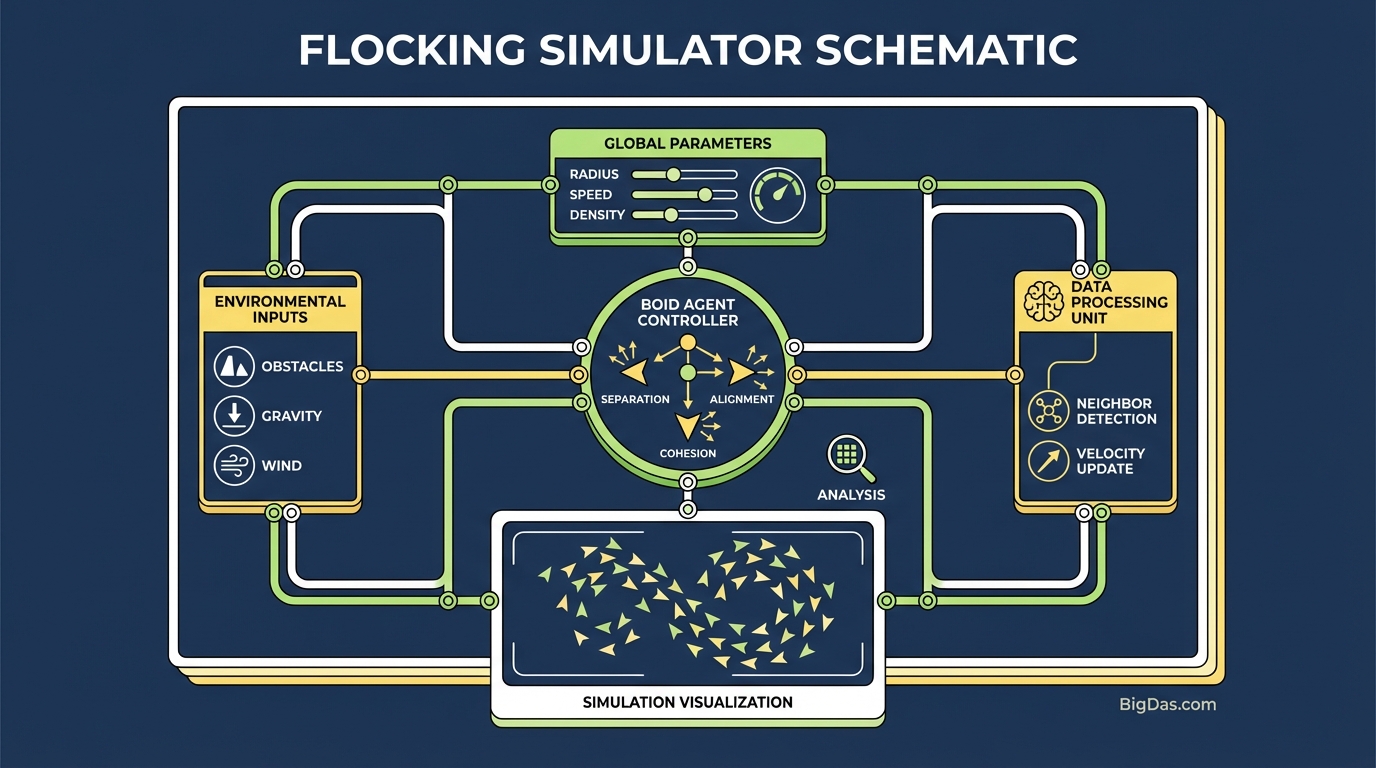
The Flocking Simulator is a high-performance, interactive environment for simulating the movement of independent agents, commonly called "Boids" (bird-oid objects).
The simulator implements the model Craig Reynolds introduced in 1986. Reynolds showed that a flock does not need a leader. Each agent follows three local steering rules. When hundreds of agents follow these rules simultaneously, the group produces complex, intelligent-looking motion.
The Three Steering Rules
The simulator calculates three forces per agent, per frame:
- Separation (Collision Avoidance): Steers an agent away from neighbors that are too close. Prevents overcrowding and collisions.
- Alignment (Velocity Matching): Steers an agent toward the average heading of its neighbors. Keeps the flock moving in the same direction.
- Cohesion (Flock Centering): Steers an agent toward the average position of its neighbors. Keeps the group together.
The Flocking Simulator renders these forces with high-fidelity graphics and physics. You can change the weight of each rule at runtime and observe the effect on the flock.
Key Features
1. Real-Time Parameter Adjustment
Most simulators require a "stop, edit, run" cycle. This tool updates parameters live. Move the Cohesion slider mid-simulation and the flock tightens or disperses instantly. This feedback loop is the fastest way to learn how sensitive the algorithm is to each rule.
2. High-Performance Rendering
Simulating N agents against N neighbors is O(n²) and quickly bottlenecks a CPU. The Flocking Simulator uses spatial partitioning (quadtrees/octrees) and compute shaders to run thousands of agents at 60 fps.
3. Environmental Interactivity
A flock in a void is interesting. A flock navigating obstacles is useful.
- Obstacle Avoidance: Drop walls and spheres. Watch the flock split and reform.
- Predator Mode: Add a predator agent. Observe scattering and evasion.
- Field of View (FOV) Controls: Limit what each boid can see. This simulates realistic sensory limits.
4. Cross-Disciplinary Use
- Developers: Copy tuned parameters into Unity or Unreal Engine projects.
- Educators: Demonstrate how local rules produce global order.
- Artists: Export screenshots and vector paths for generative art.
How to Use the Flocking Simulator
Watching the patterns is not enough. Use this workflow to learn the system.
Step 1: Calibration
When the tool launches, the default flock wanders. Reset the canvas and set all sliders to 50%. Start with 200 boids so you can see individual interactions, then scale up to 1,000+.
Step 2: Isolate Each Rule
The fastest way to learn the algorithm is to turn the other rules off.
- Test Separation: Set Alignment and Cohesion to 0. Max out Separation. The agents act like gas molecules, repelling constantly.
- Test Cohesion: Set Separation and Alignment to 0. Max out Cohesion. The agents collapse into a single point.
- Test Alignment: Isolate Alignment. The agents move in parallel lines, like cars on an infinite highway, never converging or diverging.
Step 3: Combine the Rules
Now blend them.
- Separation: Low
- Alignment: High
- Cohesion: Medium
Result: Classic fluid motion. Agents stay together, keep personal space, and flow like a river.
Step 4: Stress Test
Introduce obstacles to see how the flock recovers.
- Draw walls in the flock's path.
- Observe: Does the flock split cleanly? Does it get stuck? Adjust the Steering Force (turn rate) to help agents navigate tight corners.
Use Cases
1. Game Development and AI
Realistic crowd movement is hard to hand-author. In an RTS or open-world RPG, every zombie, ship, or NPC needs believable motion.
Use the simulator to find the ratio of Separation, Alignment, and Cohesion that looks organic, then export those values to your engine.
2. Biological Research and Education
Researchers use the simulator to model animal behavior. It demonstrates how termites build mounds, how fish evade sharks, and how complex group intelligence arises from local rules alone.
3. VFX and Motion Graphics
Particle systems often look mechanical. Flocking data produces organic movement. Use it to set up emitters in Houdini or After Effects for fireflies, nanobot swarms, or magical swirling effects.
4. Algorithm Benchmarking
The simulator is a load generator for spatial partitioning code. Push the agent count to the limit and measure how different optimization techniques (quadtrees, uniform grids, BVH) perform.
Tuning Tips
- Look for Phase Transitions: Adjust Cohesion against Separation slowly. The system will switch from a "gas" (chaotic) to a "liquid" (flocking) to a "solid" (clumped) state. The transitions are where the most interesting behavior happens.
- Change the Field of View: Lower the perception radius to simulate short-sighted agents like insects. The flock fractures into smaller sub-flocks. Raise it to simulate agents with perfect awareness, and the flock becomes unnaturally synchronized.
- Use the Mouse as a Predator: Click and drag the cursor to repel the flock. If the flock recovers slowly, raise Steering Force. If it scatters and never reforms, raise Cohesion.
Frequently Asked Questions (FAQ)
1. Is the Flocking Simulator based on real biological data?
The Boids algorithm is a mathematical approximation of biological behavior, not a measurement of real flocks. The output patterns are statistically similar to real starlings, sardines, and sheep, but they are not field data.
2. Can I use this for crowd simulation?
Yes. The same three rules apply to humans: Separation (don't bump into people), Alignment (follow traffic flow), and Cohesion (stay in the group). Lower Max Speed to simulate walking; raise it to simulate running or panic.
3. Why do the agents jitter or vibrate?
Jitter means Separation and Cohesion are fighting in a small radius. Lower the Max Force limit, or raise the Separation distance to give agents more breathing room.
4. Does this tool support 3D simulation?
Yes. The Flocking Simulator supports both 2D (top-down) and 3D modes. 3D is suited for flight and aerial simulation; 2D is better for ground crowds and naval formations.
Conclusion
The Flocking Simulator runs the math behind emergent behavior on your screen. It turns the gap between chaos and order into a sandbox you can adjust in real time.
Use it to debug AI for games, teach algorithms, or watch procedural movement. The performance and parameter control let you move from passive observation to active experimentation.