I2C & SPI Bus Simulation
 I2C & SPI Bus Simulation
Category: Electronics Engineering / Embedded Systems Reading Time: 8 Minutes
In embedded systems and digital electronics, chips talk to each other over serial buses. Whether you are connecting a temperature sensor to an Arduino or routing a PCB with multiple microcontrollers, the protocol you choose dictates your hardware and firmware design.
The problem: you cannot see electricity.
When communication fails, you stare at a black box. Is it a bad solder joint? A missing pull-up resistor? Or a clock polarity error in the firmware? Solving these issues traditionally requires a logic analyzer or oscilloscope, plus a lot of patience.
The I2C & SPI Bus Simulation tool is a browser-based, interactive logic analyzer that renders the behavior of the Inter-Integrated Circuit (I2C) and Serial Peripheral Interface (SPI) protocols in real time. This guide explains how it works and how to use it.
What is I2C & SPI Bus Simulation?
The tool visualizes two protocols. Understanding the protocols comes first.
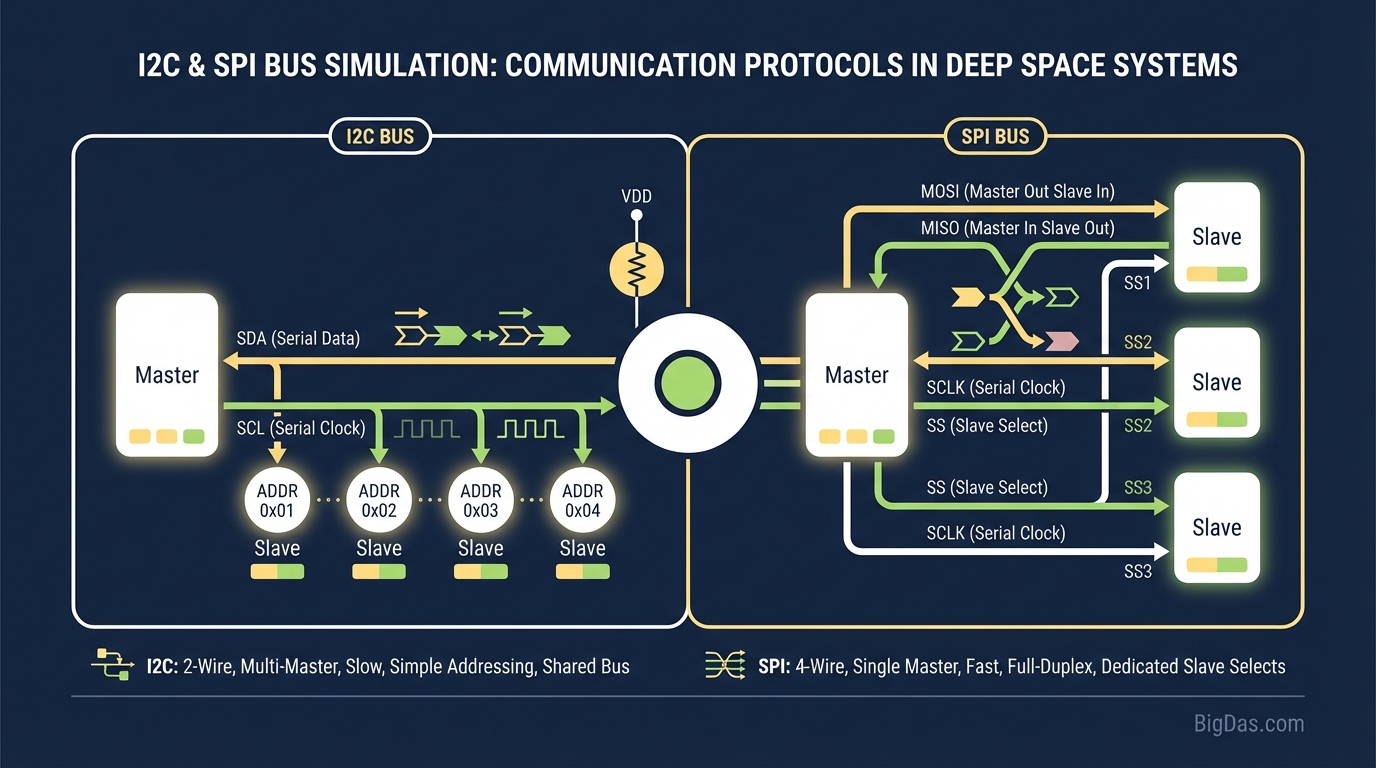
I2C (Inter-Integrated Circuit) uses two wires:
- SDA (Serial Data): Carries data in both directions.
- SCL (Serial Clock): Provides the clock signal.
I2C is simple to wire but tricky to debug. It depends on 7-bit addressing, ACK/NACK bits, and strict timing (including clock stretching).
SPI (Serial Peripheral Interface) typically uses four wires:
- MISO (Master In Slave Out): Data from Slave to Master.
- MOSI (Master Out Slave In): Data from Master to Slave.
- SCK (Serial Clock): The clock pulse.
- CS/SS (Chip Select/Slave Select): Selects the active slave device.
SPI is faster than I2C but fails often due to Clock Polarity (CPOL) and Clock Phase (CPHA) mismatches.
The simulation acts as a virtual workbench. You play the Master, send data to virtual Slaves, and watch the voltage transitions on each line.
Key Features
1. Real-Time Waveform Visualization
Enter data in Hex, Binary, or ASCII and the tool draws the clock and data waveforms immediately. You can see the relationship between clock edges and data validity.
2. Interactive Protocol Configuration
Adjust the bus parameters on the fly:
- SPI Modes: Toggle between Mode 0, 1, 2, and 3 to see how CPOL and CPHA change the sampling edge.
- I2C Addressing: Change the 7-bit address and observe the Read/Write bit.
- Clock Speed: Compare transmission time at different baud rates.
3. Error Injection
Simulate fault conditions such as clock stretching or a NACK response. The tool highlights these events in red so you can learn to recognize failure patterns.
4. Bit-Banging Reference
For engineers writing software-based SPI or I2C drivers, the tool breaks transmission into individual bits. You can match each voltage transition to the corresponding line of code.
Step-by-Step Usage
Phase 1: Select Your Protocol
- Toggle the switch between I2C and SPI.
- The interface updates to show 2 wires (I2C) or 4 wires (SPI).
Phase 2: Configure the Master
- For I2C: Set the Target Slave Address (e.g.
0x50for an EEPROM). Choose Write or Read. - For SPI: Select the Mode (0 to 3). Check the slave device datasheet if you are unsure.
- Mode 0: CPOL=0, CPHA=0 (most common)
- Mode 1: CPOL=0, CPHA=1
- Mode 2: CPOL=1, CPHA=0
- Mode 3: CPOL=1, CPHA=1
Phase 3: Input Data
Locate the Data Buffer or Payload field. Enter data as Hex (0xFF), Binary (0b11111111), or Decimal. Values like 0xAA (10101010) produce a clean alternating pattern that is easy to analyze.
Phase 4: Run the Simulation
Click Simulate or Send. Watch the timing diagram. Hover over any bit to see a tooltip explaining the event (e.g. "Master pulls SDA Low while SCL is High = START Condition").
Phase 5: Analyze and Debug
The decoder output below the graph translates the waveform back into Hex or ASCII. If the output matches your input, the logic is correct. During a read operation, observe how the virtual Slave drives the data line.
Use Cases
1. Students and Educators
Textbooks use static arrows to explain I2C. The simulator lets you answer "what if?" questions and watch the Start, Stop, and Ack conditions happen in real time.
2. Firmware Engineers
Before writing a driver for an STM32 or Arduino, use the simulator to verify your logic. If you are unsure whether a sensor samples on the rising or falling edge, simulate Mode 0 and Mode 1, then compare the output to the datasheet timing diagram.
3. Hardware Debugging
Compare your oscilloscope capture against the simulator's "ideal" waveform. Mismatches point to hardware issues such as excessive capacitance or missing pull-up resistors.
4. Interview Preparation
Embedded software interviews often include drawing timing diagrams on a whiteboard. Regular practice with the simulator builds the visual memory needed to sketch these diagrams quickly.
Expert Tips
- Compare Protocol Overhead: Send one byte over I2C, then over SPI. Count the clock cycles. I2C adds overhead (address bits + ACK bits) that SPI skips. Use this to pick the right bus for high-speed links.
- Trigger a NACK: In I2C mode, address a slave that is not in the simulation settings. Watch the NACK pulse. This is what you see on a scope when the hardware is disconnected.
- Check the Edges: Zoom in on the SPI clock. Verify that data is stable before the sampling edge, not changing. This is the most common source of SPI bugs.
Frequently Asked Questions (FAQ)
1. Can this tool connect to my physical Arduino or Raspberry Pi?
No. It is a simulation and visualization tool that runs entirely in the browser. It does not touch physical GPIO pins. It produces the "ideal" waveforms you expect to see on an oscilloscope.
2. What is the main visual difference between I2C and SPI?
I2C uses 2 lines and checks for an ACK (low pulse on SDA) after every byte. SPI uses 4 lines and streams data continuously while CS is held low, with no acknowledgement step.
3. Why does the I2C waveform look slower or have gaps?
I2C is half-duplex. The simulator shows the turnaround time when the Master releases the line so the Slave can pull it low for an ACK. SPI is full-duplex, so the data flow is continuous.
4. Is the simulation accurate enough for professional driver development?
Yes. The logic states and transition timings follow the NXP (formerly Philips) I2C specification and the Motorola SPI specification. It serves as a reliable reference implementation.
Summary
The I2C & SPI Bus Simulation tool makes invisible bus traffic visible. By seeing the relationship between clock, data, and chip select lines, you can move from guessing at failures to identifying them directly. Use it to learn the protocols, verify firmware logic, and debug hardware issues before reaching for a scope.