Monte Carlo Pi
 Monte Carlo Pi simulation
Visualize π with a Monte Carlo Simulation
Pi is a constant of circles, so it seems odd to estimate it by throwing random points at a square. That's exactly what a Monte Carlo simulation does, and it's one of the clearest ways to see the Law of Large Numbers in action.
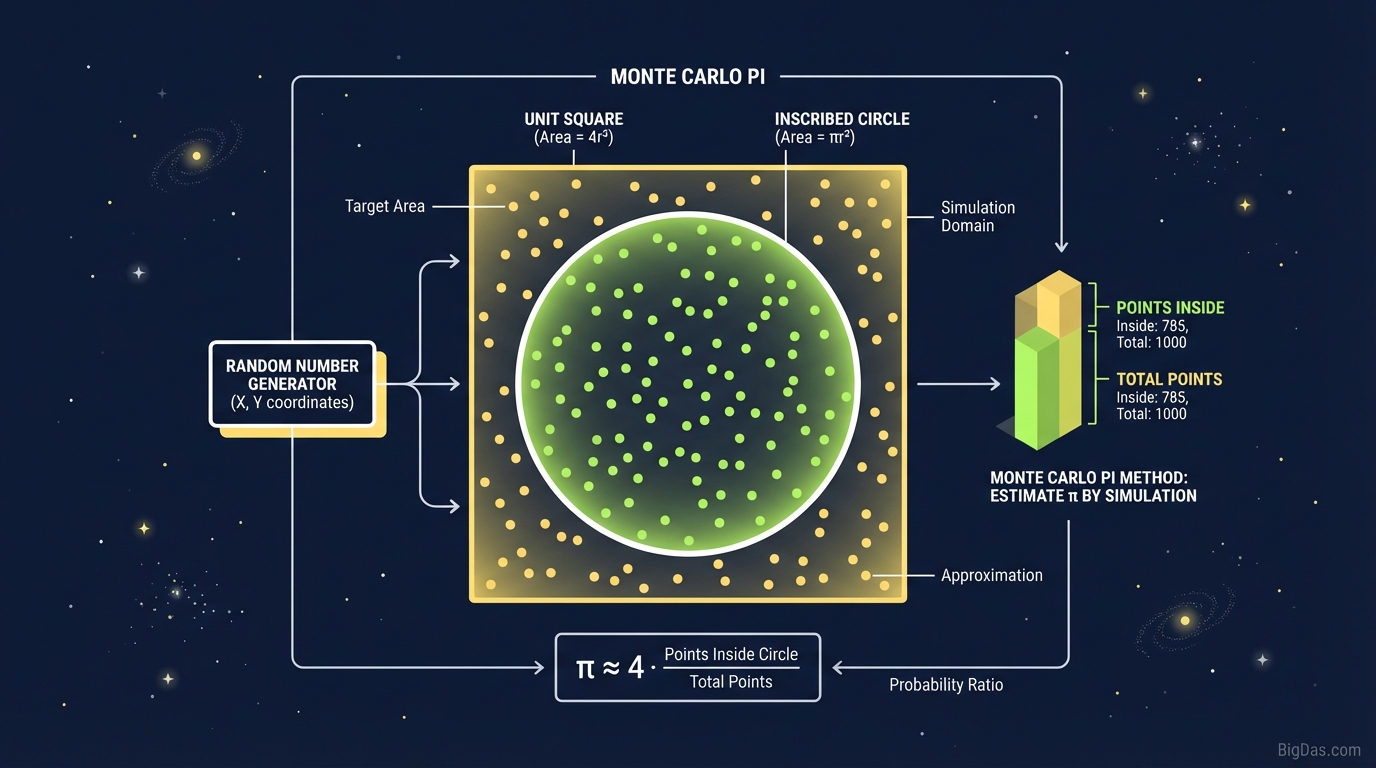
The Monte Carlo Pi tool plots random points inside a square with an inscribed circle. The ratio of points that fall inside the circle converges toward π/4, giving you a live estimate of Pi as the simulation runs.
This guide covers the geometry, the math, and how to get useful results from the tool.
The Science of Randomness
The Monte Carlo method is a class of algorithms that use repeated random sampling to get numerical results. The name comes from the Monte Carlo Casino in Monaco, where outcomes depend on chance.
Using randomness to approximate a fixed constant like Pi sounds odd, but it works because of how probability scales with area.
The Geometry
The simulation is built on a simple relationship between a circle and a square.
- Draw a square with side length 2r.
- Inscribe a circle with radius r inside it.
- The area of the square is (2r)² = 4r².
- The area of the circle is πr².
If you scatter points uniformly across the square, the probability of landing inside the circle equals the ratio of the two areas:
$P = \frac{\text{Area of Circle}}{\text{Area of Square}} = \frac{\pi r^2}{4r^2} = \frac{\pi}{4}$
Rearranging gives Pi directly:
$\pi \approx 4 \times \frac{\text{Points Inside Circle}}{\text{Total Points}}$
How the Tool Runs
The tool generates random coordinates (x, y) where both values fall between -1 and 1. It computes the distance from the origin:
- If the distance is less than 1, the point lands inside the circle (a "hit").
- If the distance is greater than or equal to 1, the point lands outside (a "miss").
Running this thousands of times per second produces a converging estimate. The more points you generate, the closer the result gets to 3.14159..
Key Features
1. WebGL Rendering
To see convergence clearly, you need a large sample size. The tool uses WebGL to plot tens of thousands of points per second without lag, so you can reach N > 100,000 quickly.
2. Live Metrics Dashboard
The dashboard shows three values in real time:
- Current Estimation: The running value of Pi calculated from the point ratio.
- Error Margin: The percentage difference between the estimate and the true value of Pi.
- Total Iterations: The number of samples generated so far.
3. Color-Coded Visualization
Hits and misses are plotted in different colors, which makes the area ratio visible at a glance.
4. Adjustable Speed
Slow the simulation down to walk through each step, or crank it up to stress-test the random number generator.
How to Use the Tool
Step 1: Initialize
When the tool loads, you'll see a blank coordinate system (the square) with a circle drawn inside. Find the control panel and set a batch size, or use the continuous stream option.
Step 2: Start the Sampling
Click "Start Simulation". Points will populate the grid, with hits (inside the circle) and misses (in the corners) shown in different colors.
In the first few seconds, the estimate will jump around, 3.0, then 3.2, then 3.1. This variance is normal for small sample sizes.
Step 3: Watch the Convergence
Let the simulation run past 10,000 points. The error margin will shrink, and the estimate will settle near 3.14. If it stalls at 3.140 or 3.143, keep going. Random walks oscillate around the true value.
Step 4: Push Past a Million
Set the speed to maximum and let it run past 1,000,000 points. The distribution should look nearly uniform, and the estimate should be accurate to within 0.001 of the true value of Pi.
Step 5: Reset and Repeat
Hit "Reset" and run it again. The exact points will differ, but the accuracy should be reproducible. That's how you know the random number generator is working.
Use Cases
For Developers
A Monte Carlo simulation is only as good as the random number generator behind it. If Math.random() is biased, the points won't distribute evenly and the estimate will drift. This tool shows you what uniform randomness should look like, so you can spot bad RNG behavior in your own code.
For Data Scientists
The same technique used here, sampling to estimate an integral, is used in finance for option pricing (Black-Scholes) and in physics for particle simulations. Running Monte Carlo Pi is a good way to build intuition for convergence rates before moving to multi-variable models.
For Educators
Projections of the area formula $\int$ can lose a classroom. Geometric probability is easier to grasp visually. Run the tool, ask students to guess Pi from the visible ratio of hits to misses, then reveal the running estimate.
Tips for Better Results
- Watch the decimal gains. Going from 3.1 to 3.14 takes a few thousand points. Going from 3.14 to 3.14159 takes millions. This is the diminishing returns of sampling.
- Expect clusters. Small clumps of points are normal. Uniform distribution and random distribution are not the same thing, random data naturally has small gaps and clusters.
Frequently Asked Questions (FAQ)
1. Why does the value of Pi change every time I run the tool?
Because the inputs are random, the output is an estimate, not an exact value. As the number of iterations grows, the result stabilizes around the true value of π.
2. How many points do I need for 3.14159?
For 4 to 5 decimal places of precision, you typically need hundreds of millions of iterations. The convergence rate of this method is slow (1/√N), so doubling your precision requires four times as many points.
3. Is this how computers actually calculate Pi?
No. Supercomputers use deterministic infinite series like the Chudnovsky algorithm to compute Pi to trillions of digits because they're much faster. Monte Carlo methods are preferred for finding the area of shapes too irregular for closed-form formulas.
4. Why are the corners of the square important?
The corners represent the area outside the circle. The probability of a point landing in a corner is $1 - \pi/4 \approx 21.5%$. If your simulation shows corner hits significantly above or below that, the Pi estimate will be off.
5. Can I use this on mobile?
Yes, the tool runs on mobile devices. For simulations past 1 million points, a desktop browser will render the visualization more smoothly.
Conclusion
The Monte Carlo Pi tool turns an abstract constant into something you can watch converge on screen. It's a practical way to understand geometric probability, test random number generators, and see the Law of Large Numbers work in real time.
[Start Your Monte Carlo Simulation Now]