Projectile Motion
 Projectile Motion
Projectile Motion Calculator & Simulation
Calculating projectile trajectories by hand usually means solving two sets of kinematic equations, plotting points, and hoping the curve looks right. A static textbook diagram doesn't help much when the variables keep changing.
This Projectile Motion Tool runs the kinematics in your browser and draws the resulting path on a live canvas. You adjust the gravity, launch speed, and angle, and the trajectory updates as you move the controls. It also outputs the flight time, peak height, and horizontal range, so you can compare the math against what you see.
This guide covers the physics behind the simulator, the controls, and a few experiments that make the underlying behavior obvious.
What Projectile Motion Is
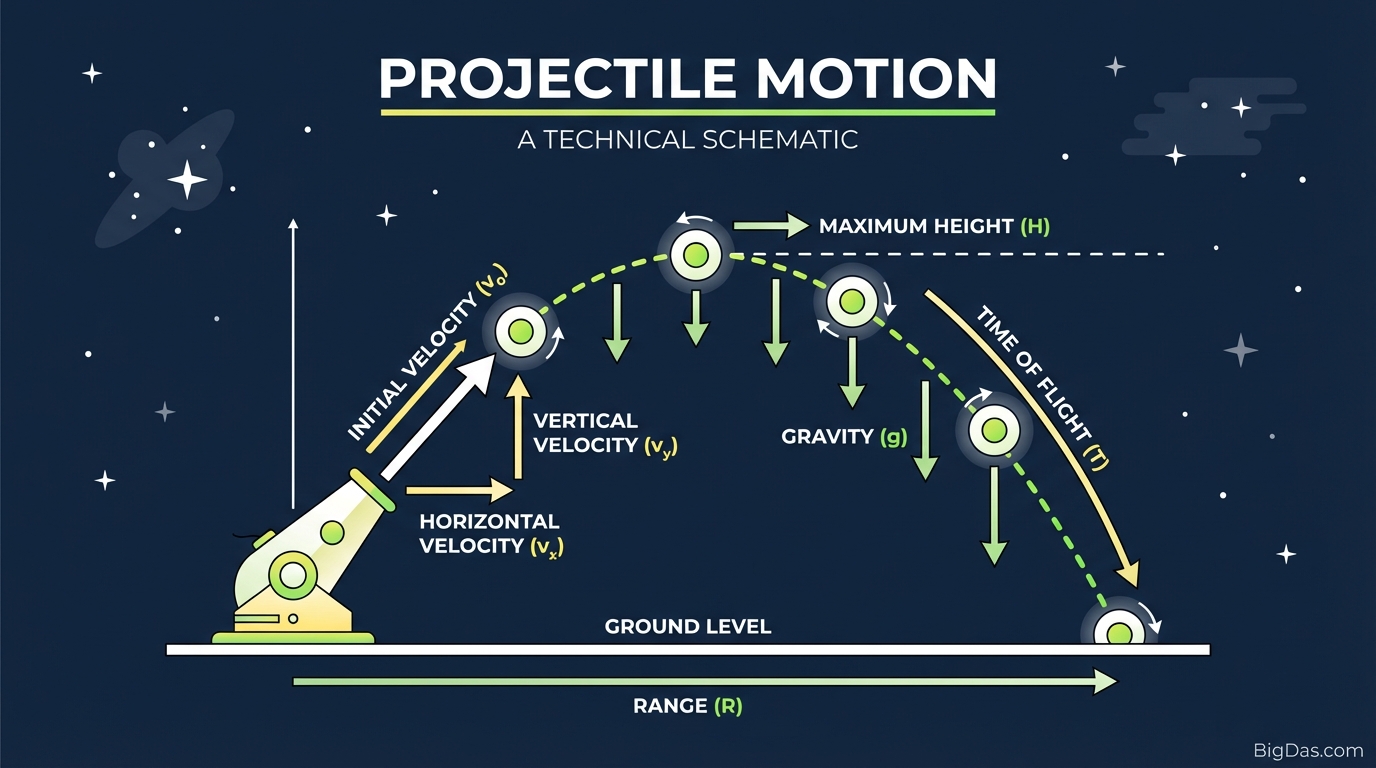
Projectile motion describes the path an object follows when it is launched and then moves under the action of gravity alone. In a vacuum, the only force acting on the object after launch is gravity, and the resulting path is a parabola.
Horizontal and Vertical Components
The motion can be split into two independent parts:
- Horizontal motion (x-axis): Without air resistance, horizontal velocity stays constant. The projectile covers equal horizontal distances in equal time intervals.
- Vertical motion (y-axis): Gravity changes the vertical velocity at a constant rate (9.8 m/s² on Earth). The object slows as it rises, stops momentarily at the peak, and accelerates back down.
Variables Used by the Simulator
- Initial Velocity (v₀): Launch speed.
- Launch Angle (θ): Angle measured from the horizontal.
- Gravity (g): Downward acceleration.
- Range (R): Total horizontal distance.
- Maximum Height (H): Highest vertical point reached.
Features
1. Live Variable Controls
Sliders and input fields let you change parameters without reloading:
- Velocity: Increase speed to see how it stretches the range.
- Angle: Sweep from 0° to 90° to find the angle that gives the maximum range.
- Gravity: Switch between Earth (9.8 m/s²), the Moon (1.62 m/s²), Mars (3.71 m/s²), or Jupiter (24.79 m/s²).
2. Real-Time Trajectory Plot
The path is redrawn as inputs change. You can watch the curve shift from launch point (0, 0) to landing point and compare it against the numeric output.
3. Numeric Output
Alongside the plot, the tool displays:
- Total Flight Time (t)
- Maximum Height (H_max)
- Horizontal Range (R)
4. Browser-Based
No installation. Runs locally in the page so changes are immediate.
How to Use the Simulator
Step 1: Set Gravity
Pick the environment for the simulation.
- Standard problem: Leave gravity at 9.8 m/s².
- Moon: Set gravity to 1.62 m/s². The projectile stays airborne longer and travels further.
Step 2: Enter Initial Velocity
Input the launch speed. Match the units to your problem (usually m/s). Higher velocity extends the range and flattens the early part of the curve.
Step 3: Set the Launch Angle
Adjust the angle to control the shape of the trajectory.
- Low angle (< 30°): Short flight, low peak, long range.
- High angle (> 60°): High peak, short range.
- 45°: Gives the maximum range when launch and landing heights are equal.
Step 4: Read the Results
Check the flight time, maximum height, and range. Try setting a target distance and adjusting only the angle while keeping velocity fixed.
Experiments to Try
Complementary Angles
Two launch angles that add up to 90° produce the same range, but different peak heights.
- Set velocity to 20 m/s.
- Launch at 30°, note the range.
- Launch at 60°, note the range.
- Compare: the range is identical, but the 60° launch reaches a higher peak.
Gravity vs. Maximum Height
Keep velocity and angle fixed, then halve gravity. Maximum height increases. The relationship between gravitational acceleration and peak height is inverse.
Common Use Cases
Students and Teachers
- Project the simulator to show how the function y(x) changes with each variable.
- Verify hand-solved homework problems against the tool's output.
Game Development
- Prototype jump arcs and ballistics for Unity or Unreal Engine projects before writing the code.
Engineering and Ballistics
- Get a quick first-pass estimate of a trajectory without opening MATLAB or similar tooling.
Sports Analysis
- Explore optimal launch angles for golf drives, baseball throws, or soccer kicks, keeping in mind that air resistance changes the result in real-world conditions.
Frequently Asked Questions (FAQ)
1. Does mass affect the trajectory in the simulation?
In ideal projectile motion (no air resistance), mass does not affect the trajectory. A bowling ball and a feather dropped together in a vacuum hit the ground at the same time. This tool models that ideal case.
2. What angle gives the maximum range?
When launch and landing heights are equal, 45° gives the maximum range. Any other angle produces a shorter range.
3. Why is the path a parabola?
The horizontal velocity is constant (linear motion), while the vertical velocity changes at a constant rate under gravity (quadratic motion). Combining a linear x-component with a quadratic y-component produces a parabola, described by $y = ax^2 + bx + c$.
4. Can I simulate other planets?
Yes. Set Gravity to the surface gravity of the body you want:
- Moon: 1.62 m/s²
- Mars: 3.71 m/s²
- Jupiter: 24.79 m/s²
Summary
The Projectile Motion Tool combines the kinematic equations with a live plot so the math and the path are visible side by side. Adjust gravity, velocity, and angle to see how each one shapes the trajectory, and use the numeric output to check your work.