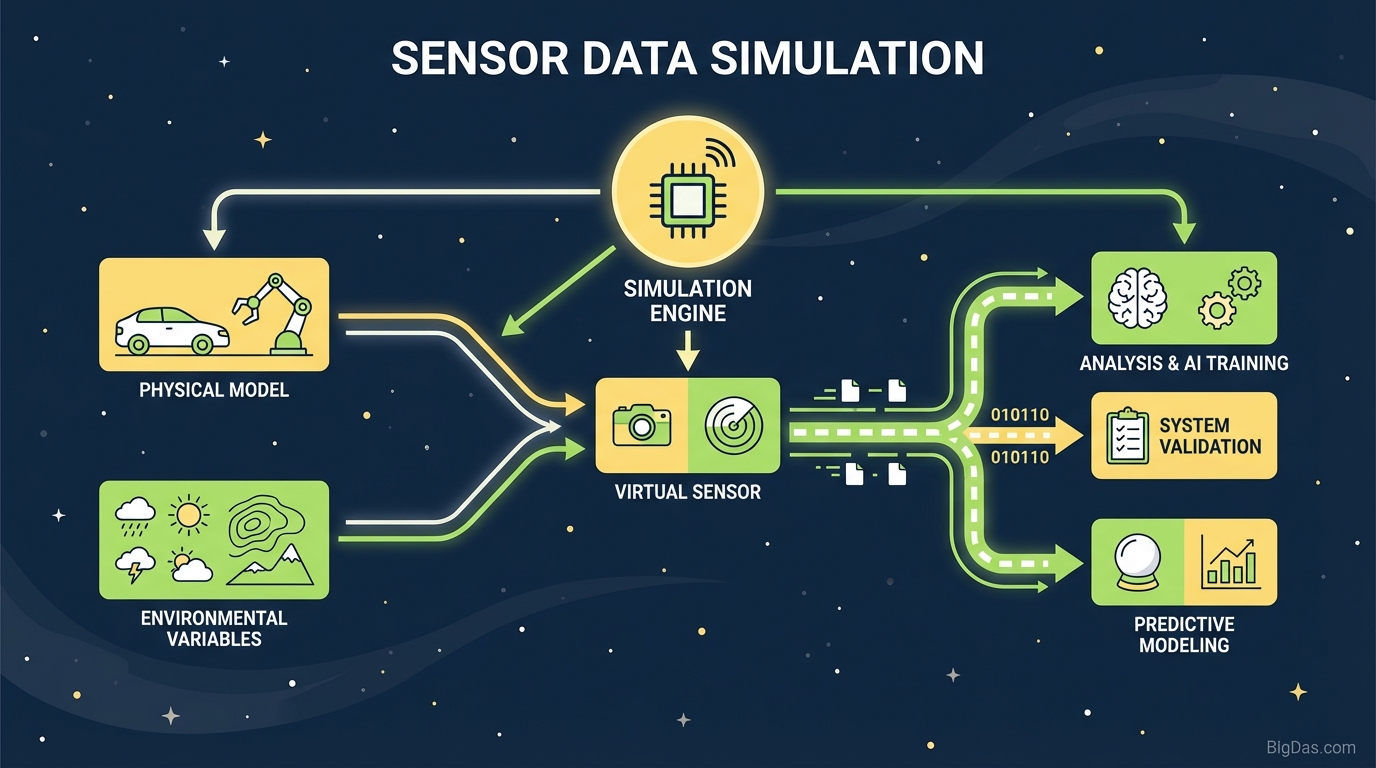
Sensor Data Simulation
 Modern scientific illustration of Sensor Data Simulation
IoT Prototyping with Sensor Data Simulation
IoT and embedded systems projects often stall because of hardware. The dashboard, backend, and ML models may be ready, but nobody can move forward until the physical sensors arrive or someone spends an afternoon wiring a breadboard just to produce a few rows of CSV data.
This page covers how to generate and visualize realistic sensor streams in software, how the simulations model temperature, LDR, and ultrasonic behavior, and how to plug that data into your development workflow.
What Is Sensor Data Simulation?
Sensor data simulation uses software algorithms to replicate the output of physical sensors. It is more than a random number generator: it approximates the physics of the environment the sensor sits in.
Real sensor data is noisy. It drifts, jitters, and occasionally spikes. A temperature probe in an industrial boiler behaves differently from one in a refrigerator. An HC-SR04 has a minimum range and reflects poorly off soft surfaces. An LDR responds non-linearly to light.
A useful simulation respects those constraints:
- Range limits: an ultrasonic sensor cannot report negative distance.
- Temporal consistency: temperature does not jump from 20°C to 100°C in one millisecond without a reason.
- Noise: every component has small random variations.
Simulating these effects lets you decouple software work from hardware availability and test edge cases that are hard or unsafe to reproduce physically.
Features
1. Multi-Sensor Support
The tool ships with separate algorithms for the common sensor types in IoT and robotics:
- Temperature: thermal dynamics for HVAC, environmental monitoring, and industrial equipment.
- LDR (Light Dependent Resistor): lux and resistance changes from ambient light, useful for day/night cycles and automated lighting.
- Ultrasonic: distance and proximity data for obstacle avoidance and tank level monitoring.
2. Realistic Noise Injection
Clean data is not useful for testing. A pipeline that only works on a straight line will fail in the field. The tool injects Gaussian noise and occasional anomalies, which exercises filters (Kalman, median, running average) and alert thresholds.
3. Real-Time Visualization
A live chart shows the simulated values as they are generated. You can watch temperature climb or distance shrink, which makes configuration changes easy to evaluate.
4. Customizable Parameters
The defaults are starting points, not limits. You can adjust:
- Frequency: 1 Hz vs 100 Hz, or anything in between.
- Min/Max: the operating boundaries of the virtual hardware.
- Trend: upward, downward, oscillation (sine wave), or random walk.
5. Export
Generated data can be exported as CSV or JSON for use in Python, MATLAB, Excel, or direct ingestion into a database.
Step-by-Step: Simulating a Temperature Sensor
Step 1: Select the Sensor Type
Open the dashboard and pick Temperature from the sensor dropdown. The parameter panel switches to thermal units (°C or °F).
Step 2: Set the Baseline and Range
- Minimum Value: 20 (room temperature)
- Maximum Value: 80 (overheating threshold)
- Base Value: 25
Step 3: Configure Behavior
- Trend: Oscillate, to model a thermostat cycling a heater on and off.
- Volatility/Noise: Low for a stable room, High for a probe in a turbulent environment.
Step 4: Start the Simulation
Click Start Simulation. The chart begins plotting immediately. If the trace looks too jagged, lower the noise. If it looks too flat, raise the variance.
Step 5: Use the Data
Copy the JSON or CSV output and feed it into your application's input stream, or save it to a file to test your backend's parser.
Common Use Cases
IoT Developers and Firmware Engineers
Logic like "if Temp > 50, turn on fan" is tedious to test with a physical sensor. Instead of heating a probe with a hair dryer, script a spike to 51°C in the simulator and confirm the fan triggers. The same approach covers dozens of branches and edge cases in minutes.
Data Scientists and ML Engineers
Predictive maintenance models need failure data, and real machines rarely fail on demand. The simulator can generate thousands of hours of normal operation and inject failure signatures into it. Combining that synthetic data with a small real dataset usually improves model robustness.
QA and Load Testing
Procuring 10,000 physical sensors to test a cloud pipeline is not realistic. Spinning up 10,000 simulation instances is. Use the tool to flood MQTT brokers and API endpoints and find the breaking point.
UI/UX Designers
Smart home dashboards need live data to look right. Plug the simulator in and watch how the gauges and color thresholds (green to red, for example) behave during rapid changes.
Tips for Better Simulations
- Simulate hardware failure. Don't just vary the value; drop the signal to
0ornullat random intervals. If the app crashes, the real sensor will eventually do the same. - Test jitter explicitly. Ultrasonic readings bounce off angled surfaces and return occasional outliers. Crank the noise up and confirm that a running average or median filter smooths the trace. If the raw output breaks your logic, the real-world version will too.
- Check the boundaries. Push the value to the exact minimum and maximum and watch for overflow, truncation, or off-by-one errors. This is where integer and floating-point bugs tend to hide.
FAQ
Q1: Can the tool simulate connection latency? The tool generates data payloads, not network behavior. You can stagger the timestamps in the exported output to simulate lag or packet loss, which is enough to test how your app handles out-of-order data.
Q2: Is the ultrasonic simulation physically accurate? The model is based on time-of-flight characteristics, so the data stream looks like what a microcontroller reading an HC-SR04 would produce, including variance. It does not model 3D spatial acoustics.
Q3: Can I use the data for commercial ML models? Yes. Synthetic data is standard practice. Augmenting a small real dataset with large volumes of simulated data usually improves generalization.
Q4: How do the LDR and temperature algorithms differ? Temperature has high thermal mass and changes slowly. Light changes instantly. The temperature model resists rapid jumps unless a spike is configured, while the LDR model allows instant state changes, similar to flipping a light switch.
Conclusion
Most IoT projects lose time in the gap between finished software and available hardware. Physical testing alone is slow, expensive, and poor at covering edge cases.
Sensor data simulation lets you validate architecture, train models, and stress-test code before any circuit board is fabricated. The data is available now; use it.