Whale Optimization Algorithm (WOA)
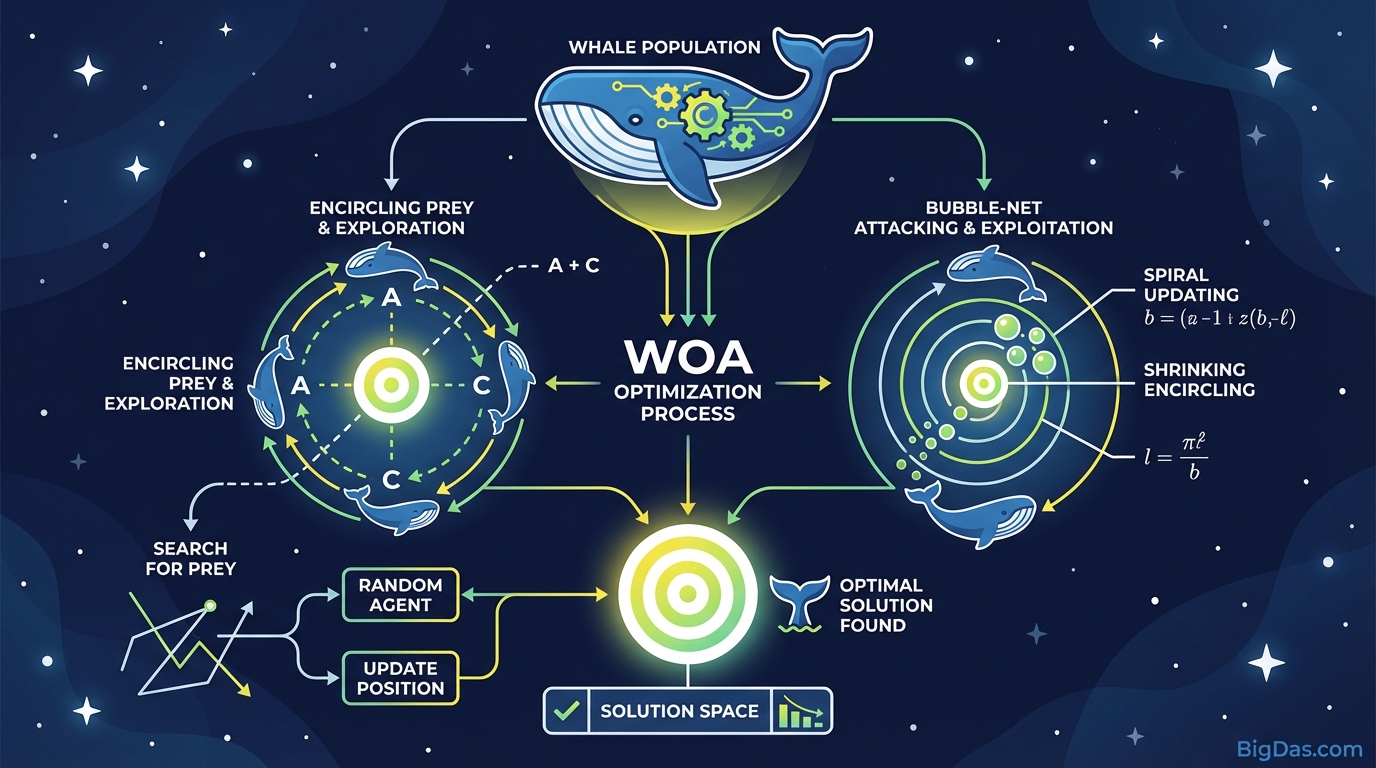
 Modern scientific illustration of Whale Optimization Algorithm (WOA)
Unlocking Nature’s Intelligence: The Ultimate Guide to the Whale Optimization Algorithm (WOA)
Finding optimal solutions in data science, engineering, and computational intelligence is rarely straightforward. Hyperparameter tuning, structural design optimization, and resource allocation all involve large search spaces with local optima that trap standard mathematical methods.
The Whale Optimization Algorithm (WOA) addresses this. Proposed in 2016 by Mirjalili and Lewis, WOA is a meta-heuristic based on the bubble-net feeding behavior of humpback whales. This guide covers the algorithm's mechanics, the WOA Simulation Tool, and a step-by-step framework for using it.
What is the Whale Optimization Algorithm (WOA)?
WOA is a swarm intelligence meta-heuristic that mimics humpback whale social behavior, specifically the bubble-net feeding method. Humpback whales dive below a school of krill or small fish, then exhale bubbles while swimming in a spiral upward. This creates a bubble net that traps prey near the surface. The whales then swim through the center of the spiral to consume the trapped prey.
The Mathematical Translation
WOA translates this biological process into mathematical equations across three phases:
- Encircling Prey
The algorithm assumes the current best solution is the target prey. Other search agents (whales) update their positions relative to this best agent.
- Bubble-Net Attacking (Exploitation Phase)
The spiral movement is modeled mathematically. The algorithm calculates a spiral equation to refine search agent positions, narrowing the search space around the current best solution.
- Search for Prey (Exploration Phase)
To avoid getting stuck in a local optimum, whales occasionally search randomly across new areas of the search space.
Key Features & Benefits of the WOA Tool
The WOA algorithm is open-source, but effective implementation requires computational architecture. The WOA Simulation Tool provides this.
1. Balance of Exploration and Exploitation
Most optimization tools struggle to balance exploring new areas with refining the best found area. The WOA Tool uses an adaptive parameter mechanism that transitions between spiral movement and random search, reaching the global optimum faster.
2. High Convergence Speed
The bubble-net mechanism converges toward solutions faster than Genetic Algorithms (GA) or Particle Swarm Optimization (PSO) by eliminating dead ends quickly.
3. Minimal Parameter Tuning
Neural networks require tweaking dozens of variables. WOA is simpler by design, and the WOA Tool streamlines this further, allowing complex simulations with a few core inputs.
4. Gradient-Free Optimization
The tool treats your problem as a black box. It does not require the gradient of the underlying function, making it suitable for problems where the derivative is unknown or expensive to compute.
Step-by-Step Guide: How to Use the WOA Tool
Step 1: Define Your Objective Function
Define what "success" means mathematically:
- Are you minimizing cost?
- Are you maximizing structural integrity?
- Are you minimizing error rates in an AI model?
Input this logic into the Objective Function Editor.
Step 2: Set Your Search Space (Constraints)
- Lower Bound (LB): Minimum acceptable value for your variables.
- Upper Bound (UB): Maximum acceptable value.
- Dimensions: Number of variables you're optimizing (e.g. 30 dimensions for complex engineering problems).
Step 3: Configure Population and Iterations
- Search Agents (Whales): Start with 30 to 50 agents. More agents cover more ground but require more processing power.
- Max Iterations: 500 iterations works well for most standard problems.
Step 4: Execute the Simulation
Hit "Start Simulation" and watch the visualization dashboard. Agents (nodes) spiral toward the optimal point:
- Blue Nodes indicate exploration.
- Red Nodes indicate the bubble-net attack (exploitation).
Step 5: Analyze the Convergence Curve
The tool generates a Convergence Curve showing fitness value over time.
- A steep drop indicates rapid discovery of good solutions.
- A flat line at the end indicates convergence on the optimal solution.
Pro-Tips: Getting the Most Out of WOA
Use the "Elitism" Feature
Ensure the tool saves the best solution from each iteration. If a new iteration produces worse results, the "Elite" whale (previous best) should remain the leader. This prevents regression.
Hybridization for Complex Problems
For highly chaotic search spaces, use Hybrid Mode. This combines WOA with a local search technique (like Simulated Annealing) at the end of the process to fine-tune the final result.
Normalize Your Inputs
Variables with vastly different scales (e.g. variable A from 0 to 1, variable B from 0 to 10,000) can bias the algorithm. Use the tool's built-in Normalization feature to scale all inputs to a 0 to 1 range, ensuring unbiased optimization.
Real-World Use Cases
1. Engineering Design Problems
Engineers use WOA to minimize the weight of tension/compression springs while maintaining safety factors, and to optimize airfoil shapes in aerodynamics to reduce drag.
2. Machine Learning Hyperparameter Tuning
Choosing learning rate, batch size, and number of layers is an optimization problem. WOA automates this, finding the hyperparameter set that yields the highest accuracy in a fraction of the time grid search takes.
3. Cloud Computing & Networking
In cloud environments, allocating tasks to virtual machines to balance load and minimize energy consumption is critical. WOA schedules these tasks effectively, reducing server latency and electricity costs.
4. Renewable Energy
WOA optimizes the placement and angle of photovoltaic (solar) panels and wind turbines to capture maximum energy based on terrain and weather patterns.
Frequently Asked Questions (FAQ)
1. How is WOA different from Particle Swarm Optimization (PSO)?
Both are swarm-based. PSO relies on velocity vectors and memory of personal best positions. WOA uses a spiral update position and logarithmic spiral function. WOA generally avoids local optima better than standard PSO due to its exploration mechanisms.
2. Can this tool handle Multi-Objective Optimization?
Yes. The tool includes a Multi-Objective WOA (MOWOA) module. This allows you to optimize two conflicting objectives simultaneously (e.g. minimizing cost while maximizing strength), resulting in a Pareto Optimal Front.
3. Is the Whale Optimization Algorithm suitable for discrete problems?
WOA is natively designed for continuous problems. However, the tool includes discretization functions (such as Sigmoid or V-shaped transfer functions) that allow it to solve binary and discrete problems, such as Feature Selection in data mining.
4. Does the tool require coding knowledge?
No. The GUI is no-code: you input parameters and constraints, and the tool handles the vector math. Python and MATLAB export options are available for advanced users.
Conclusion
The search for efficiency is a defining challenge in modern technology. Trial and error is not a viable strategy for engineers, data scientists, or researchers.
The Whale Optimization Algorithm is a mathematically grounded, bio-inspired approach to complex search spaces. The WOA Simulation Tool provides the interface to apply it effectively.