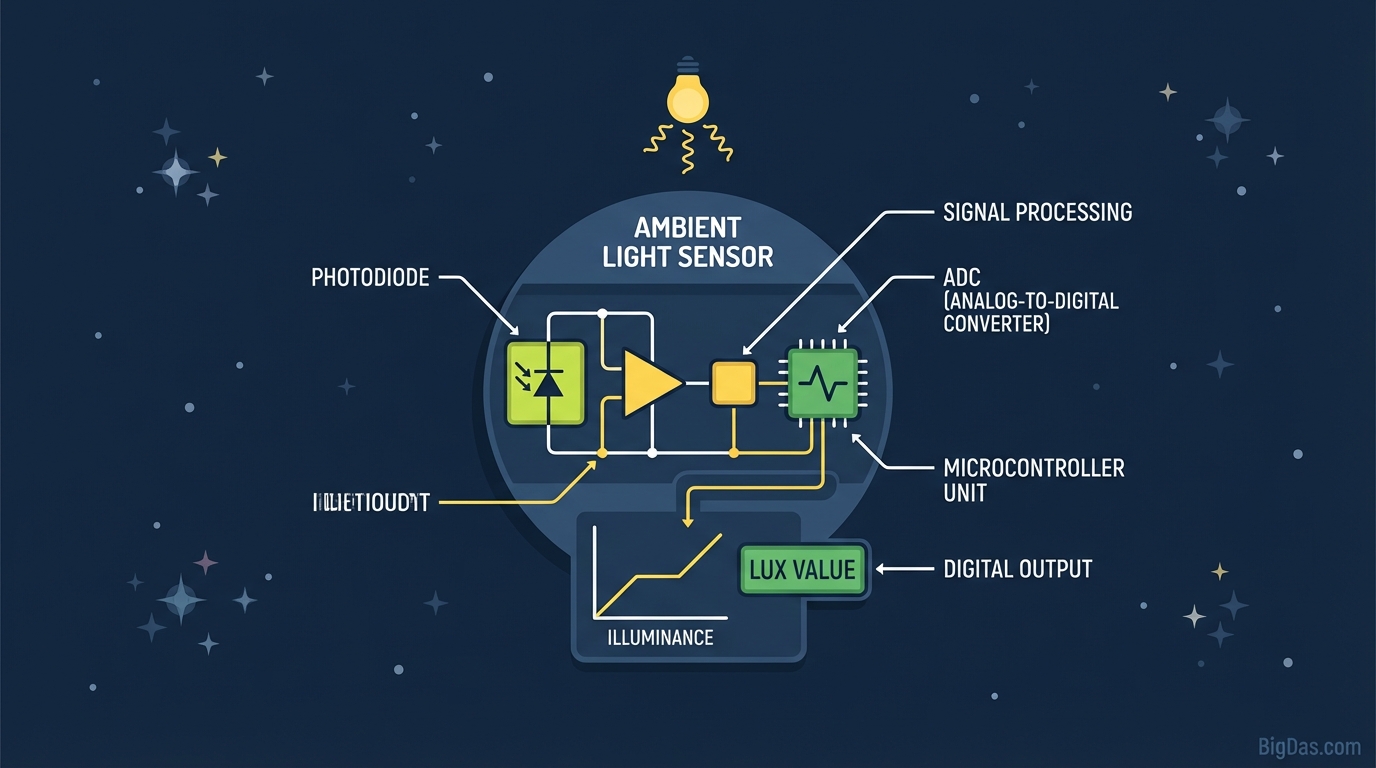
Ambient Light Sensor
 Modern scientific illustration of Ambient Light Sensor
A Practical Guide to Measuring Ambient Light with Your Device
Light affects your sleep, your work, and your plants. Most people still treat lighting as a guess, which leads to eye strain, dying houseplants, and bad photos. The fix is simple: measure it.
This guide explains how the Ambient Light Sensor tool works, why light levels matter, and how to get accurate readings.
What is an Ambient Light Sensor?
An Ambient Light Sensor (ALS) is a photodetector built into most modern phones, tablets, and laptops. It was originally designed to auto-adjust screen brightness and save battery. The sensor detects incoming light and tells the OS to brighten the display in sunlight or dim it in a dark room.
How It Works
The sensor contains a photodiode that converts photons into an electrical current. Brighter light produces a stronger current. The device's ADC converts this analog signal into a digital value measured in Lux.
What is Lux? Lux (lx) is the SI unit of illuminance, measuring luminous flux per unit area.
- 1 Lux ≈ Light from a single candle at one meter.
- Direct Sunlight = 30,000 to 100,000+ Lux.
From Hardware to Browser
This data used to be locked inside the OS. The Generic Sensor API now lets web browsers read it in real time. The tool processes the signal, filters noise, and displays a lux reading on screen. No app installation required.
Key Features
1. Real-Time Readings
The tool streams continuous data, not just snapshots. Move your device around a room and watch the lux graph update. You can spot glare hot spots and dark zones immediately.
2. No Installation
It runs in the browser (Chrome, Edge, or Opera) and processes data locally. Your environment data never leaves your device.
3. Calibration
Sensor hardware varies by device. The tool applies normalization to make readings as comparable as possible across phones and laptops.
4. Battery Efficiency
The sensor is polled only when needed, so leaving the tool running won't kill your battery.
How to Measure Lux Levels
Step 1: Open the Tool
Use Chrome or Edge on your phone, tablet, or laptop for full sensor API support.
Step 2: Grant Permission
Browsers require explicit consent before reading hardware sensors. Click "Allow" when prompted.
- If no prompt appears, check Site Settings > Sensors.
Step 3: Find the Sensor
On phones, the ALS is near the front camera (top bezel). On laptops, it's usually next to the webcam.
- Tip: Slowly move your hand over the top edge of the device. When the reading drops to near zero, you've found it.
Step 4: Position the Device
- Room lighting: Place the device flat with the screen facing up.
- Workstation: Place it where your eyes focus (on the monitor stand or keyboard).
- Plants or photography: Point the screen (sensor side) directly at the light source.
Step 5: Read the Data
Wait for the number to stabilize, then compare it to the reference ranges below.
Use Cases and Reference Standards
1. Home Office Ergonomics
Poor lighting causes eye strain, headaches, and fatigue. OSHA and ISO publish recommended lux levels for different work types:
- Corridors/Hallways: 100 to 150 Lux
- Computer Work: 300 to 500 Lux
- Detailed Tasks (drafting, mechanical work): 750 to 1,000 Lux
If your desk reads under 300 Lux, the room is likely too dim. If it reads over 1,000 Lux, glare may be an issue.
2. Plant Care
"Bright, indirect light" is too vague to keep a plant alive. Measure it instead.
- Low Light (Snake Plant, Pothos): 50 to 250 Lux
- Medium Light (Monstera, Philodendron): 250 to 1,000 Lux
- High Light (Succulents, Fiddle Leaf Fig): 1,000 to 2,000+ Lux
Tip: Measure at leaf level at 9 AM, 12 PM, and 3 PM to get a daily average. Human eyes adapt quickly, so a spot that looks bright may not be.
3. Photography and Video
A dedicated incident meter is more accurate, but a phone is a useful backup for checking light ratios.
- If the lit side of a face reads 400 Lux and the shadow reads 100 Lux, you have a 4:1 ratio, which works for dramatic portraits.
4. Sleep and Circadian Health
Light sets your body's internal clock.
- Morning: 1,000+ Lux helps suppress melatonin and wake you up.
- Evening: Under 50 Lux helps prepare for sleep.
- Check your bedroom 30 minutes before bed. Readings above 100 Lux can interfere with melatonin production.
Tips for Accurate Readings
- Clean the sensor area: Smudges and fingerprints can cut the reading by up to 20%. Wipe the top bezel first.
- Remove thick cases: Rugged cases sometimes shadow the sensor.
- Don't stand in the light path: Your body blocks light. Step aside.
- Match the method to the goal:
- Incident (direct): Point the sensor at the source. Use this for photography.
- Reflective (ambient): Place the sensor flat on the surface. Use this for reading or work conditions.
Frequently Asked Questions
Q1: Can I use this on a desktop computer?
A: Most desktops don't have built-in light sensors. It works on most laptops, smartphones, and tablets. On a desktop, you'll need an external sensor or webcam with ALS support.
Q2: Is this as accurate as a $200 hardware lux meter?
A: For general use, yes. Lab-grade photometers use a cosine corrector dome to capture light from all angles perfectly. Phone sensors are good enough for relative comparisons, plant care, and workspace checks, but not for certified photometric work.
Q3: Why does my reading say "0 Lux"?
A: Three common causes:
- Permissions: You may have denied sensor access. Reset it in browser settings.
- True darkness: Consumer sensors often bottom out at 0 in very dim rooms where a lab meter would still read a few lux.
- Covered sensor: Your thumb might be over the sensor.
Q4: Does my screen color affect the reading?
A: No. The sensor is a separate hardware component in the bezel, outside the display. The only exception is in a completely dark room, where a maxed-out screen can leak enough light to slightly affect the sensor on some devices.
Summary
Light is measurable. Once you have a lux reading, you can adjust your workspace, place your plants correctly, or fix your bedroom lighting for better sleep.
The sensor is already in your pocket. Open the tool, grant permission, and start measuring.