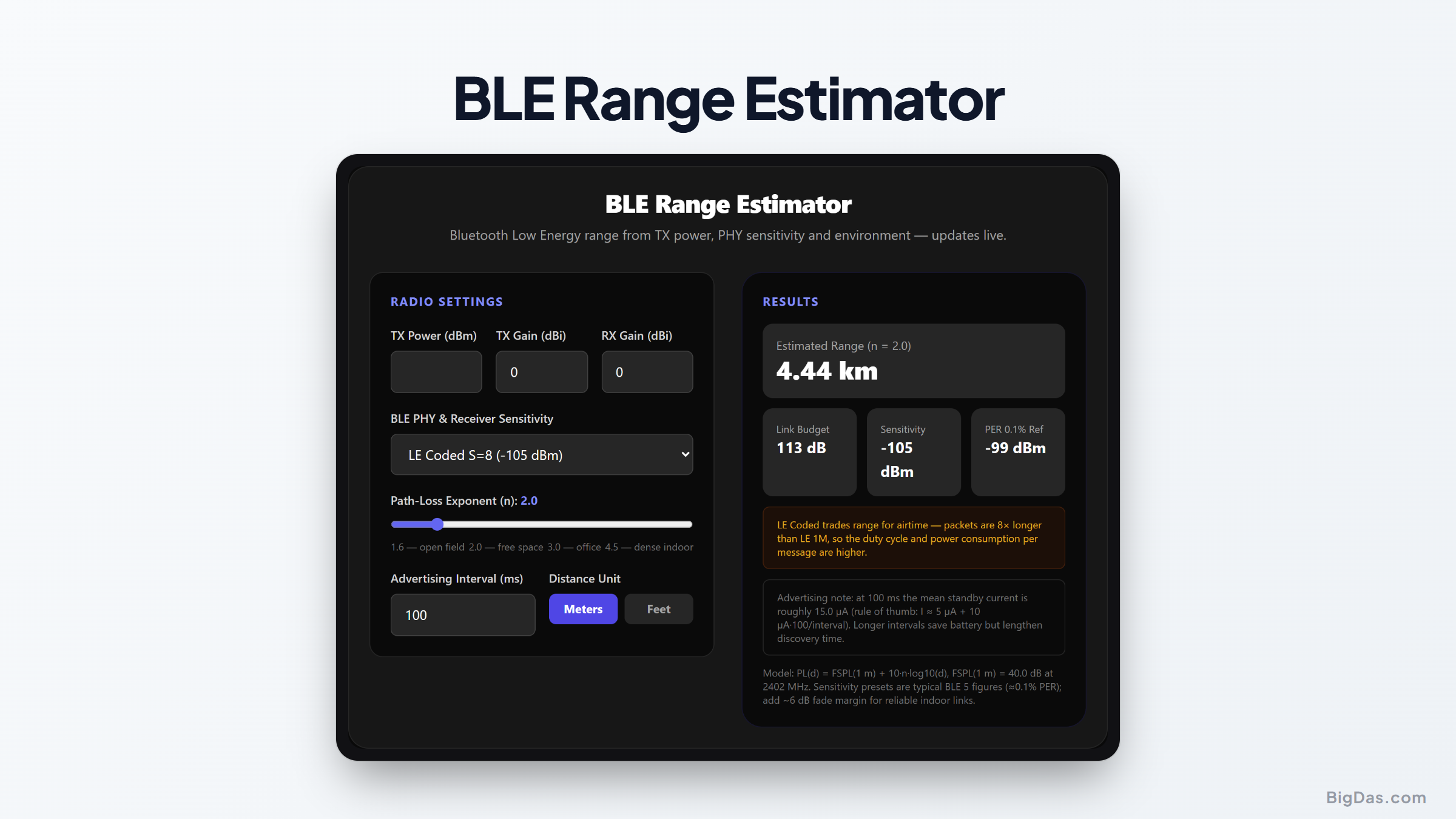
BLE Range Estimator
 Generated infographic and interface snapshot for BLE Range Estimator
Translate dBm into meters — before you build the enclosure.
Free BLE Range Estimator Online — Big Das
Bluetooth Low Energy range is dominated by three knobs: transmit power, the PHY's receiver sensitivity, and how hostile the environment is. The Big Das BLE Range Estimator combines them with a path-loss exponent slider (open field to dense indoor) and PHY presets from the BLE 5 spec to give you a live range estimate — plus a power note for your advertising interval — entirely in your browser.
Stop trusting "up to 100 m" marketing; get the number for your settings.
What Determines BLE Range?
- Transmit power — classically 0 dBm, up to +10 or +20 dBm on boosted designs.
- PHY mode — the BLE 5 PHYs trade speed for sensitivity:
- LE 1M: ~-95 dBm sensitivity, 1 Mb/s
- LE 2M: ~-93 dBm, 2 Mb/s (slightly less range)
- LE Coded S=2: ~-102 dBm, 500 kb/s
- LE Coded S=8: ~-105 dBm, 125 kb/s
- Environment — captured by the path-loss exponent n: open field ≈ 1.6–2, offices ≈ 3, dense indoor with bodies and metal ≈ 4+.
The sensitivity figures are specified at 0.1% packet error rate — the point where a link is just barely usable, which is exactly what "maximum range" means.
How to Use the BLE Range Estimator
- Enter transmit power in dBm — check your SoC or module datasheet (nRF52840 maxes at +8 dBm).
- Enter TX/RX antenna gains in dBi — 0 dBi for chip antennas, 2.15 dBi for dipoles.
- Pick the PHY preset — LE 1M, 2M, Coded S=2 or S=8, or enter a custom sensitivity.
- Drag the environment slider — 1.6 (open field) to 4.5 (dense indoor).
- Set the advertising interval — the tool shows the standby-current impact.
- Read the range — headline distance plus link budget, sensitivity, PER reference, and a fade-margin note, in meters or feet.
The Formula Used
Link budget:     B       = TXpower + Gtx + Grx

- Sensitivity
Reference loss:  FSPL(1m) = 20·log10(4π·f / c) ≈ 40.0 dB @ 2402 MHz
Log-distance:    PL(d)   = FSPL(1m) + 10·n·log10(d)
Range:           d       = 10^((B

- 40.0) / (10·n))

Advertising standby current (rule of thumb):
I ≈ 5 µA + 10 µA · (100 ms / advertising interval)
Worked Example
An asset beacon on LE Coded S=8 at +8 dBm, 0 dBi antennas, in an office (n=3.0), 100 ms advertising:
Sensitivity ≈ -105 dBm
B           = 8 + 0 + 0 - (-105) = 113 dB
d           = 10^((113

- 40.0) / 30) ≈ 271 m
Same beacon on LE 1M (-95 dBm) reaches only about 125 m in the same office. Coded PHY roughly doubles the range under typical indoor clutter — at the cost of packets that are 8× longer, hence markedly more transmit energy per message. The advertising note also matters: dropping the interval from 100 ms to 1 s cuts the standby floor from ~15 µA to ~6 µA.
Common Use Cases
- Beacon deployment: Estimate cell coverage for asset tracking or presence detection.
- PHY selection: Quantify what switching from LE 1M to Coded S=8 buys on your link.
- Outdoor monitoring: Use n≈1.8–2.2 for agriculture or field sensors with clear line of sight.
- Battery sizing: Use the advertising-current note alongside a battery-life calculator for complete power budgets.
Frequently Asked Questions
Why does the tool mention 0.1% PER?
BLE receiver sensitivity is defined at 0.1% packet error rate — one in a thousand packets lost. That's the standard comparison point; links that need reliability should keep 6–10 dB of margin beyond the estimate, which is why the panel also shows sensitivity + 6 dB as a reference.
What's the difference between advertising interval and connection interval?
The advertising interval governs how often a beacon broadcasts when not connected (and drives standby current). The connection interval applies after pairing and sets the data exchange rhythm. This tool's power note covers advertising — the dominant cost for sleepy sensors.
Can BLE really reach 1 km?
Yes — in open field (n≈2) with LE Coded S=8 and +8/+20 dBm transmit, kilometer-class links are documented (and the calculator reproduces them at low n). Indoors, expect tens of meters regardless of PHY.
Why is LE 2M range slightly shorter than LE 1M?
Doubling the bit rate doubles the occupied bandwidth, which lets in more noise — about 2 dB worse sensitivity (-93 vs -95 dBm). You trade a little range for throughput.
Are the sensitivity presets exact?
They're typical BLE 5 figures for modern SoCs (Nordic nRF52/TI CC26xx class). Individual radios vary ±3 dB; select Custom and enter your datasheet value when it matters.
Does mesh (Bluetooth Mesh) change the range?
No — mesh extends the network via relay hops, but each hop is still a point-to-point BLE link governed by exactly the physics this tool models. Use it to plan the spacing between relay nodes.