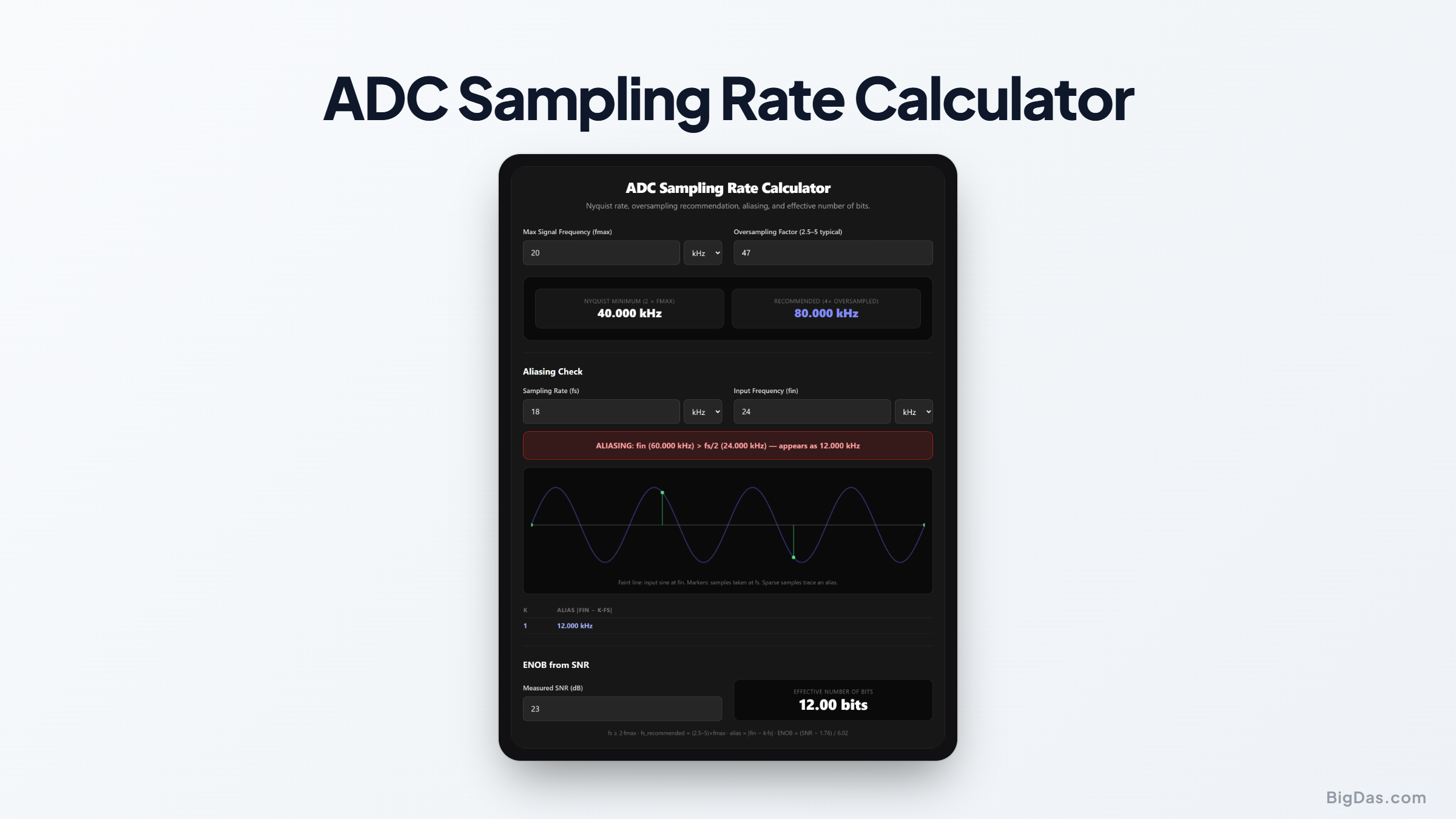
ADC Sampling Rate Calculator
 Generated infographic and interface snapshot for ADC Sampling Rate Calculator
Pick a sampling rate that captures your signal without aliasing.
Free ADC Sampling Rate Calculator Online. Big Das
Picking an ADC sampling rate means balancing signal fidelity against data throughput. The Big Das ADC Sampling Rate Calculator computes the Nyquist minimum, a practical oversampled recommendation, the alias frequency when an input exceeds half the rate, and the effective number of bits from a measured SNR.
What Is the Sampling Rate?
An analog-to-digital converter samples a continuous waveform at discrete instants. The sampling rate fs (samples per second) sets the highest signal frequency that can be reconstructed without ambiguity.
The Nyquist Criterion
To avoid aliasing, the sampling rate must exceed twice the highest signal frequency:
fs ≥ 2 × fmax
Sampling exactly at 2×fmax leaves no margin. In practice, engineers oversample by 2.5 to 5× to relax the anti-alias filter and improve dynamic performance.
Aliasing
If the input exceeds fs/2, it folds back into the first Nyquist zone and appears as a false lower frequency:
f_alias = |fin − k × fs| for the integer k that places the result in [0, fs/2]
ENOB and SNR
An ADC's datasheet SNR maps to effective bits via:
ENOB = (SNR_dB − 1.76) / 6.02
How to Use the ADC Sampling Rate Calculator
- Enter fmax: the highest frequency component you must capture.
- Set an oversampling factor: 2.5 to 5 is typical; 4 is a common default.
- Read the rate panel: Nyquist minimum and recommended rate update live.
- For the aliasing check, enter your actual sampling rate fs and an input fin.
- Inspect the result: an aliasing banner appears if fin > fs/2, plus the exact alias frequency and the |fin − k·fs| table.
- View the sampled waveform: the SVG shows the input sine and the sample points, so sparse sampling (aliasing) is immediately visible.
- For ENOB, enter a measured SNR in dB to see the effective number of bits.
The Formulas Used
Nyquist minimum fs_min = 2 × fmax
Oversampled rate fs_rec = OSR × fmax (OSR ≈ 2.5 to 5)
Alias frequency f_alias = |fin − k·fs|, folded into [0, fs/2]
Effective bits ENOB = (SNR − 1.76) / 6.02
Ideal SNR check SNR_ideal = 6.02 × N + 1.76 dB
Worked Example
You are digitizing an audio signal whose content reaches 20 kHz:
- Nyquist minimum: 2 × 20 kHz = 40 kHz
- With 4× oversampling: 80 kHz recommended
Now suppose the ADC actually runs at 48 kHz and a 60 kHz tone leaks in past the filter:
- fs/2 = 24 kHz, so 60 kHz is out of band.
- k = round(60/48) = 1 → f_alias = |60 − 48| = 12 kHz, right in the audible band.
The calculator flags this and lists neighboring |fin − k·fs| values so you can trace the fold.
Finally, if the ADC's measured SNR is 74 dB, ENOB = (74 − 1.76) / 6.02 ≈ 12.0 bits, consistent with the commonly quoted ~74 dB SNR of a real 12-bit ADC.
Common Use Cases
- Audio digitizing: Confirm a rate captures the audible band with filter headroom.
- Sensor data acquisition: Balance resolution and throughput for vibration or pressure signals.
- Oscilloscope selection: Verify a scope's sample rate against the signal bandwidth.
- Anti-alias filter design: See how much attenuation the filter needs at fs/2 and above.
- ADC evaluation: Convert measured SNR into ENOB to compare against datasheet claims.
Frequently Asked Questions
Why not just sample as fast as possible?
Higher rates mean more data to store, transmit, and process, higher power, and higher cost. The 2.5 to 5× rule provides adequate margin for a practical anti-alias filter without excess.
What exactly is aliasing?
Aliasing is the false lower-frequency signal that appears when a higher-frequency input is sampled too slowly. Once recorded, an alias is indistinguishable from a genuine signal at that frequency, no post-processing can remove it.
Does 24-bit audio really give 24 effective bits?
No. A 24-bit ADC typically achieves an SNR of 120 to 130 dB, which corresponds to an ENOB of roughly 19.6 to 21.2 bits. Marketing resolution and effective resolution differ.
What if my signal has harmonics above fmax?
Harmonics above fs/2 will alias. You must either raise the sample rate or filter the input hard enough that out-of-band energy is negligible at the alias frequencies.
Can an input exactly at fs/2 be captured?
Barely, and ambiguously, the samples land at the sine's zero crossings or peaks depending on phase. Practical designs keep fmax comfortably below fs/2.
How does lowering sample rate save power?
Both the ADC's conversion energy and the downstream digital logic scale with rate. Dropping from 5× to 2.5× oversampling can nearly halve acquisition power.