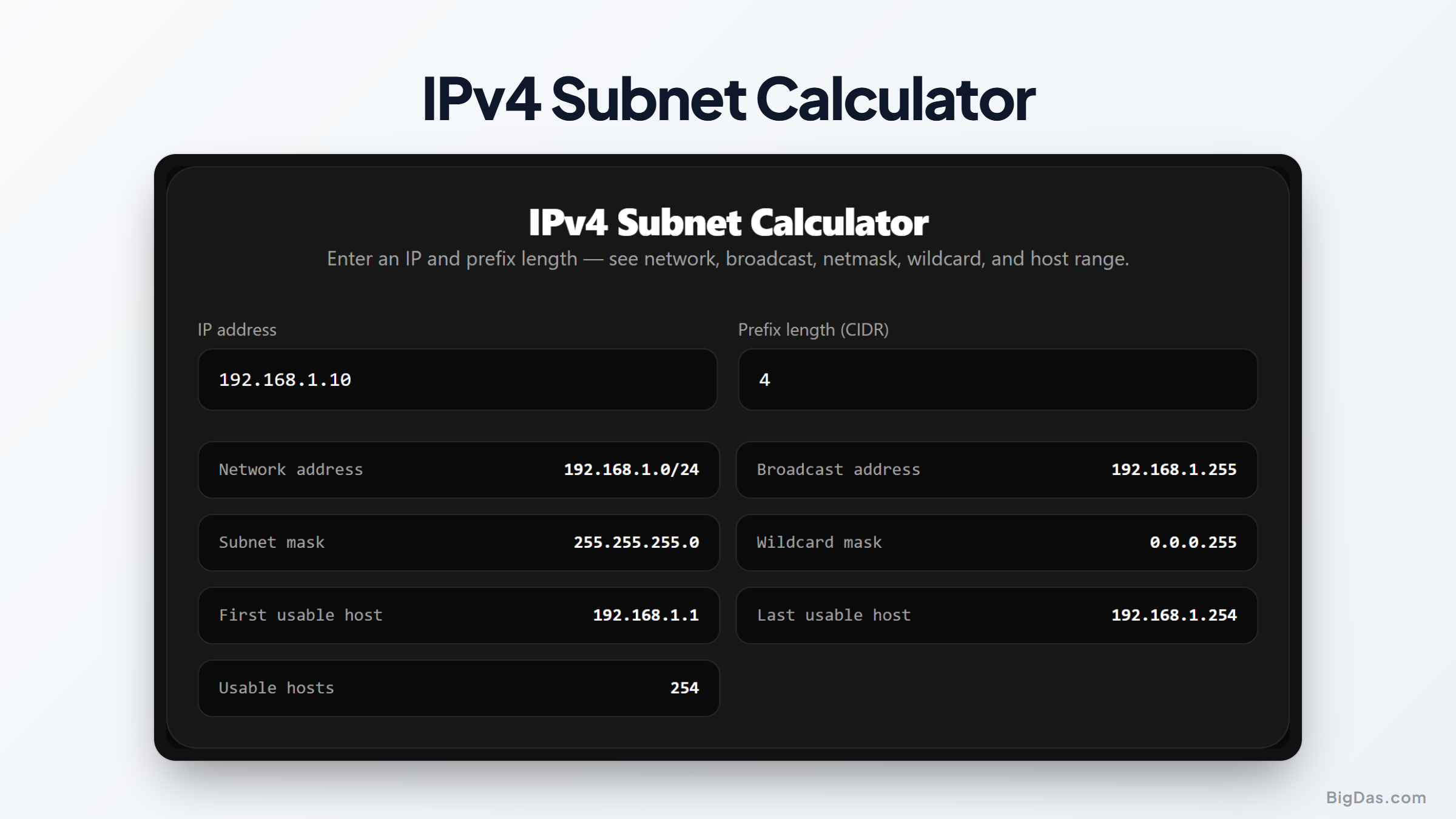
IPv4 Subnet Calculator
 Generated infographic and interface snapshot for IPv4 Subnet Calculator
IPv4 Subnetting: CIDR, Netmasks, and Host Ranges
A wrong subnet mask can break routing, cause IP collisions, or expose internal systems. Whether you are building a branch office, provisioning cloud infrastructure, or writing ACLs on a core switch, subnet math comes up daily. Calculating network addresses, broadcast addresses, and usable host ranges by hand means converting decimals to 32-bit binary, running bitwise operations, and converting back. Manual calculation is fine for learning, but it is slow and error-prone in production. An IPv4 subnet calculator handles the binary work and gives accurate results for any address and prefix.
What is an IPv4 Subnet Calculator?
An IPv4 subnet calculator computes network parameters for any IP address and netmask. Every IPv4 host address has two parts: a network portion that identifies the subnetwork, and a host portion that identifies the device. The tool takes an IP address with either a CIDR prefix (like /24) or a dotted decimal netmask (like 255.255.255.0) and works on the underlying binary. It returns the values needed for routing and static IP assignment:
- Network address: The subnet's primary identifier. Hosts cannot use it.
- Broadcast address: The address used to send packets to every host on the subnet.
- Subnet mask: A 32-bit sequence of ones followed by zeros that separates the network portion from the host portion.
- Wildcard mask: The bitwise inverse of the subnet mask, used in router ACLs and protocols like OSPF.
- Usable host range: The range of IP addresses assignable to endpoints, from the first usable host to the last usable host.
- Total usable hosts: The count of address slots available for endpoints in the subnet.
Key Features
An online netmask calculator removes the friction from manual IP allocation. Below are the core benefits for administrators, engineers, and students.
Instant and Error-Free Computations
Manual binary math under pressure leads to off-by-one errors, wrong wildcard masks, or overlapping subnets. The calculator returns results based on standard specifications, with no guesswork.
Complete CIDR Support
The tool handles all prefix lengths from /0 to /32. It works on large allocations like /16, standard LANs like /24, and point-to-point links using /30 or /31.
Dual Input Options
You can enter the subnet as slash notation (like /28) or as a dotted decimal mask (like 255.255.255.240). The calculator keeps the two values in sync.
Comprehensive Output Metrics
Instead of running multiple commands or consulting reference tables, the tool shows all related data in one view: network address, broadcast address, wildcard mask, netmask, first usable host, last usable host, and total valid hosts.
Step-by-Step Guide
Getting subnet details takes a few steps.
Step 1: Input the Base IPv4 Address
Enter the IPv4 address to evaluate. Any valid public or private address works, such as 192.168.1.50 or 10.0.0.1.
Step 2: Select or Enter the Subnet Prefix
Specify the subnet size using the CIDR dropdown or by typing the decimal mask directly. For example, /26 assigns 26 bits to the network identifier and leaves 6 bits for host addresses.
Step 3: Review the Output Data
The calculator processes the inputs and displays the full subnet parameters. Check the network address, broadcast address, and host boundaries.
Step 4: Apply the Values
Copy the host range into your IPAM system, set the netmask on the interface, or paste the wildcard mask into firewall rules or router ACLs.
Use Cases
Subnetting is practical work, not theory. Here is where a subnet calculator pays off.
Cloud Network Planning
When setting up VPCs in AWS, Azure, or Google Cloud, you need non-overlapping CIDR blocks for subnets, gateways, and services. A CIDR calculator helps you size subnets for auto-scaling groups while avoiding overlaps with on-premises ranges.
Enterprise VLAN Design
Segmenting corporate networks into VLANs improves security and reduces broadcast traffic. Teams use host range metrics to size subnets for engineering, voice, management, and guest wireless networks.
ACL and Firewall Configuration
Cisco routers, firewalls, and enterprise switches often require wildcard masks in ACLs. Manually computing a wildcard mask for irregular subnet sizes is easy to get wrong. The wildcard output from the tool is accurate and ready to paste.
IT Certification Study
Candidates studying for CCNA, CCNP, or Network+ spend a lot of time on binary math. The tool lets students verify practice problems quickly and build confidence before exams.
Frequently Asked Questions
What is the difference between a subnet mask and CIDR notation?
A subnet mask uses dotted decimal, such as 255.255.255.0, to define network boundaries. CIDR notation, or slash notation, counts the active network bits and writes them as /24. Both represent the same boundary; CIDR is just shorter to type and read.
Why are two host addresses unusable in standard subnets?
The first address is the network address and identifies the subnet. The last address is the broadcast address and sends packets to every host on the subnet. Usable hosts equal total addresses minus two.
What is a wildcard mask?
A wildcard mask is the inverse of a subnet mask. In a subnet mask, ones mark network bits and zeros mark host bits. In a wildcard mask, zeros mark bits that must match and ones mark bits that can vary. Wildcard masks are used in router filtering and dynamic routing.
What is a /31 prefix used for?
Per RFC 3021, a /31 prefix provides exactly two IP addresses for point-to-point links between routers. Unlike standard subnets, /31 networks do not reserve network and broadcast addresses, which saves addresses on direct links.
How do I calculate the total number of hosts for a prefix?
To find total addresses in a subnet, subtract the prefix length from 32, then raise 2 to that power. For a /28, subtract 28 from 32 to get 4. Two to the power of 4 equals 16 total addresses. Subtract 2 for the network and broadcast addresses to get 14 usable hosts.
Summary
Reliable address management matters for networks of any size. Manual binary math takes time and increases the risk of misconfiguration. An IPv4 subnet calculator gives instant results for CIDR prefixes, wildcard masks, usable host boundaries, and total capacity. Using it during design, cloud planning, or troubleshooting keeps the work fast and accurate.