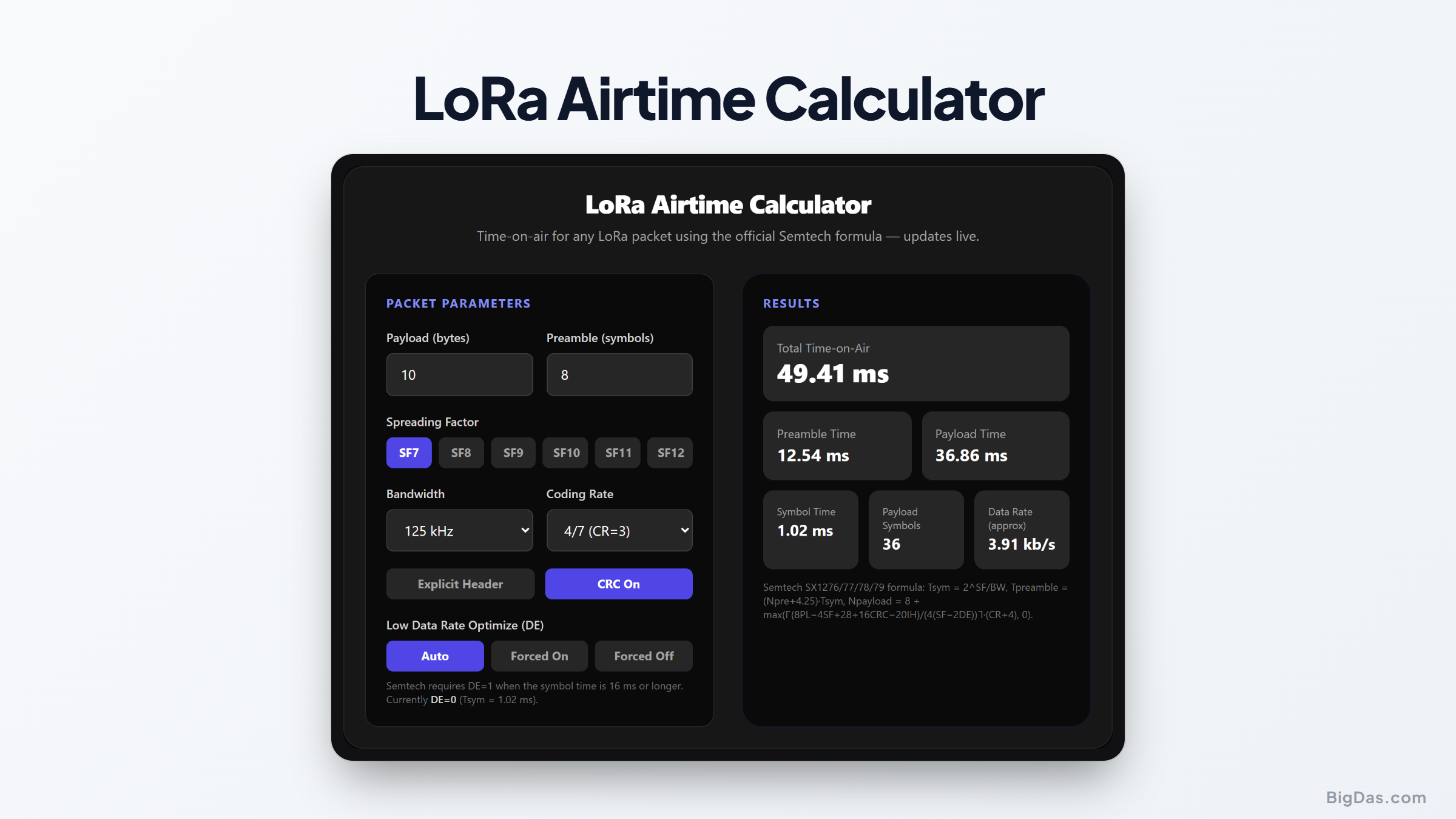
LoRa Airtime Calculator
 Generated infographic and interface snapshot for LoRa Airtime Calculator
Know exactly how long every packet keeps the radio busy.
Free LoRa Airtime Calculator Online. Big Das
LoRa trades speed for range, and the cost is paid in milliseconds on air. The Big Das LoRa Airtime Calculator applies the official Semtech airtime formula to any combination of payload size, spreading factor, bandwidth, coding rate, preamble length, header mode, CRC, and low-data-rate optimization. Use it to size duty-cycle budgets and battery life before flashing firmware.
Everything runs in your browser and updates the moment you change a setting.
What Is LoRa Airtime?
Time-on-air (ToA) is the total duration a LoRa transmitter occupies the channel for one packet: the preamble plus the payload symbol stream. It matters for three reasons:
- Regulations such as the EU 868 MHz duty-cycle rules cap how much airtime each device may use per hour.
- Battery life scales directly with transmit duration.
- Network capacity in LoRaWAN depends on how little time each node talks.
Doubling the spreading factor roughly doubles the airtime while adding about 2.5 to 3 dB of link budget.
How to Use the LoRa Airtime Calculator
- Enter the payload size in bytes (0 to 255).
- Pick the spreading factor: SF7 to SF12.
- Choose the bandwidth: from 7.8 kHz up to 500 kHz.
- Select the coding rate: 4/5, 4/6, 4/7, or 4/8 (CR = 1 to 4).
- Set the preamble length in symbols (regional default is 8).
- Toggle header mode, CRC, and low data rate optimize: leave DE on Auto to follow the Semtech rule (required when the symbol time is 16 ms or longer).
- Read the results: total time-on-air, preamble and payload split, symbol time, payload symbol count, and approximate data rate appear instantly.
The Formulas Used
Symbol time: Tsym = 2^SF / BW (BW in Hz)
Preamble time: Tpre = (Npre + 4.25) * Tsym
Payload symbols: Npld = 8 + max( ceil( (8PL - 4SF + 28 + 16*CRC - 20*IH) / (4*(SF - 2*DE)) ) * (CR + 4), 0 )
Payload time: Tpld = Npld * Tsym
Total airtime: ToA = Tpre + Tpld
Here PL is the payload in bytes, CRC is 1 when the payload CRC is enabled (0 otherwise), IH is 1 for implicit header mode (0 for explicit), and DE is 1 when low data rate optimization is on. The calculator also shows the approximate bit rate SF · (4/(4+CR)) · BW / 2^SF.
Worked Example
A LoRaWAN sensor sends 10 bytes at SF7, 125 kHz, coding rate 4/5, explicit header, CRC on, preamble 8 (DE off since Tsym ≈ 1.024 ms < 16 ms):
Tsym = 2^7 / 125,000 = 1.024 ms
Tpre = (8 + 4.25) * 1.024 ms ≈ 12.54 ms
Npld = 8 + ceil((80 - 28 + 28 + 16 - 0) / 28) * 5 = 28 symbols
Tpld = 28 * 1.024 ms ≈ 28.67 ms
ToA ≈ 41.22 ms
Switch to SF12 (DE now on automatically): Tsym = 32.768 ms, Tpre ≈ 401.4 ms, Npld = 18, Tpld ≈ 589.8 ms, and the packet spends about 991 ms on air, roughly 24× longer for ~14 dB more link budget.
Common Use Cases
- Duty-cycle compliance: Check that a packet rate respects the 1% (or 0.1%) sub-band limits common in the EU 868 MHz band.
- Battery budgeting: Multiply airtime by the transceiver's transmit current to estimate energy per uplink.
- Adaptive data rate planning: See how much you save by stepping down from SF12 to SF7 when a gateway is close.
- Firmware sizing: Verify a proposed payload format fits within a target transmit window.
Frequently Asked Questions
Why does the result differ slightly from the Semtech web calculator?
The web tool adds optional radio ramp-up time (≈1.5 ms) and uses chip-specific defaults. This calculator implements the pure airtime equation from the SX1276/77/78/79 datasheet, so expect small offsets in the last millisecond or two.
What coding rate should I pick?
CR = 4/5 has the least overhead and is the LoRaWAN default. Raise it (4/6 … 4/8) only in noisy or interference-heavy environments; each step adds airtime without improving sensitivity.
When is low data rate optimize required?
Semtech mandates DE = 1 whenever the symbol time reaches 16 ms, that means SF11 and SF12 at 125 kHz, and SF12 at 250 kHz. The Auto mode in this calculator applies that rule for you.
Does the header mode change airtime much?
Implicit header mode (no header) saves 20 × Tsym in the numerator of the payload formula, typically one or two symbols. It only pays off when the peer already knows SF, CR, and CRC settings, e.g. fixed point-to-point links.
Why can't I enter a payload above 255 bytes?
255 bytes is the maximum the LoRa frame format allows. LoRaWAN regional settings further limit the application payload (51 to 222 bytes depending on data rate).
How accurate is the data-rate figure?
It is the raw physical-layer rate SF·(4/(4+CR))·BW/2^SF. Your effective throughput is lower because of the preamble, header, CRC, and any duty-cycle limits, the total airtime shown is what really governs throughput.