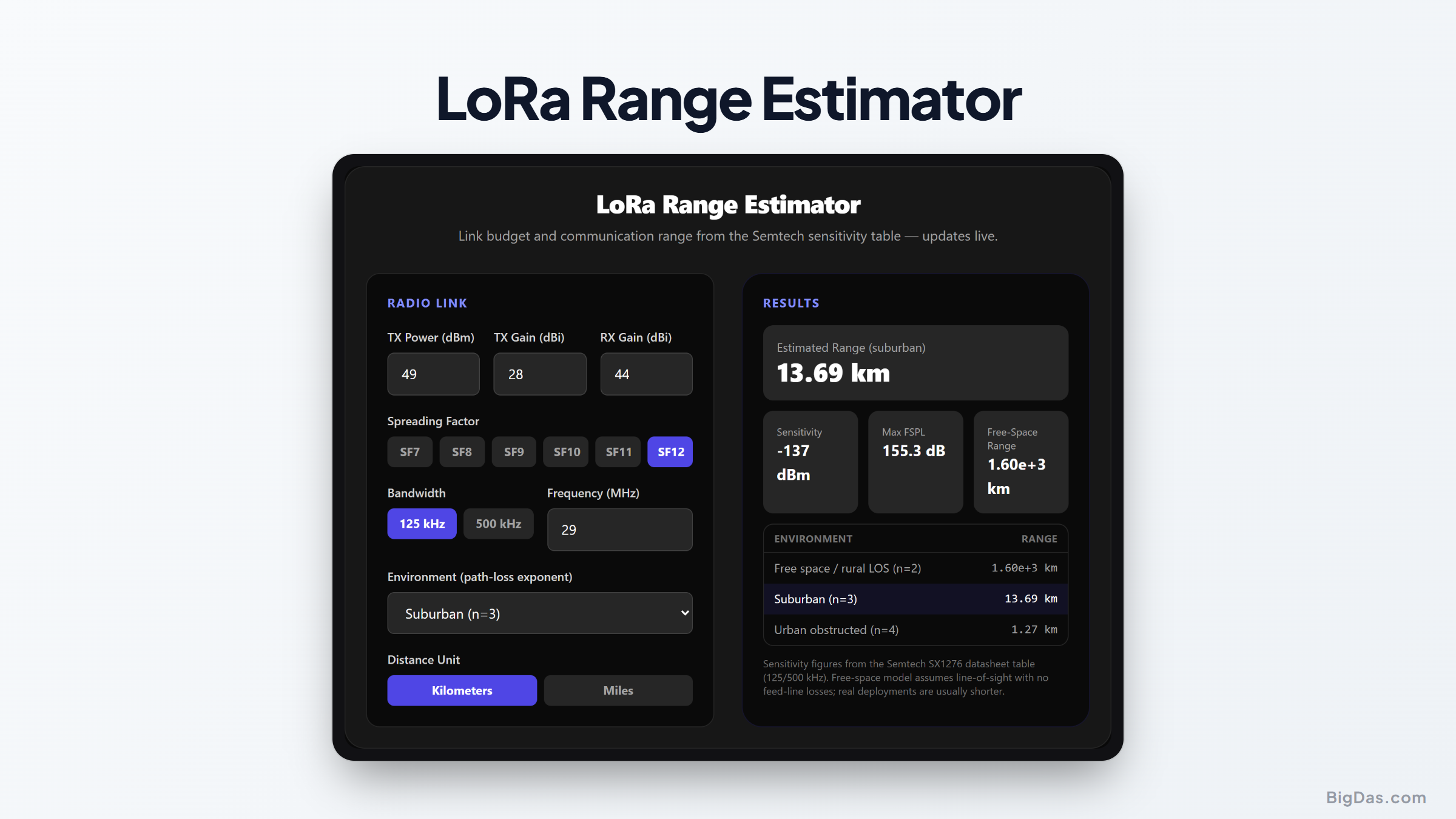
LoRa Range Estimator
 Generated infographic and interface snapshot for LoRa Range Estimator
From link budget to realistic kilometers.
Free LoRa Range Estimator Online. Big Das
"How far will my LoRa node reach?" is the first question every LoRaWAN builder asks. The Big Das LoRa Range Estimator answers it from first principles: it looks up the Semtech receiver sensitivity for your spreading factor and bandwidth, combines it with transmit power and antenna gains into a link budget, then converts that budget into free-space and environment-adjusted range, instantly, in your browser.
No datasheets to cross-reference; the SX1276 sensitivity table is built in.
What Determines LoRa Range?
Three numbers dominate:
- Transmit power: how loud the node shouts, up to about +14 dBm (EU) or +30 dBm (US, conducted).
- Antenna gains: how well both ends focus that energy, typically 2.15 dBi for dipoles.
- Receiver sensitivity: how faint a whisper still decodes. LoRa's chirp spread spectrum pushes sensitivity far below the noise floor: down to about -137 dBm at SF12 / 125 kHz on an SX1276.
Their difference is the link budget, the maximum path loss the link tolerates. Higher SF means better sensitivity, a bigger budget, and more range, at the cost of a much longer packet.
How to Use the LoRa Range Estimator
- Enter transmit power in dBm (e.g. 14).
- Enter TX and RX antenna gains in dBi, 2.15 dBi suits a half-wave dipole.
- Select the spreading factor (SF7 to SF12) and bandwidth (125 or 500 kHz).
- Set the frequency in MHz (868 EU, 915 US, 433 MHz Asia variants).
- Pick the environment: free space/rural (n=2), suburban (n=3), or urban obstructed (n=4).
- Read the range: the headline shows the environment-adjusted distance, plus free-space range and a table comparing all three environments. Switch between kilometers and miles.
The Formulas Used
$$ \begin{aligned} \text{Link budget:} \quad B &= P_{TX} + G_{TX} + G_{RX} - S \ \text{Free-space loss:} \quad FSPL(d) &= 32.44 + 20\log_{10}(d_{km}) + 20\log_{10}(f_{MHz}) \ \text{FSPL range:} \quad d_{fs} &= 10^{,(B - 32.44 - 20\log_{10}(f_{MHz}))/20} \ \text{Log-distance:} \quad PL(d) &= PL(d_0) + 10,n\log_{10}(d/d_0) \ \text{Environment range:} \quad d_{env} &= d_0 \cdot 10^{,(B - PL(d_0))/(10,n)}, \quad d_0 = 1\text{ m} \end{aligned} $$
The sensitivity values come from the Semtech SX1276 datasheet: -123 … -137 dBm for SF7 to SF12 at 125 kHz and -111 … -126 dBm at 500 kHz.
Worked Example
EU gateway link: +14 dBm TX, +2.15 dBi dipoles on both ends, SF12 / 125 kHz, 868 MHz, suburban (n=3):
$$ \begin{aligned} S &= -137 \text{ dBm} \ B &= 14 + 2.15 + 2.15 - (-137) = 155.3 \text{ dB} \ d_{fs} &= 10^{,(155.3 - 32.44 - 58.77)/20} \approx 1{,}600 \text{ km} \quad \text{(theoretical LOS ceiling)} \ d_{suburban} &= 0.001 \cdot 10^{,(155.3 - 35.57)/30} \approx 13.7 \text{ km} \end{aligned} $$
The free-space number is a theoretical line-of-sight ceiling, real gateways on rooftops reach the suburban/urban figures (around 14 km here, a few km in a dense city), which is why the environment selector matters more than the absolute budget.
Common Use Cases
- Gateway siting: Compare expected reach from a rooftop versus a window before climbing a ladder.
- SF planning: See how stepping from SF7 to SF12 trades airtime for kilometers of coverage.
- Antenna upgrades: Quantify what swapping a wire whip for a 5 dBi antenna actually buys.
- Feasibility checks: Sanity-check whether a farm, campus, or marina fits inside one gateway's footprint.
Frequently Asked Questions
Why is the free-space range so unrealistic?
Free space assumes zero obstructions, reflections, or ground losses, satellites, basically. Real deployments sit in clutter, which the n=3/n=4 models account for by raising the loss exponent.
Where do the sensitivity numbers come from?
They are the typical figures from the Semtech SX1276/77/78/79 datasheet receiver sensitivity table, at coding rate 4/5 with packet error rate 1%. Newer chips (LR1110, SX1262) are within a couple of dB.
Does antenna gain really add to the budget?
Yes, a directional antenna concentrates the same energy into a smaller solid angle. Both TX and RX gains add linearly to the link budget in dB.
What about cable and connector losses?
They're not added here, so subtract them yourself from the TX power (e.g. 1 m of RG-174 at 868 MHz loses about 1 dB). As a rule of thumb, treat every dB of feeder loss as a dB off the budget.
Why two bandwidth options only?
125 kHz and 500 kHz bracket the practical LoRaWAN range. Narrower bandwidths improve sensitivity by roughly 3 dB per halving; 250 kHz values sit between the two columns shown.
Can LoRa really reach hundreds of kilometers?
In free space (balloons, high-altitude nodes) yes, records above 700 km exist from stratospheric balloons. Ground-level urban links, however, usually land in the 1 to 10 km window this tool estimates with n=3 to 4.