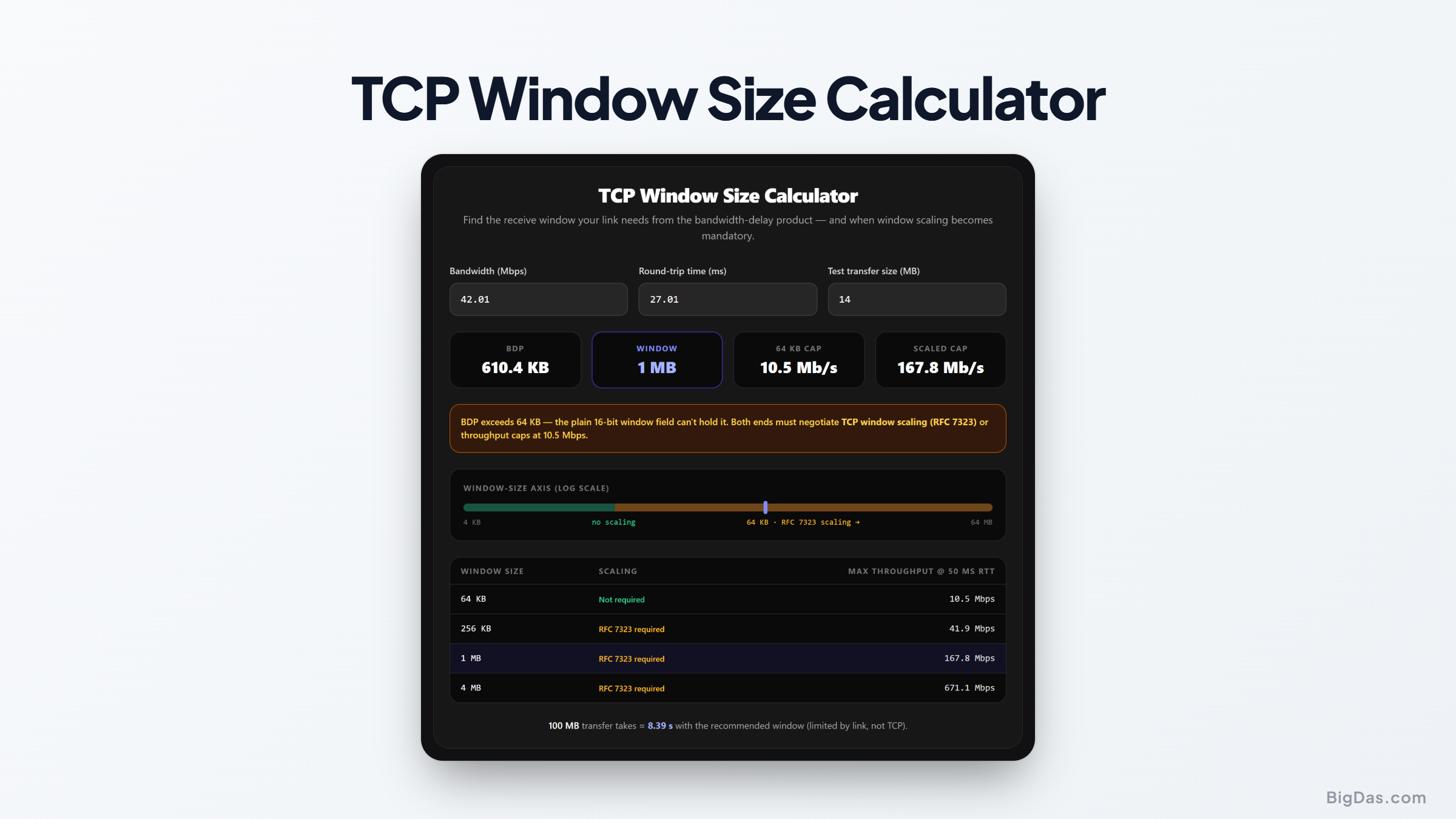
TCP Window Size Calculator
 Generated infographic and interface snapshot for TCP Window Size Calculator
TCP Window Size Calculator: Bandwidth Delay Product and Network Throughput
A 10 Gigabit WAN link sometimes delivers only a small fraction of its theoretical capacity during a single file transfer. The cause is usually not hardware failure or congestion, but a misconfigured TCP receive window combined with unaddressed network latency. The TCP Window Size Calculator solves this by computing the exact Bandwidth Delay Product, flagging when RFC 7323 window scaling is required, and providing ready-to-use parameters for diagnostic tools like iperf.
What is the TCP Window Size Calculator?
The calculator determines the buffer size needed for maximum TCP throughput over a given network path.
TCP uses flow control to keep a fast sender from overwhelming a slow receiver. The TCP receive window specifies how much data the receiver can buffer before sending an acknowledgment. When latency increases, packets and ACKs take longer to travel. If the window is too small, the sender stalls while waiting for an acknowledgment, and throughput drops.
The calculator computes the Bandwidth Delay Product (BDP), which is the volume of data that can be in transit on the path at any given moment. Setting the TCP window to match the BDP keeps the pipe full.
Key Features and Benefits
1. Accurate Bandwidth Delay Product Calculation
The calculator multiplies your available bandwidth by the round-trip time to produce the minimum buffer size required to sustain maximum throughput.
2. RFC 7323 Window Scaling Determination
The standard TCP header allocates 16 bits for the window size field, capping the receive window at 65,535 bytes (64 KB). On high-bandwidth or high-latency links, 64 KB is not enough. The calculator detects when your path exceeds this limit and outputs the shift count required under RFC 7323 to support buffers up to 1 GB.
3. IPerf Tuning Guidance
iperf and iperf3 require explicit buffer parameters to test maximum capacity. The calculator outputs the corresponding command-line flags (such as -w), eliminating guesswork during benchmarking.
4. Transfer Time Estimations
Beyond raw byte counts, the tool estimates transfer times for large datasets based on your latency and window configuration. This helps teams project file transfer durations between remote data centers.
Step by Step Guide on How to Use It
Step 1: Measure Your Round Trip Time
Determine the round-trip latency between source and destination. Run ping or similar diagnostics over an extended period and average the results in milliseconds.
Step 2: Input Target Network Bandwidth
Enter the link capacity you intend to use, in either Megabits per second or Gigabits per second.
Step 3: Compute the Bandwidth Delay Product
Click calculate. The tool converts bandwidth to bits per second and latency to seconds, then outputs the BDP in bytes, kilobytes, and megabytes.
Step 4: Check RFC 7323 Scale Factor
Review the window scaling output. If the required window exceeds 65,535 bytes, the tool displays the scale factor. Verify that window scaling is enabled in your OS kernel settings.
Step 5: Implement Tuning Parameters
Copy the calculated buffer sizes into your system configuration or diagnostic tools. Use the generated iperf parameters to confirm that the link reaches full capacity.
Why You Need This Tool (Use Cases)
Data Center Replication and Offsite Backups
Storage replication across geographically separated data centers introduces high round-trip latency. Without TCP window tuning, storage appliances use only a fraction of leased line capacity. Calculating the BDP ensures long-distance links operate at full efficiency.
Network Performance Testing with iPerf
Default iperf tests often mislabel a healthy link as degraded because the OS uses TCP window sizes tuned for LANs, not high-latency paths. The calculator provides tuning parameters that reflect actual path capacity, giving accurate baseline results.
Cloud Migration and Hybrid Storage
Migrating terabytes or petabytes to public cloud infrastructure requires predictable transfer schedules. By computing buffer requirements and realistic transfer times, infrastructure teams can plan migration windows and avoid unexpected delays.
WAN Optimization and Firewall Tuning
Firewalls, routers, and WAN acceleration appliances inspect and buffer TCP flows. Setting appropriate window limits on these devices prevents bufferbloat while ensuring long-haul traffic is not throttled.
Frequently Asked Questions
What is the relationship between TCP window size and Bandwidth Delay Product?
BDP is the maximum amount of data in flight on the network pipe at one time. To achieve full link speed, the TCP window must be at least equal to the BDP. A smaller window forces the sender to wait for acknowledgments, leaving the link idle.
Why is RFC 7323 window scaling necessary?
The original TCP spec reserved 16 bits for the receive window, capping buffer size at 65,535 bytes. On a 1 Gbps link with a 50 ms round-trip time, the required buffer far exceeds 64 KB. RFC 7323 introduces a window scale option that shifts the window value left by up to 14 bits, allowing buffers up to 1 GB.
How do I apply these window size calculations in iperf testing?
Pass the calculated window size using the -w option. For example, with a 16 MB window:
iperf3 -c server_ip -w 16M
This sets the socket buffer to the required size for the test.
Can a TCP window size be set too large?
Yes. If hundreds or thousands of connections each request massive buffers, the system can run out of memory. On lossy links, an oversized window can also force retransmission of large volumes of unacknowledged data, worsening congestion. Tune the window to match path capacity rather than setting it to the maximum.
Final Considerations for Network Performance
Optimal throughput across long-distance paths depends on matching socket buffers to the bandwidth-delay product. Default OS settings are tuned for LANs and underutilize WAN links. The TCP Window Size Calculator provides the exact BDP, the correct RFC 7323 scale factor, and the iperf parameters needed to validate the link. Proper window tuning removes the latency bottleneck and lets the network deliver its full capacity.