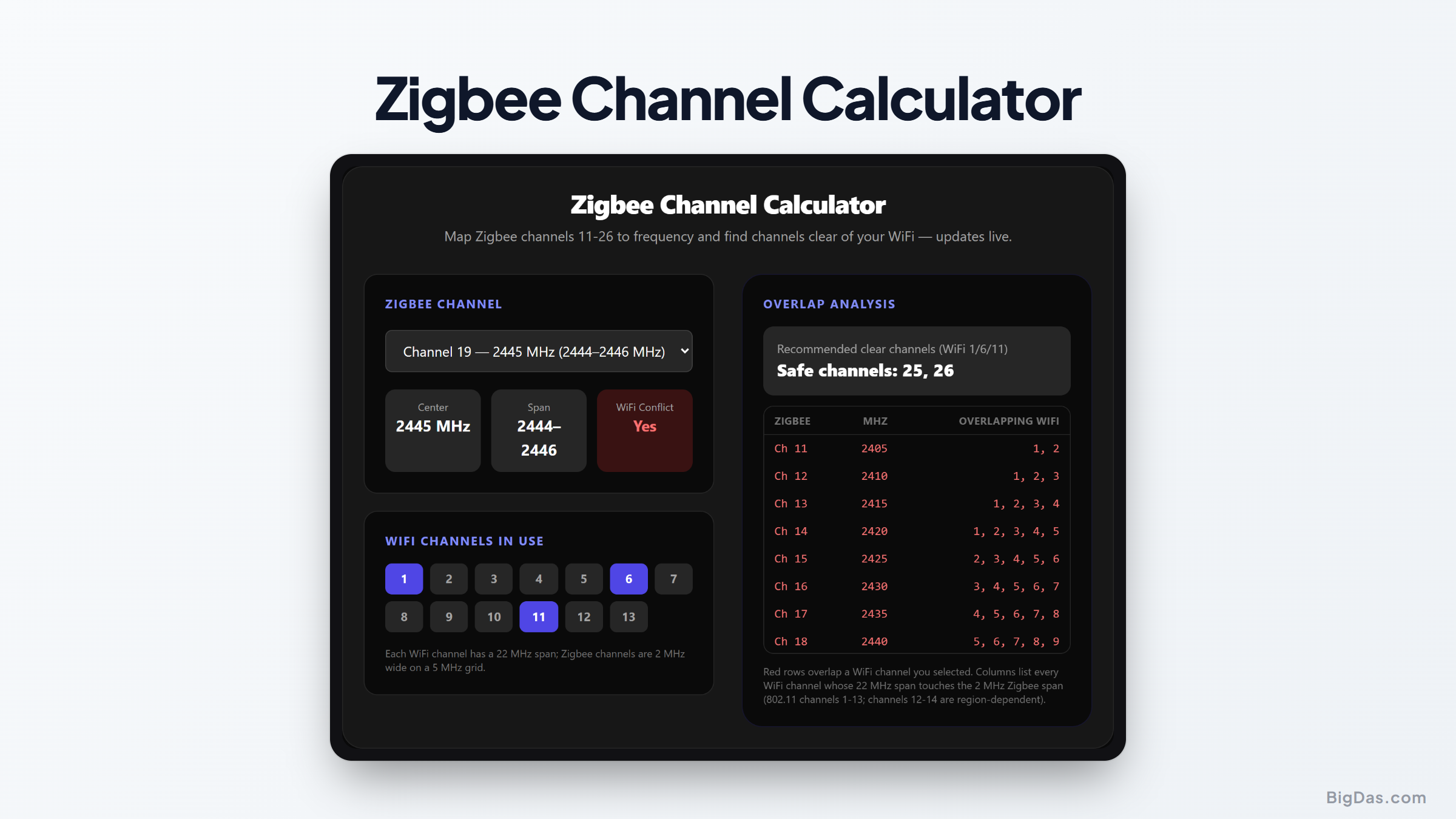
Zigbee Channel Calculator
 Generated infographic and interface snapshot for Zigbee Channel Calculator
Stop Zigbee and WiFi from stepping on each other.
Free Zigbee Channel Calculator Online. Big Das
Zigbee's sixteen 2.4 GHz channels (11 to 26) sit in the same spectrum your WiFi router uses, and a single 22 MHz-wide WiFi channel can straddle four Zigbee channels at once. The Big Das Zigbee Channel Calculator maps every Zigbee channel to its center frequency, shows which 802.11 channels collide, and recommends clear Zigbee channels for your network's WiFi plan, all in your browser, instantly.
Useful when pairing Zigbee hubs with a congested 2.4 GHz neighborhood.
How Zigbee and WiFi Share 2.4 GHz
Zigbee (IEEE 802.15.4) channels are 2 MHz wide on a 5 MHz spacing from 2405 MHz upward: channel 11 centers on 2405 MHz, channel 26 on 2480 MHz.
WiFi 802.11b/g/n channels are each 22 MHz wide but spaced only 5 MHz apart. Only three channels (1, 6, 11 in the US) fit without overlapping each other, and even those each blanket three or four Zigbee channels.
Zigbee networks squeezed between active WiFi channels suffer packet errors, retries, and sluggish devices, often mistaken for "bad Zigbee range."
How to Use the Zigbee Channel Calculator
- Select your Zigbee channel from the dropdown to see its center frequency, span, and whether it conflicts with your WiFi setup.
- Tick the WiFi channels in use on your network (the classic 1/6/11 plan is preselected).
- Read the recommendation panel: it lists every Zigbee channel that stays clear of your WiFi.
- Scan the overlap table: red rows mark channels that collide with one of your selected WiFi channels; the right column lists every WiFi channel whose 22 MHz span touches each 2 MHz Zigbee slot.
The Formula Used
Zigbee center frequency (2.4 GHz band, channels 11 to 26):
f(ch) = 2405 + 5 · (ch - 11) MHz
Span = f(ch) ± 1 MHz

WiFi center frequency (channels 1 to 13):
f(ch) = 2407 + 5 · ch MHz
Span = f(ch) ± 11 MHz

Overlap condition:
Zigbee [low, high] ∩ WiFi [low, high] ≠ ∅
Worked Example
A home hub sits next to a router on the standard WiFi 1/6/11 plan:
- WiFi 1 spans 2401 to 2423 MHz → blocks Zigbee 11 to 14
- WiFi 6 spans 2426 to 2448 MHz → blocks Zigbee 16 to 19
- WiFi 11 spans 2451 to 2473 MHz → blocks Zigbee 21 to 24
Applying the strict "any touch of the 22 MHz WiFi span counts" rule above, only Zigbee 25 (2475 MHz) and 26 (2480 MHz) are fully clear of all three WiFi channels. Channels 15 (2425 MHz) and 20 (2450 MHz) sit exactly at the edge of WiFi 6 and 11 respectively, their 2 MHz slot only grazes the WiFi span by a single megahertz, where the WiFi signal is already tens of dB below its center-carrier strength, so in practice 15 and 20 are routinely treated as the "non-overlapping" picks too.
- Zigbee 25 (2475 MHz) is the classic favorite, it sits in the guard band above WiFi 11 and below the restricted band edge, and most hubs default to it for exactly this reason.
- Zigbee 15 (2425 MHz) tucks between WiFi 1 and 6 and is a solid second home when 25 is congested by neighbor networks.
Setting the hub to channel 25 on a 1/6/11 WiFi network usually yields visibly snappier Zigbee devices.
Common Use Cases
- New hub setup: Pick a clean channel once instead of debugging flaky sensors for months.
- Adding a second hub: Assign it the complementary clear channel (15 if the first is on 25).
- Coordinating with a new router: Recheck overlap when an ISP swaps your router to channel 3 or 9, which shifts the whole interference map.
- Troubleshooting: Confirm whether a "dead" Zigbee sensor is simply suffocating under WiFi 6's duty cycle.
Frequently Asked Questions
Why is Zigbee channel 25 so often recommended?
It sits at 2474 to 2476 MHz, clear of WiFi 1/6/11 (which tops out at 2473 MHz). Combined with Zigbee 15, 20, and 26, where 15/20 only graze the extreme edges of WiFi 6/11 where the signal has already rolled off tens of dB, these four are the canonical non-overlapping set for the standard three-channel WiFi plan.
What if my router uses channels 12 to 14?
Channels 12 (2467 MHz) and 13 (2472 MHz) shift overlap upward: WiFi 12 blocks Zigbee 21 to 25, and WiFi 13 blocks 22 to 26 (leaving 26 at the very edge). Tick them in the calculator to see the exact effect on your plan. Channel 14 is Japan-only (DSSS) and frequencies above 2483 MHz are heavily restricted.
Does overlap mean Zigbee won't work at all?
No. Zigbee is low duty-cycle and uses CSMA/CA plus retries, so it copes with light interference at the cost of latency and battery life. Heavy sustained WiFi traffic on an overlapping channel is what reliably cripples it.
Can I change the channel of an existing Zigbee network?
Yes, but the hub broadcast channel change requires every end device to rejoin or follow the channel change announcement. Battery devices in deep sleep may take a while, plan on doing it once, during setup.
Is channel 26 usable everywhere?
Channel 26 (2480 MHz) carries lower regulatory power limits in some regions (FCC restricted band edge at 2483.5 MHz), so some radios transmit more quietly there. It's fine for most home use, but 25 is the safer default.
What about Zigbee 3.0 and Thread networks?
Same radio, same 11 to 26 channels, this calculator applies identically to Thread-based ecosystems (Matter over Thread) and to older Zigbee 1.2 / ZLL gear.