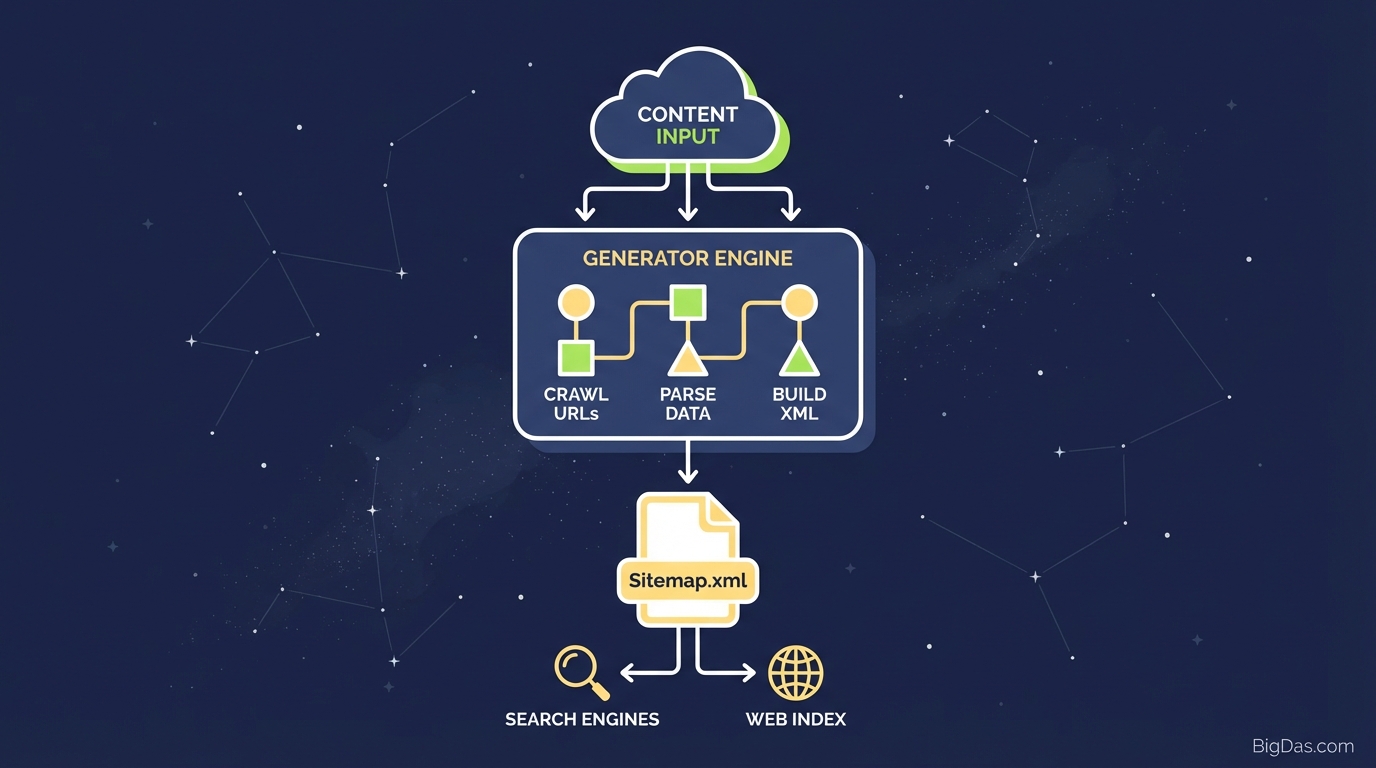
Sitemap.xml Generator
 Modern scientific illustration of Sitemap.xml Generator
Sitemap.xml Generator: Build a Clean XML Sitemap for Search Engine Indexing
Search engines need a way to find every page on your site. Internal links help, but they often miss deep pages, new posts, and orphaned content. If a bot cannot crawl a page, that page does not appear in search results.
An XML sitemap solves this problem. It is a file that lists your URLs along with optional metadata (last modified date, change frequency, and priority). Search engines read this file to discover pages they might otherwise miss.
The Sitemap.xml Generator converts a plain list of URLs into a standards-compliant XML file. It handles the syntax so you do not have to write code by hand.
What is the Sitemap.xml Generator?
The Sitemap.xml Generator is a technical SEO tool that converts a raw list of URLs into a structured XML file that follows the sitemaps.org protocol.
An XML sitemap acts as a roadmap for crawler bots like Googlebot. The file communicates four things:
- Where each page is located.
- When the page was last updated (
<lastmod>). - How often the content changes (
<changefreq>). - How important the page is relative to other pages on your site (
<priority>).
The "List-to-XML" Conversion
Many CMS platforms generate sitemaps automatically, but these built-in versions are often limited. If you work on a static site, a custom build, or a migration project, you may have a list of URLs that need to be indexed without a CMS handling the sitemap for you.
This tool takes that list and wraps it in the required XML tags. The output is a valid sitemap that search engines can parse immediately.
Key Features
1. Instant XML Formatting
Writing XML by hand is error-prone. One missing bracket invalidates the file, and Google Search Console will reject it. The generator handles the syntax automatically and produces output that follows W3C standards.
2. Custom Attribute Control
You can set metadata for each URL:
- Priority: A value from 0.0 to 1.0 that signals which pages matter most.
- Change Frequency: Values like
daily,weekly, ormonthlyto help bots optimize their crawl schedule.
3. Bulk URL Processing
The tool processes 10 URLs or 5,000 URLs in a single pass. This is useful for e-commerce sites with large product catalogs.
4. No Installation
Paste your URLs, click generate, and copy the output. There is no plugin to install and no server-side script to maintain.
5. Clean Output
The generated XML contains only the necessary tags. No extra comments, no bloat, and no whitespace that slows down parsing.
How to Use the Sitemap.xml Generator
Step 1: Prepare Your URL List
- Collect the full URLs (including
https://) of the pages you want indexed. - Exclude pages that should not rank: admin login pages, thank-you pages, and duplicate content.
- Verify that each URL returns a
200 OKstatus. Do not include 404s or 301 redirects.
Step 2: Input Data
- Open the Sitemap.xml Generator.
- Paste your URLs into the "Enter URLs" box, one per line.
Step 3: Configure Optional Attributes
Adding metadata helps search engines prioritize your pages:
- Last Modified: Add a date to signal fresh content.
- Frequency: Use
dailyfor news,weeklyfor blogs,monthlyfor static pages. - Priority: The default is
0.5. Set your homepage to1.0and key landing pages to0.8.
Step 4: Generate
Click "Generate Sitemap". The XML appears in the output window.
Step 5: Validate and Download
The output should look like this:
<?xml version="1.0" encoding="UTF-8"?>
<urlset xmlns="http://www.sitemaps.org/schemas/sitemap/0.9">
<url>
<loc>https://www.yoursite.com/page1</loc>
<lastmod>2023-10-27</lastmod>
<changefreq>weekly</changefreq>
<priority>0.8</priority>
</url>
</urlset>
Click Download to save the file as sitemap.xml.
Step 6: Upload to Your Server
Upload sitemap.xml to the root directory of your domain (for example, yoursite.com/sitemap.xml) using FTP or cPanel.
Step 7: Submit to Google Search Console
- Log in to Google Search Console.
- Go to Sitemaps in the left sidebar.
- Enter
sitemap.xmland click Submit.
Common Use Cases
1. Static Websites and Custom Builds
Static sites built with HTML, React, or a headless CMS often lack a built-in sitemap feature. This tool fills that gap.
2. Large E-Commerce Stores
Plugins that generate sitemaps dynamically can time out on stores with thousands of SKUs. A static XML file generated from a URL list is more reliable and reduces server load.
3. Orphan Pages
Orphan pages (pages with no internal links pointing to them) are hard for Google to find. Listing them in a sitemap forces Google to crawl them.
4. Post-Migration SEO
After migrating a site, URL structures often change. A sitemap listing the new URLs helps Google recrawl the site faster and reduces traffic loss.
5. Image and Video Sitemaps
You can structure URLs specifically for Google Images or Google Video by generating a sitemap that targets those verticals.
Best Practices
- Size Limits: A single sitemap cannot exceed 50 MB (uncompressed) or 50,000 URLs. For larger sites, generate multiple files (
sitemap-1.xml,sitemap-2.xml) and link them through a Sitemap Index file. - Match Canonical Tags: The URLs in your sitemap must match your canonical tags. A mismatch between
https://www.site.com/page/andhttps://www.site.com/pagesends conflicting signals to Google. - Maintain Your Sitemap: Update the file whenever you add or remove pages. Static sitemaps do not update themselves.
Frequently Asked Questions (FAQ)
1. Does a sitemap guarantee my pages will be indexed?
No. A sitemap is a request to search engines, not a command. It increases the likelihood and speed of indexing, especially for new sites or pages with few internal links.
2. How often should I update my sitemap?
Update it whenever you add new content, remove old pages, or change your site structure. Active blogs may update daily; brochure sites may update monthly.
3. Can I include "noindex" pages in my sitemap?
You can, but you should not. A sitemap tells Google to crawl and rank a page; a noindex tag tells Google not to rank it. These instructions conflict. Only include pages that return a 200 status and are meant to be indexed.
4. Why does the generator ask for "Priority"?
Priority is a hint about which pages you consider most important. Google has stated it weighs this signal loosely, but it still helps differentiate high-value pages (1.0) from archive pages (0.3) on large sites.
5. What is the difference between an HTML Sitemap and an XML Sitemap?
An HTML Sitemap is a page designed for human visitors. An XML Sitemap is a code file designed for search engine bots. Use both for best results.
Conclusion
A sitemap does not replace good content or strong internal linking, but it makes sure search engines can find every page you want to rank. The Sitemap.xml Generator handles the syntax so you can focus on the URLs and metadata that matter.