Countdown Timer
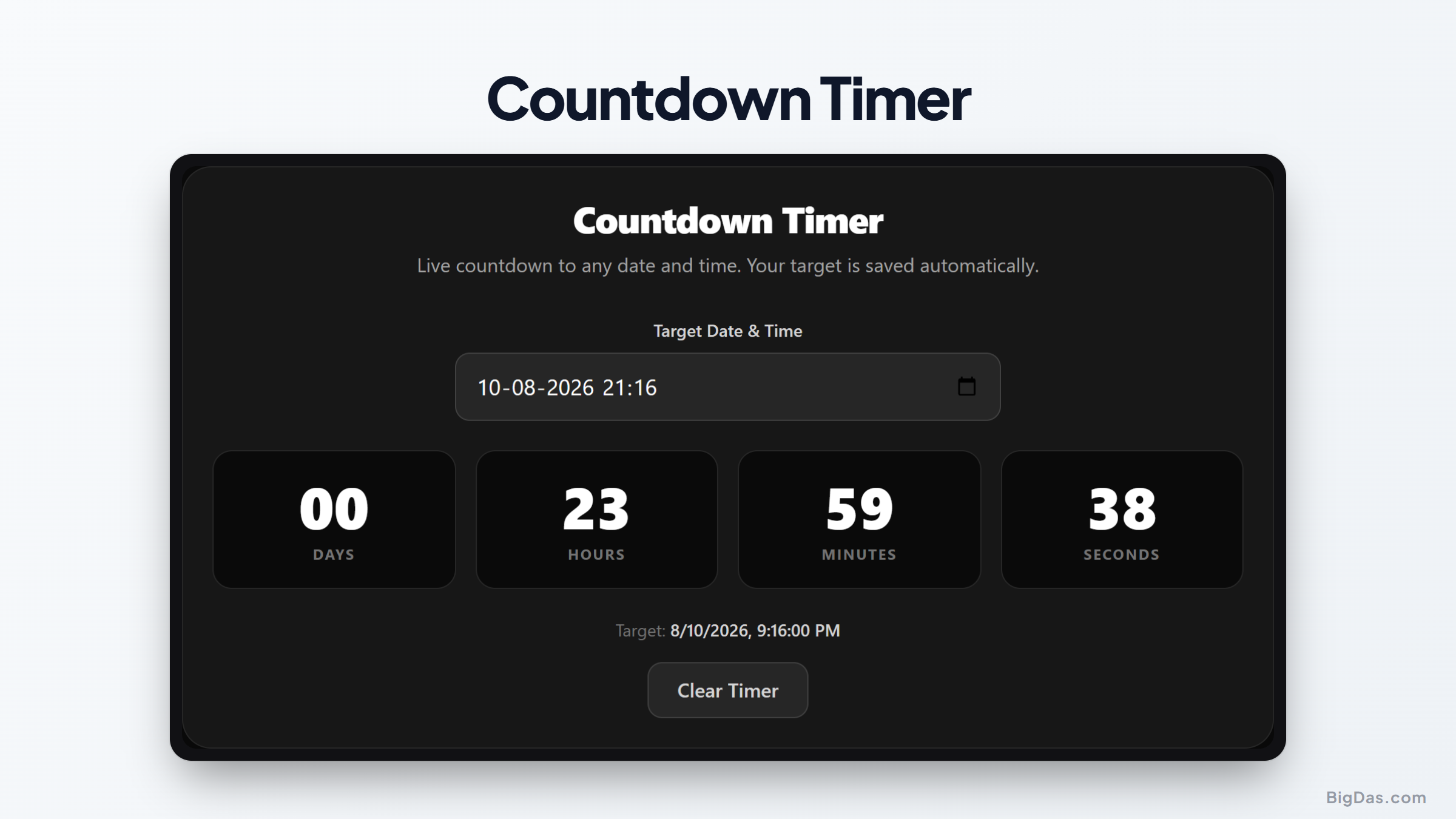
 Generated infographic and interface snapshot for Countdown Timer
Precision Tracking: A Professional Guide to Using a Countdown Timer
Time management remains one of the most significant challenges for professionals and individuals alike. Whether you are preparing for a critical business launch, planning a wedding, or tracking the arrival of a holiday, knowing exactly how much time remains helps maintain focus and urgency. Using a reliable countdown timer is a simple way to visualize the passage of time and ensure you stay on schedule for important milestones.
This guide explains why a dedicated digital clock is more effective than mental math and how you can use our specific tool to manage your upcoming deadlines with clarity.
What is a Countdown Timer?
A countdown timer is a digital interface that calculates the exact difference between your current local time and a future target date or time. While many devices have basic clocks, our tool provides a specialized view that breaks down time into days, hours, minutes, and seconds.
By presenting time in a card view format, the tool removes the cognitive load of calculating how many hours are left in a week or how many minutes remain in a day. It acts as a visual deadline tracker, keeping your objective visible at all times. Because the tool remembers your target automatically, you do not need to reconfigure your settings every time you open your browser.
Key Features and Benefits
The primary advantage of this tool is its focus on clarity. Here are the core features that make it a practical choice for daily planning:
- Granular Precision: You see the countdown broken down into discrete units. This level of detail is helpful for high stakes projects where every minute impacts your progress.
- Automatic Persistence: Once you set your date, the system saves your choice. You can return to the page later without having to re enter the information.
- Visual Interface: The card style layout is designed for quick scanning. You can glance at the screen and immediately grasp the urgency of the situation without interpreting complex dials or bars.
- Universal Compatibility: Since this tool runs in your web browser, it works across all devices. You can keep it open on your desktop while you work or check it on your mobile device while on the move.
- No Clutter: This is a focused utility. It does not contain distracting ads or unnecessary animations that might slow down your workflow.
Step by Step Guide on How to Use It
Setting up your countdown is a straightforward process that takes only a few seconds. Follow these steps to get your clock running:
- Open the countdown timer page in your web browser.
- Locate the input fields for the date and time.
- Enter the specific date you are tracking. Ensure you select the correct year, month, and day.
- Input the target time. If you have a specific deadline, such as 5:00 PM, enter that accurately to ensure your countdown is precise.
- Click the button to start the clock.
- Observe the card view as it updates in real time.
If you need to change your target, simply click the edit or reset button to clear the current settings and enter new information. The system will update instantly to reflect the new time remaining.
Why You Need This Tool
Many people underestimate the power of visual feedback when it comes to time management. When you rely on a calendar alone, you see the date, but you do not feel the flow of time. A countdown clock changes your relationship with your schedule in several specific ways.
Staying Accountable with Deadline Tracking
When you have a project due in two weeks, it is easy to procrastinate. However, seeing the number of days until the project is due creates a sense of accountability. If you see the hours and minutes ticking away, you are more likely to prioritize the tasks that contribute to your goal. It turns an abstract deadline into a tangible constraint.
Coordinating Group Events
If you are organizing an event, sharing a link to a countdown clock is a great way to keep everyone on the same page. Whether it is a product release or a team meeting, having a shared reference point prevents confusion regarding time zones or scheduling errors. Everyone looks at the same timer, ensuring that expectations for the deadline are identical for every person involved.
Managing Personal Milestones
Life is filled with events that deserve anticipation. Tracking the days until a vacation, a graduation, or a family gathering makes the wait more enjoyable. It provides a visual signal that the event is approaching, which helps in the planning process as well. You can see how much time is available to finish your preparations, such as packing or buying gifts.
FAQ Section
Is the countdown timer accurate to my local time?
Yes. The tool synchronizes with your device clock. This ensures that the time remaining is always accurate regardless of your geographical location or time zone.
Does the timer stop if I close my browser?
The tool uses browser storage to remember your target. While the browser cannot run a live script if the tab is closed, the moment you return to the page, the timer will recalculate the exact time remaining based on the current moment. Your target date is never lost.
Can I track multiple events at once?
This specific tool is designed to track one primary event at a time to maintain focus. If you need to track multiple events, you can open multiple browser tabs and set a different target in each one.
Is it necessary to be connected to the internet?
Once the page is loaded, the timer logic runs locally on your machine. You do not need a constant internet connection to see the time counting down, provided the browser tab remains open.
Are there any limits on how far into the future I can track?
You can set a date as far into the future as your system calendar allows. Whether you are tracking a deadline for next week or a milestone for next year, the tool will calculate the duration correctly.
Summary
Managing your schedule effectively requires the right tools. By using a countdown timer, you shift your focus from passive observation to active management. This tool provides a clear, persistent, and reliable way to track the time remaining until your most important dates.
The value lies in its simplicity. By removing the need for manual calculations and providing a constant visual cue, you can better allocate your energy and ensure that your deadlines are met with confidence. Use this tool to organize your projects, manage your expectations, and keep your goals in sight at all times.