AI Speech to Text
 AI Speech to Text
The Guide to AI Speech to Text: Transcribing Audio with GPT-4o and Whisper
Manual transcription is slow. Typing an interview, meeting, or podcast word-for-word takes hours, and the result often contains errors. Older automated transcription tools made things worse, producing garbled text that required more cleanup than manual typing would have.
That problem is solved. Our AI Speech to Text tool combines OpenAI's Whisper for acoustic transcription with the language reasoning of GPT-4o to produce clean, formatted transcripts.
This guide explains how the tool works, why the Whisper + GPT-4o combination outperforms legacy transcription services, and how to get the best results.
What is AI Speech to Text?
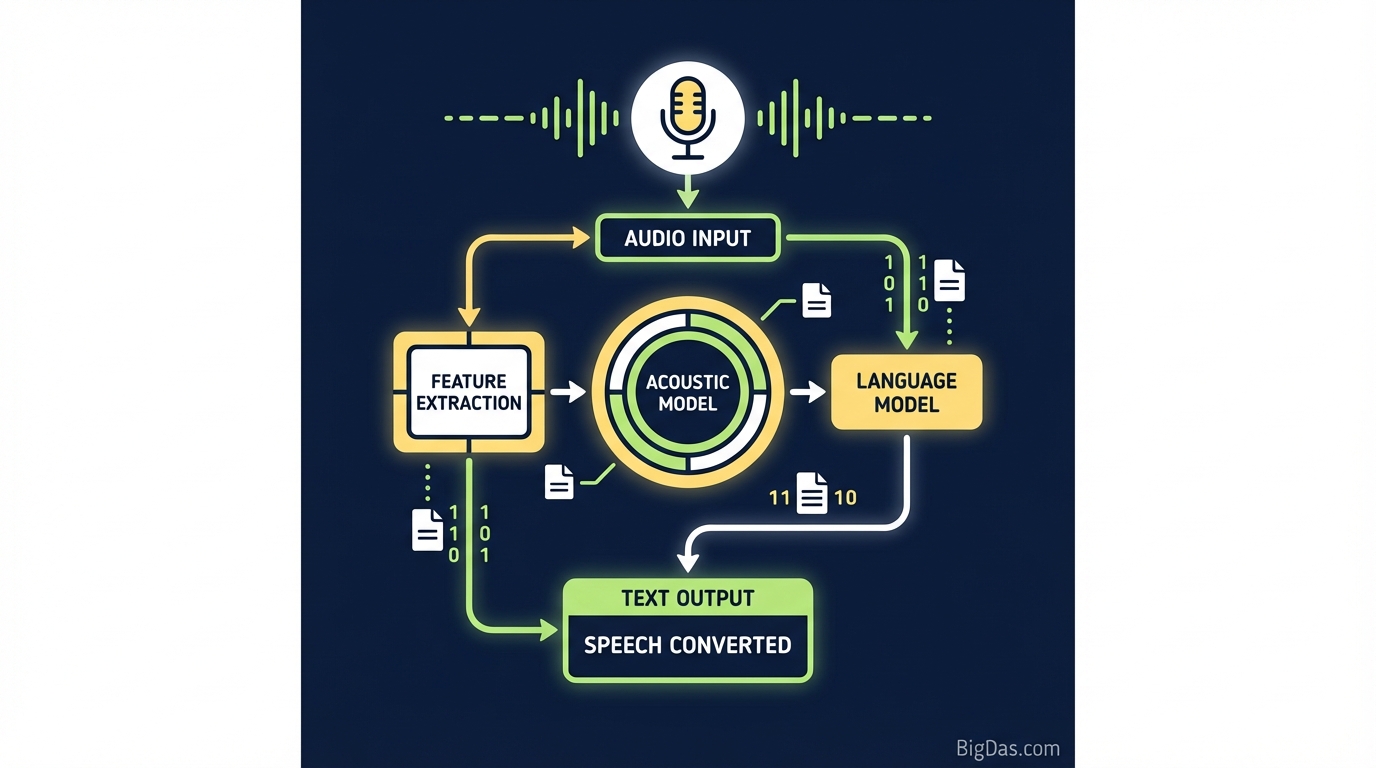
AI Speech to Text (also called Automatic Speech Recognition, or ASR) converts spoken language into written text using machine learning models. Our tool uses a two-stage pipeline.
Stage 1: Whisper AI
Whisper is OpenAI's speech recognition model, trained on 680,000 hours of multilingual audio. It handles accents, background noise, and technical vocabulary better than older ASR systems. Whisper produces the raw transcript: a sequence of words with timestamps.
Stage 2: GPT-4o
GPT-4o (Omni) takes Whisper's raw output and applies language understanding. It performs four key tasks:
- Resolves homophones based on context ("their" vs. "there").
- Adds punctuation and capitalization.
- Identifies speaker changes (diarization).
- Splits the text into logical paragraphs.
The output is a formatted document, not a wall of text.
Key Features
1. High Accuracy
Whisper handles the acoustic side (sound → words). GPT-4o handles the linguistic side (words → clean text). Together, they handle fast speakers, interruptions, and specialized vocabulary.
2. Fast Processing
A one-hour file that takes a human transcriber four hours is processed in minutes. You can integrate transcription into a same-day workflow.
3. Multilingual Support
Whisper was trained on dozens of languages. The tool auto-detects the source language and can translate non-English audio to English text.
4. Automatic Punctuation and Formatting
Older ASR tools return a single unbroken string of words. GPT-4o inserts commas, periods, question marks, and paragraph breaks based on syntax and context.
5. Speaker Diarization
The tool labels each segment with the speaker, producing a script suitable for meeting minutes and interview transcripts.
How to Use the Tool
Step 1: Upload Your Audio
Navigate to the tool dashboard and drag and drop your file. Supported formats include .mp3, .wav, .m4a, and .mp4 (for video files).
Note: Keep the file under the maximum upload size for the fastest processing.
Step 2: Configure Settings
Before transcribing, set these options:
- Language: Auto-detect is the default. Specify a language manually for higher accuracy.
- Output Format: Choose plain text, a Word document, or an SRT file (for subtitles).
- Context Prompt (Advanced): Enter keywords, acronyms, or industry-specific terms expected in the audio. GPT-4o uses these cues to recognize the correct words.
Step 3: Transcribe and Edit
Click Transcribe. The progress bar shows processing status. When finished, the transcript appears in the editor. You can play the audio back while clicking through the text to make corrections before exporting.
Use Cases
Legal and Medical Professionals
Accuracy matters. Whisper handles specialized terminology in depositions and patient notes, reducing turnaround time from days to hours.
Content Creators and Podcasters
Search engines cannot index audio. Transcribing podcasts and YouTube videos creates indexable text for SEO and provides captions for accessibility. SRT export is supported.
Corporate Teams
Record Zoom or Teams meetings and run them through the tool. You get an accurate record of decisions and action items without taking manual notes during the call.
Researchers and Students
Qualitative research generates hours of interview audio. Automated transcription removes the bottleneck, letting researchers focus on coding and analysis.
Getting the Best Results
Output quality depends on input quality. Follow these guidelines for the best transcripts.
Use a Good Microphone
A dedicated external microphone produces a cleaner signal than a laptop's built-in mic, making phonemes easier to distinguish.
Minimize Cross-Talk
GPT-4o separates speakers well, but constant overlapping speech is difficult for any system. Ask speakers to take turns.
Use the Context Prompt
If the audio contains technical terms (for example, "hydro-pneumatic suspension systems"), enter them in the context box. This primes the model to expect those words.
Upload High-Bitrate Audio
Highly compressed audio loses data. A 128 kbps MP3 works, but a WAV file gives the model more information to work with.
Frequently Asked Questions (FAQ)
1. How does this compare to human transcription?
AI is much faster. For clear audio, the tool matches human transcription accuracy. Humans may catch obscure cultural references, but the speed and cost ratio makes AI the practical choice for most tasks.
2. Is my audio data secure?
Audio files are processed over encrypted channels and are not used to train public OpenAI models. Your data remains yours.
3. Can it handle heavy accents?
Yes. Whisper's training data includes diverse global accents and dialects, which is one of its core strengths compared to older ASR systems.
4. Can I transcribe a video file?
Yes. Upload MP4 or MOV files. The tool extracts the audio track and processes it like a standard audio file, returning text or subtitles.
Conclusion
The Whisper + GPT-4o pipeline produces transcripts that are accurate, formatted, and ready to use. Whether you need to index audio for search, document a meeting, or caption a video, the tool handles the work in minutes.