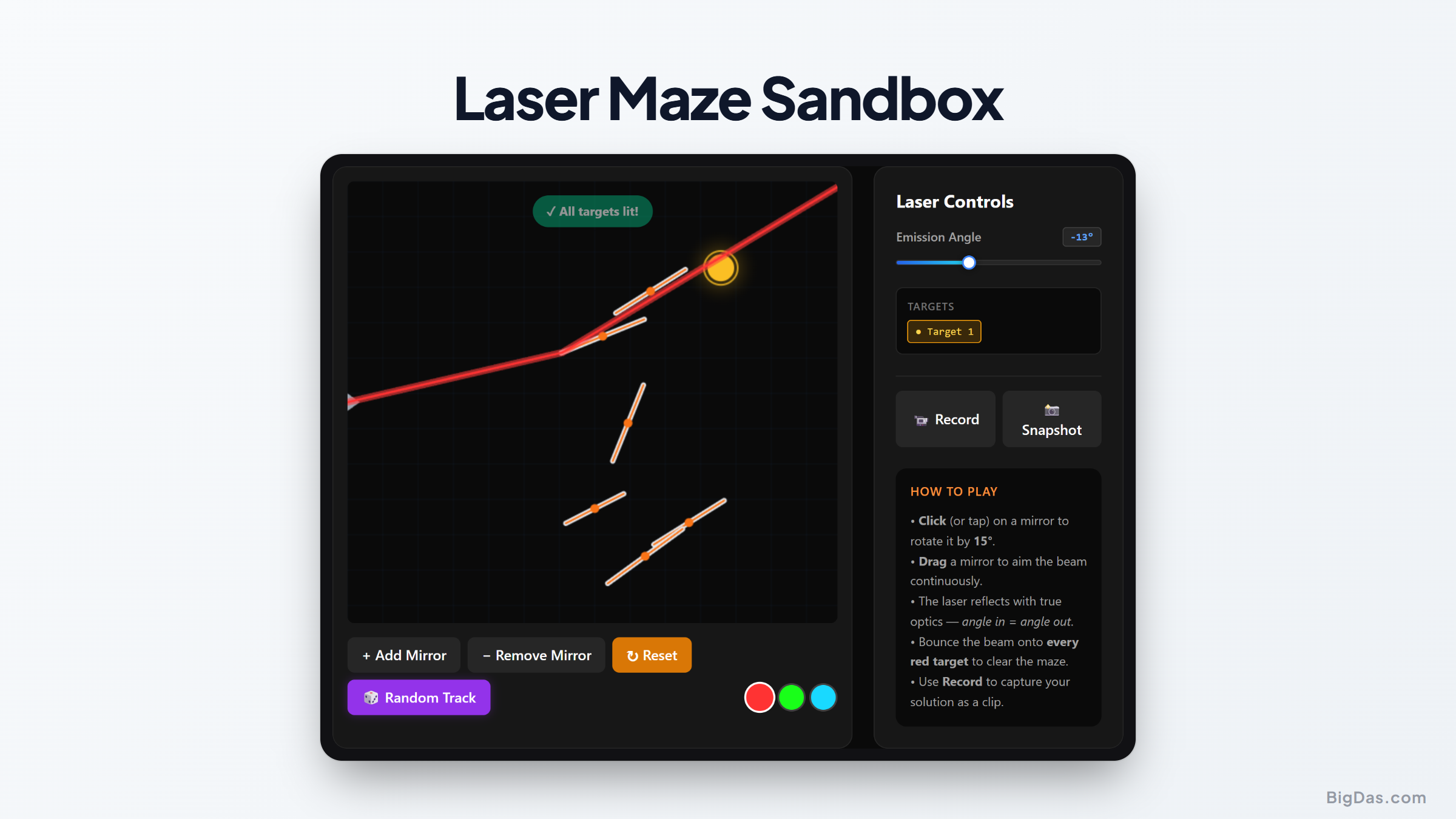
Laser Maze Sandbox
 Generated infographic and interface snapshot for Laser Maze Sandbox
Interactive Optics Simulation: Mastering Light Reflection with the Laser Maze Sandbox
Light travels fast, bends around obstacles, and splits into colors. Studying its behavior usually means buying lab equipment or working through dense math. Visualizing these ideas can be tough for students, teachers, and hobbyists.
Software closes that gap. A virtual environment lets anyone test physics without the cost or the risk of breaking gear. The Laser Maze Sandbox does this by combining a creative sandbox with physics puzzles. It turns ray tracing and reflection into a visual exercise you can manipulate directly.
What is Laser Maze Sandbox?
The Laser Maze Sandbox is a browser-based optics simulation. You place and adjust optical components on a grid to redirect a laser beam toward hidden targets.
The simulation runs ray tracing algorithms that calculate the beam's path as you move mirrors. Drag, rotate, and reposition mirrors to see the laser react in real time. This feedback loop makes the tool useful for both learning and experimentation.
The sandbox has target puzzles to solve, but it also lets you build custom setups. You can chain reflections, test edge cases, or just enjoy lining up a perfect path.
Key Features and Benefits
Real-Time Ray Tracing Physics
The physics engine calculates the beam's trajectory using geometric optics. Move a mirror, and the path updates instantly. You are seeing the actual math, not a pre-rendered animation.
Intuitive Mirror Mechanics
Mirrors are the main tool. Drag them across the grid and rotate them to any angle. The interface supports fine adjustments so you can hit precise targets.
Visual Target Activation
Targets stay dark until the laser hits them. A successful hit lights the target up, giving immediate feedback on whether your path is correct.
Custom Obstacle Placement
Place obstacles to block the beam. This lets you design mazes that require multiple reflections, which is useful for testing spatial reasoning and angle calculations.
No-Risk Experimentation
Real lasers are dangerous, and quality mirrors are expensive. The sandbox removes both problems. You can build complex setups without safety concerns or equipment costs.
Step-by-Step Guide
Step 1: Understand the Layout
Open the sandbox and look at the grid. Find the laser emitter and the targets. Targets are often placed behind obstacles, so a straight shot will not work.
Step 2: Place Your First Mirror
Drag a mirror from the tool menu onto the grid, directly in the beam's path. The laser will bounce off it immediately.
Step 3: Adjust the Angle of Reflection
Rotate the mirror to aim the beam at the target. The angle of incidence (the incoming beam) equals the angle of reflection (the outgoing beam). Use this relationship to dial in your path.
Step 4: Navigate Around Obstacles
Use multiple mirrors to get past barriers. Place a second mirror where the first reflection lands, then rotate it to redirect the beam. Chaining reflections is how you solve most puzzles.
Step 5: Activate the Targets
Fine-tune your mirrors until the beam hits the center of a target. The target lights up when the path is correct. In sandbox mode, you can keep adding mirrors for more complex patterns.
Primary Use Cases
For Physics Teachers
Geometric optics is hard to teach with static diagrams. This simulation works as a virtual lab. Project it on a screen to demonstrate the law of reflection in front of a class. You can ask students to predict the beam's path before rotating a mirror, then show the result.
For Students
Hands-on testing beats memorization. Change an angle by a degree and watch the path shift. This builds spatial reasoning and a working understanding of the physics involved.
For Puzzle Enthusiasts
The mix of physics and logic has wide appeal. The sandbox plays like a spatial puzzle game where you use geometry and critical thinking to find the right path.
For Game Designers
The sandbox is a reference for level design in physics-based games. It shows how clear visual feedback and intuitive controls work in practice.
Frequently Asked Questions
How does the simulation calculate the laser path?
The tool uses ray tracing. It projects a line from the laser source and checks for intersections with objects. When the line hits a mirror, the engine calculates the normal line perpendicular to the mirror's surface and applies the law of reflection to project the next segment.
Do I need a powerful computer to run the sandbox?
No. The simulation runs in any modern browser. The math is efficient enough to work without a dedicated graphics card, so it performs well on standard laptops, desktops, and tablets.
Can I use this tool to learn about refraction?
This sandbox focuses on reflection. The skills you build here, including working with light paths and angles, apply to refraction as well. Refraction is the bending of light through different mediums and uses similar geometry.
Are there pre-made challenges, or is it only a sandbox?
Both. You can solve structured puzzles with set obstacles and targets, or switch to open sandbox mode and build your own layouts with no restrictions.
Summary
The Laser Maze Sandbox makes optics accessible by turning physics rules into an interactive exercise. You learn how light behaves by moving mirrors and watching the results.
Teachers can use it for live demonstrations. Students can use it to test concepts directly. Puzzle fans can use it for spatial challenges. The tool works because it lets you experiment with light in a way that textbooks and labs cannot easily match.