Thin-Film Iridescence Playground
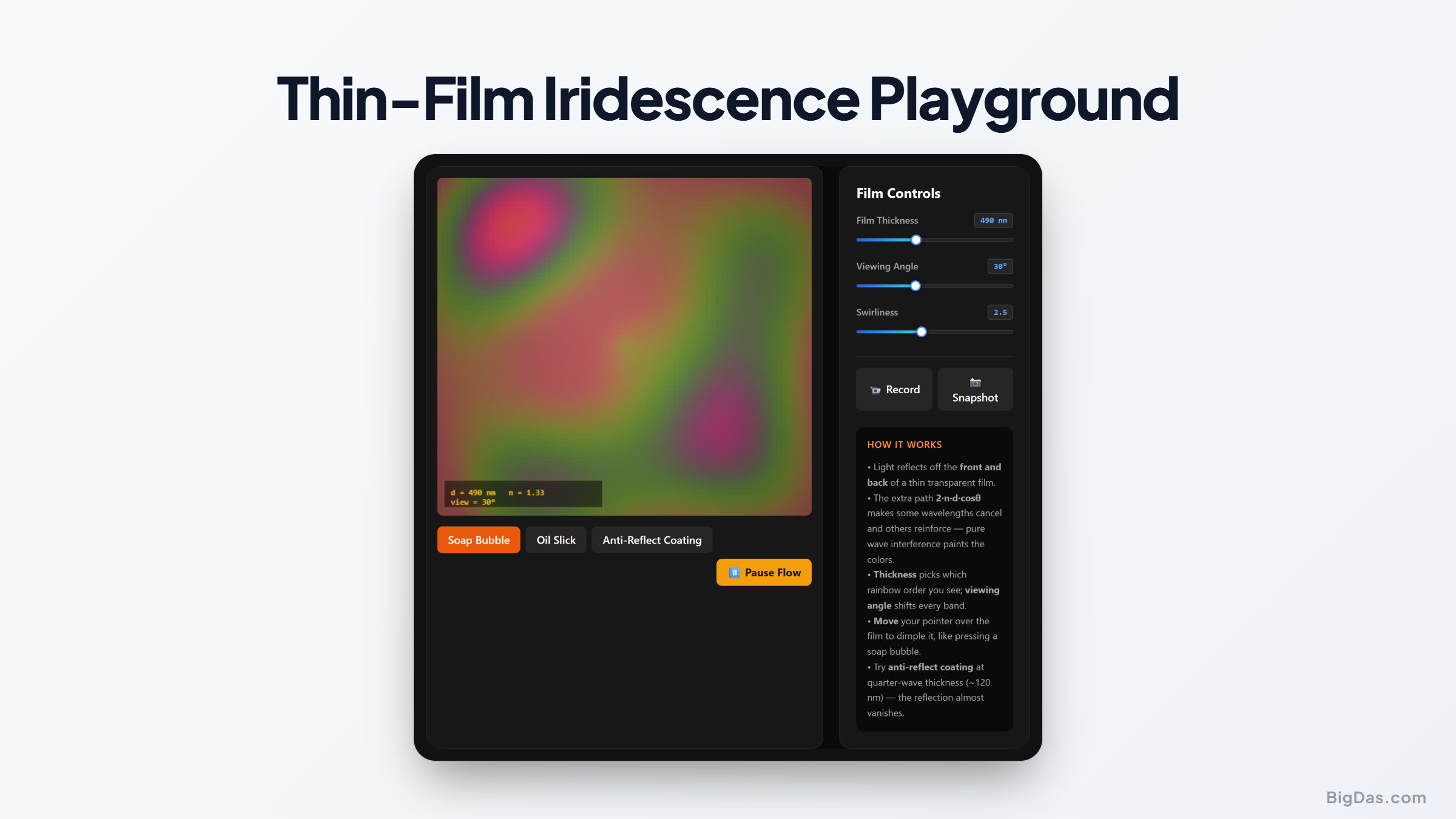
 Generated infographic and interface snapshot for Thin-Film Iridescence Playground
Soap bubbles and oil slicks on wet roads show swirling, rainbow colors. These colors do not come from pigments. They come from thin film interference: light reflects off both the upper and lower boundaries of a microscopic fluid layer, and the two reflected waves interfere with each other to reinforce some wavelengths and cancel others.
Static textbook diagrams and dense equations make this hard to visualize. The Thin-Film Iridescence Playground fixes that. You drive a swirling soap-bubble wall, change the film thickness, change the viewing angle, and watch physically accurate iridescent colors update in real time.
What is the Thin Film Iridescence Playground?
The Thin-Film Iridescence Playground is an interactive simulation that models how light interacts with micro-scale fluid membranes. It combines two areas of physics:
- Fluid dynamics drives a virtual liquid film, producing eddies, swirls, and currents.
- Wave optics calculates how light waves reflect from and pass through the moving boundary.
When light hits a thin film, part of it reflects off the outer surface. The rest passes through, reflects off the inner surface, and exits. Because the second wave travels a longer path, it arrives out of phase with the first. When the two waves recombine, they interfere.
Depending on the film thickness and the angle of incidence, some wavelengths undergo constructive interference and appear bright, while others undergo destructive interference and disappear. The playground models this interaction in real time.
Key Features and Benefits
- Physically accurate color rendering: Colors are computed from optical equations, not gradient tricks. What you see corresponds to real wavelengths produced by interference at the given thickness and angle.
- Dynamic fluid simulation: Click and drag the canvas to push the fluid around. The swirls change local thickness, which immediately shifts the colors.
- Adjustable film thickness: A slider controls thickness at the nanometer scale. As you increase it, the palette cycles through deep blues, purples, greens, and yellows.
- Variable viewing angle: A control changes the observer's angle, showing how perceived colors shift with the angle of incidence.
- Instant visual feedback: Parameter changes render immediately, which helps build intuition without solving equations by hand.
Step-by-Step Guide
- Open the simulation. A dark canvas appears with a fluid membrane that moves slowly on its own.
- Disturb the fluid. Click and drag across the membrane to create currents. The fluid swirls, thickness varies across the surface, and colors update with the motion.
- Adjust the thickness slider. The value is in nanometers. Slide left to thin the film, right to thicken it. Around 50 nm, the film goes nearly black because most visible wavelengths interfere destructively. By 500 nm and above, you get clear cycles of pinks, greens, and blues.
- Adjust the viewing angle. This simulates tilting the film relative to your eyes or the light source. A patch of green can shift to violet purely from a change in angle, with no change in thickness.
- Combine controls. Try different fluid motions, base thicknesses, and angles to either study specific physical states or just enjoy the motion.
Why This Tool Exists
Educators and students: Wave optics is hard to teach with static figures. Real-time control over thickness, angle, and color makes phase shifts and optical path differences concrete.
Digital artists, game developers, and VFX designers: Realistic soap bubbles, oil spills, and insect wings require correct thin-film shading. The playground gives a direct reference for writing shaders and tuning materials.
Web designers and creative developers: The combination of fluid dynamics and physics-based color rendering shows what modern web graphics can do, and offers a starting point for interactive elements.
Curious minds: It is a meditative space to play with the physics behind everyday colors.
Frequently Asked Questions
What is the physics formula behind thin film iridescence?
The governing equation is the optical path difference:
$$ \text{OPD} = 2 , n , d \cos\theta $$
Here, $n$ is the refractive index of the fluid, $d$ is the film thickness, and $\theta$ is the angle of refraction inside the film. When OPD equals an integer multiple of the wavelength, constructive interference occurs and that color becomes visible.
Why does a soap bubble turn black right before it pops?
As a bubble drains, its thickness drops below the wavelength of visible light, often under 50 nm. The path difference between the front and back reflections approaches zero, but the front-surface reflection picks up a 180° phase shift while the back-surface reflection does not. All visible wavelengths then interfere destructively, and the film looks black.
How does the viewing angle affect the colors we see?
At a steeper angle, light travels a different distance inside the film before exiting. The changed path length changes the phase relationship, so a different set of wavelengths interferes constructively. That is why a soap bubble changes color as it rotates or as you move your head.
Can this tool simulate other materials besides soap bubbles?
Yes. The underlying physics applies to any thin transparent layer: oil slicks on water, anti-reflective coatings on lenses, beetle wings, and oxide layers on tempered steel. The default parameters match a soap bubble, but the model is general.
Summing Up
The Thin-Film Iridescence Playground combines a real-time fluid simulator with physically accurate wave optics. It turns a topic that is usually locked inside equations into something you can see, touch, and drive with a mouse. It is useful for teaching physics, designing shaders, and for anyone who wants to watch the rules of optics play out on a canvas.